Dominique_R2
Known Participant
August 6, 2026
Answered

Drop Cap is applied automatically to the first word in every new text frame

  • August 6, 2026
  • 12 replies
  • 67 views

Hello all,

I am not new to InDesign but new to the latest version. I haven’t used the software for several years.

This is my most strange problem:

I create a new multi-page document, give it its basic specs in the Document Setup window. I go to the first page, draw a text frame. The default font is Minion Pro, 12 point, left-aligned. All seems fine. I have not yet created any character or paragraph style.

I type my very first word… and it has a drop cap!

The only Paragraph Style is [Basic Paragraph], the only Character Style is [None]. In [Basic Paragraph], under Drop Caps and Nested Styles, all parameters are at zero and the Properties panel confirms that the current character style is [Basic Paragraph], which has no drop cap… except that it does in my text frame!

I would love to hear your suggestions as to what might be causing this. I am stumped.

Attached is my screen capture.

Many thanks in advance.

Dominique

    Correct answer graphics_4075

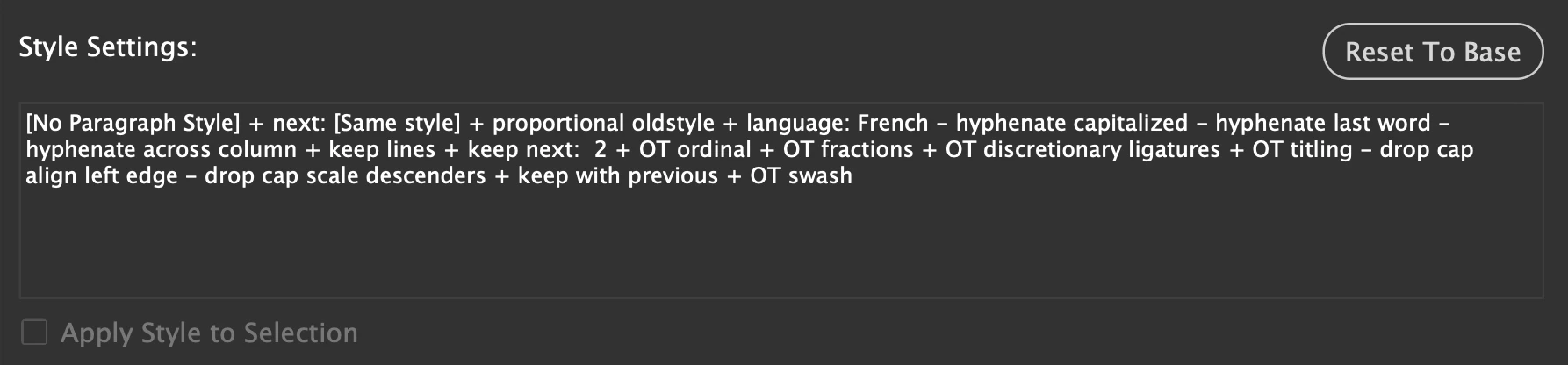
    Your Basic Paragraph has all of these settings attached. I clicked reset to base and type seems normal. I believe this is your problem, lots of OpenType settings applied somehow. 


    Also I assume you are French but if not, make sure your language is correctly set.

    12 replies

    rob day
    Community Expert
    Community Expert
    August 6, 2026

    I can see your Paragraph panel dropcap is set to 0 0. Can you share the document?

    Dominique_R2
    Known Participant
    August 6, 2026

    I did above. Thank you.

    rob day
    Community Expert
    Community Expert
    August 6, 2026

    Hi ​@Dominique_R2 , You don’t have Preview checked in your Paragraph Style panel’s lower left corner.


    Also, with your cursor in the paragraph, check your Paragraph (not Paragraph Styles) panel’s Dropcap setting:


    And, you can set the default Paragraph and Paragraph Style settings by closing all documents and choosing the desired defaults. You may have inadvertently set a dropcap as the default with no docs open.


    Dominique_R2
    Known Participant
    August 6, 2026

    Thank you Rob. I checked the Preview box in the Paragraph Styles dialog, nothing changed. I checked the Paragraph panel with the cursor in the paragraph, *and* highlighting the drop cap, nothing  (see capture B attached).

    I also checked all the settings with all documents closed and my workspace launched, no drop caps set anywhere...

    rob day
    Community Expert
    Community Expert
    August 6, 2026

    Have you dried trashing our ID Caches, and if that doesn’t fix trashing Preferences?

    Dave Creamer of IDEAS
    Community Expert
    Community Expert
    August 6, 2026

    Select ONLY the first character and check the Character panel. Also check it with nothing selected. 

    David Creamer: Community Expert (ACI and ACE 1995-2023)
    Dominique_R2
    Known Participant
    August 6, 2026

    Thanks Dave for your suggestions. I did both things, to no avail.

    I can share the document, as requested, and for what it’s worth… It’s attached.

    D.

    graphics_4075
    graphics_4075Correct answer
    Inspiring
    August 6, 2026

    Your Basic Paragraph has all of these settings attached. I clicked reset to base and type seems normal. I believe this is your problem, lots of OpenType settings applied somehow. 


    Also I assume you are French but if not, make sure your language is correctly set.

    Cheers