
Sandee Cohen
Legend
May 23, 2019
Answered

Drop cap paragraph gets indented

  • May 23, 2019
  • 2 replies
  • 2549 views

I don't know if this is a bug, a fact of life, or intended behavior. But I've never seen it before.

Create a series of drop cap paragraphs with no other paragraph styles between them. When there are enough lines of text to cover the depth of the drop cap, the paragraphs indent correctly.
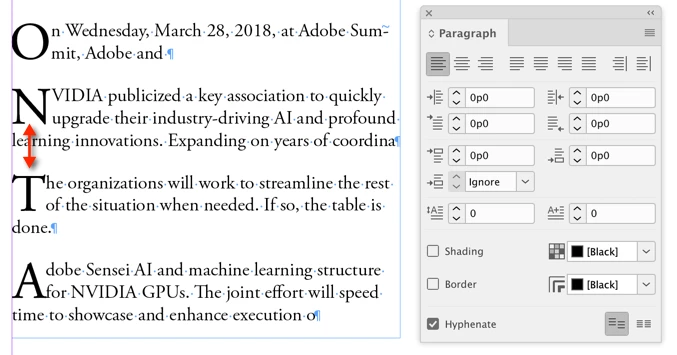
But if there isn't enough lines to cover the drop cap, the next paragraph indents bizarrely.
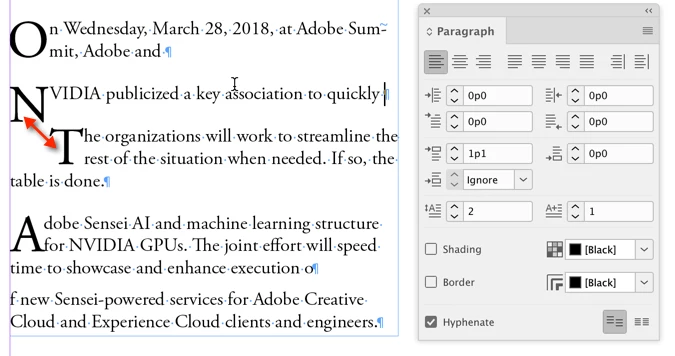
This doesn't seem right. What I expected would be the next paragraph does not indent and there is a space to cover the drop cap.
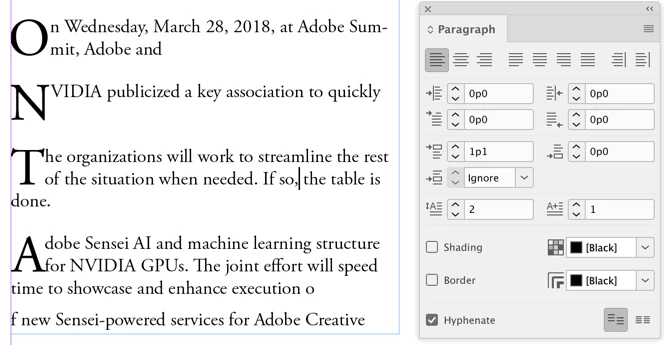
Has anyone run into this? Is it a known bug or something new?

This topic has been closed for replies.
Correct answer Michael Bullo

Hi Sandee,

This behaviour has been around for years. I just confirmed that it is happening in both InDesign 2017 and InDesign 2019 on my computer. I have seen this numerous times when demoing Drop Caps in a Paragraph Style in a class. Inevitably someone, possibly myself, will apply the "Intro" style to everything.

Michael

2 replies

Michael Bullo
Community Expert
Michael BulloCommunity ExpertCorrect answer
Community Expert
May 23, 2019

Hi Sandee,

This behaviour has been around for years. I just confirmed that it is happening in both InDesign 2017 and InDesign 2019 on my computer. I have seen this numerous times when demoing Drop Caps in a Paragraph Style in a class. Inevitably someone, possibly myself, will apply the "Intro" style to everything.

Michael

Sandee Cohen
Legend
May 23, 2019

Thanks Michael for confirming it's been around for a while.

The more I look at it, it feel like a bug. I'm going to report it as such.

Michael Bullo
Community Expert
Community Expert
May 23, 2019

Thanks Sandee

Willi Adelberger
Community Expert
Community Expert
May 23, 2019

I can only recommend to insert a shift-tab followed by a shift-return at the end of your N-line.

I know, this is only a short solution, but I don't know better yet.