

selondon
Community Expert
Community Expert
March 26, 2017
Answered

Drop Shadow Overprint Outer Glow

  • March 26, 2017
  • 4 replies
  • 3383 views

Hi,

I am trying to use two effects on an object, a coloured outer glow and a black drop shadow.

I want the drop shadow to appear over the top of the outer glow (i.e. control the stacking priority) as I want to match as close as possible effects I have previously placed in Photoshop.

I can only get the outer glow to appear over the drop shadow though, thus 'killing it'.

I can attach screen grabs if it helps but imagine someone will know what I mean!

Many Thanks
    This topic has been closed for replies.
    Correct answer rob day

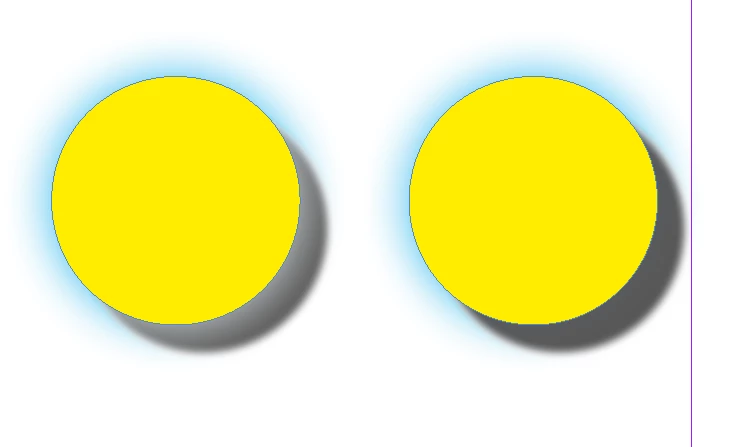
    Try setting the Blending Mode of the outer glow to something that will overprint—Multiply, Overlay, Soft Light etc.

    The default Screen on the left, Overlay on the right

    4 replies

    selondon
    Community Expert
    selondonCommunity ExpertAuthor
    Community Expert
    April 5, 2017

    Sorry for the delay, been so busy!

    Also apologies both, I didn't fully explain, the Outer Glow has to be on Blending Mode 'Normal' as it is sitting over another image.

    Zaid, I have tried to apply the shadow to the Fill but have had no luck, I am probably doing something wrong.

    I have attached a screengrab.

    The word 'hello' is text and the 'Icon' is a Bitmap Tif (which I am mostly using), coloured up as White in Swatches.

    I cannot get the Drop Shadow to overprint the Outer Glow on both.

    Many Thanks!

    selondon
    Community Expert
    selondonCommunity ExpertAuthor
    Community Expert
    March 27, 2017

    Thank You very much for the replies.....

    I will look into it with my files and feedback!

    Zaid Al Hilali
    Community Expert
    Community Expert
    March 27, 2017

    I was able to get the drop shadow on top of other effects by applying a glow on Object level, while drop shadow on the Fill level. Make sure the object has a Fill color

    rob day
    Community Expert
    rob dayCommunity ExpertCorrect answer
    Community Expert
    March 26, 2017

    Try setting the Blending Mode of the outer glow to something that will overprint—Multiply, Overlay, Soft Light etc.

    The default Screen on the left, Overlay on the right