Participating Frequently
Jan 17, 2025 4:22 PM UTC
Answered

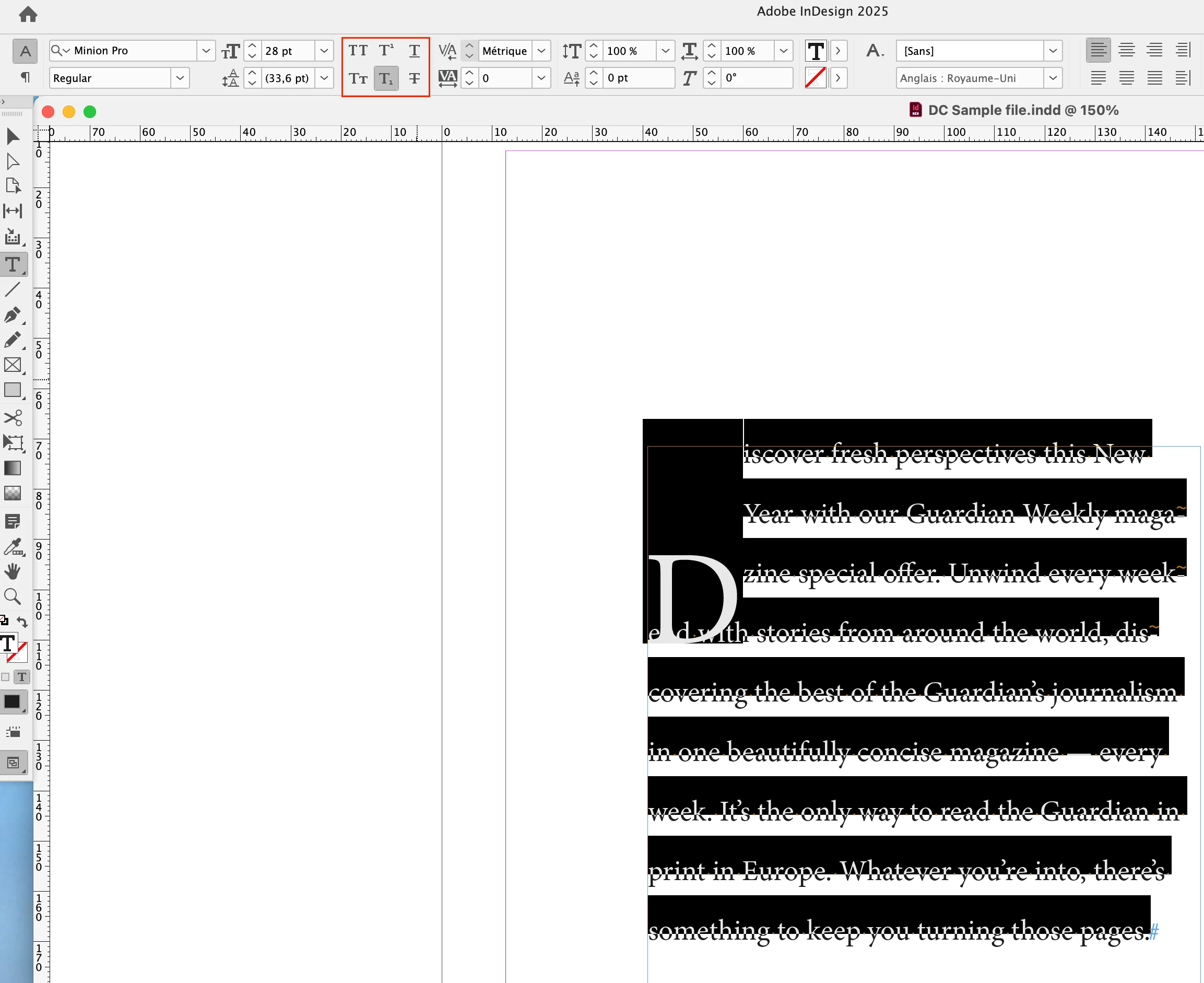
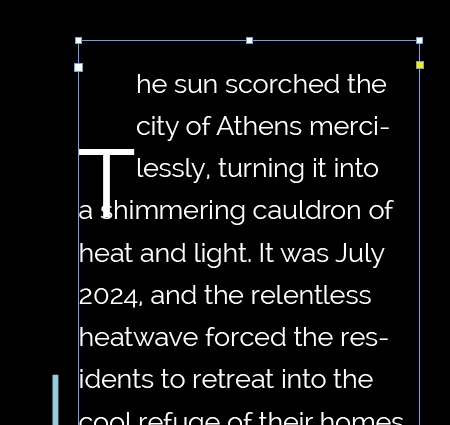
DropCap not working :(

Hello, can anyone tell me why my DropCap acts like this?

(Please see picture attached)

I can't find anything online. It's very frustrating.


Thank you so much!
 

jmlevy
jmlevyCorrect answer
Community Expert
Jan 17, 2025 10:49 PM UTC

You have applied subscript on all your text

27 replies

easy easeAuthor
Participating Frequently
Jan 18, 2025 8:22 AM UTC

Great thank you!

Translate
Brad @ Roaring Mouse
Community Expert
Community Expert
Jan 17, 2025 10:07 PM UTC

I agree there might be a baseline shift applied. In fact it might be applied to the whole paragraph as the first baseline is suspiciously low, even without the drop cap issue.

Also what are your text box's baseline settings?

if you can upload a sample file with a small sample of this text, we can suss it out.

Translate
easy easeAuthor
Participating Frequently
Jan 17, 2025 10:12 PM UTC

 Hello there! No baseline shift. Thanks!

Translate
Inspiring
Jan 17, 2025 7:01 PM UTC

It kinda looks like it's using a Character Style that has a negative Baseline Shift.


Translate
James Gifford—NitroPress
Legend
Jan 17, 2025 7:08 PM UTC

Yeah, I think the full scope of the question is —

  • Is this a print layout we're looking at (and not a digital export)?
  • Show the Drop Cap menu for that paragraph's style.
  • Does the DC setup apply a Character Style? If so, show that setup as well.
  • Are there any spot formats or overrides applied anywhere in that paragraph? (turn on override highlight to make sure).
Translate
easy easeAuthor
Participating Frequently
Jan 17, 2025 10:05 PM UTC


Translate
James Gifford—NitroPress
Legend
Jan 17, 2025 4:44 PM UTC

Yes, seeing your settings for the style is a first step. But also — is that a layout for print? It looks as if it may be a digital layout or an export to a digital format. If so, which format and what are you using to view it?

Translate
easy easeAuthor
Participating Frequently
Jan 17, 2025 9:59 PM UTC

hello! thanks for you message. I haven't exported it yet. It shows this way right away.


Translate
BobLevine
Community Expert
Community Expert
Jan 17, 2025 4:26 PM UTC

Please show us a screenshot of the settings.

Translate
easy easeAuthor
Participating Frequently
Jan 17, 2025 10:00 PM UTC

Hello there! With pleasure. ahich settinngs?

Thanks so much

Translate
easy easeAuthor
Participating Frequently
Jan 17, 2025 10:06 PM UTC


Translate