Participant
October 11, 2018
Answered

Duplicate booklet in same page

  • October 11, 2018
  • 1 reply
  • 413 views

Hi, I'm doing a tiny book (3.9 in height). And I have to print in A4 sheet and I have to save money, because of that instead one booklet per page It would be great if I can put two booklet per page.
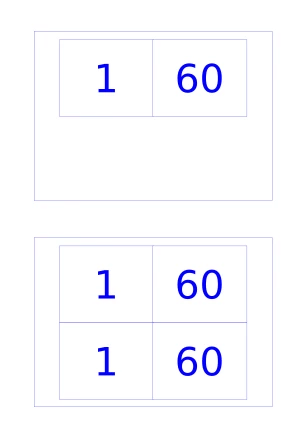
All I get is the first image, but I need the second one. It is possible?

Thanks!!

    This topic has been closed for replies.
    Correct answer Willi Adelberger

    Imposing should be done by the printer.

    But if you insist, doing it in InDesign, do following:

    1. Design your booklet normal as if you would export it to single pages.
    2. Create a second file in DIN A4 where you place the single pages. Create on the Master image frame which makes it easy to place the first document.
    3. Select the first INDD document (or an exported PDF/X-4), select the import options, select all pages and place page by page the whole document. Repeat it for the second copy.

    1 reply

    Willi Adelberger
    Community Expert
    Willi AdelbergerCommunity ExpertCorrect answer
    Community Expert
    October 11, 2018

    Imposing should be done by the printer.

    But if you insist, doing it in InDesign, do following:

    1. Design your booklet normal as if you would export it to single pages.
    2. Create a second file in DIN A4 where you place the single pages. Create on the Master image frame which makes it easy to place the first document.
    3. Select the first INDD document (or an exported PDF/X-4), select the import options, select all pages and place page by page the whole document. Repeat it for the second copy.