3a9393195
Participant
May 30, 2018
Answered

Duplicate page numbers in TOC

  • May 30, 2018
  • 4 replies
  • 1254 views

Hi

I am fairly new to InDesign and have spent a bit of time setting up the document template with paragraph styles, etc.  This has allowed me to generate a TOC which is looking (almost) exactly as I want it.

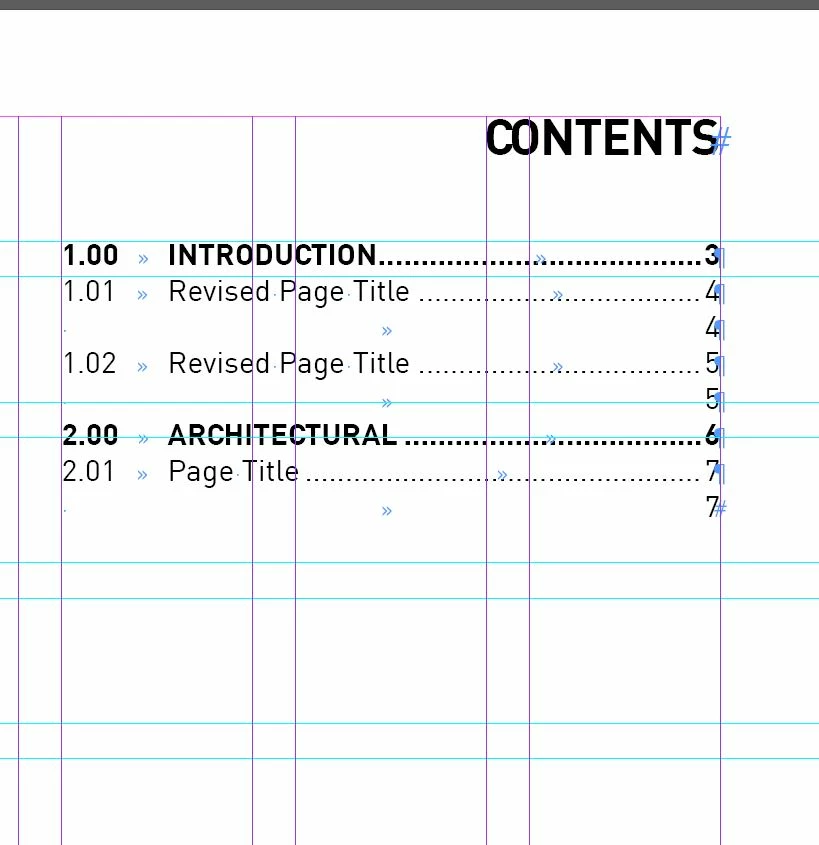
The problem is that I am getting duplicate page numbers against some of the entries (see below).

I can't understand this.  I have created similar paragraph styles for the 'TOC Titles' and 'TOC Body Text', the only difference being that one is in bold.  However, the body text seems to be giving me an extra carriage return where I don't want it.

Any ideas?  Any help would be gratefully appreciated.

Thanks

E
This topic has been closed for replies.
Correct answer Barb Binder

Hi E:

I would expect the see an empty ¶ marker on pages 4, 5 and 7, tagged as your heading. Start by navigating to page 4, turn on Hidden Characters (at the bottom the Type menu) and start the hunt. If you can't find them, you can always share a page (or those three pages) on dropbox and we can help.

~Barb

4 replies

3a9393195
3a9393195Author
Participant
May 31, 2018

Thanks everyone - what a helpful bunch of people!

After 3 hours of trying to sort this on my own, you fixed it in 2 minutes!

Greatly appreciated.

E

Barb Binder
Community Expert
Community Expert
May 31, 2018

Glad that worked for you, E, and we are always happy to help.

~Barb

~Barb at Rocky Mountain Training
jane-e
Community Expert
Community Expert
May 30, 2018

You could do a Find to look for the text to find it on the page and then format it with a style you are not using when you generate the TOC

Barb Binder
Community Expert
Barb BinderCommunity ExpertCorrect answer
Community Expert
May 30, 2018

Hi E:

I would expect the see an empty ¶ marker on pages 4, 5 and 7, tagged as your heading. Start by navigating to page 4, turn on Hidden Characters (at the bottom the Type menu) and start the hunt. If you can't find them, you can always share a page (or those three pages) on dropbox and we can help.

~Barb

~Barb at Rocky Mountain Training
Mike Witherell
Community Expert
Community Expert
May 30, 2018

You don't have useless hidden tabs after the text in the headings on page 4 and 5 and 7, do you?

If so, have you considered running a script to clean out useless whitespace characters, such as my variation on the built-in Find/Change by List (in the Scripts panel):

Mikes Find/Change by List 2017

Mike Witherell