Inspiring
July 31, 2020
Answered

Duplicate shortcut ( Ctrl + Alt + Shift + D ) Not working

  • July 31, 2020
  • 4 replies
  • 5435 views

When i use Duplicate shortcut ( Ctrl + Alt + Shift + D ) ... it is not working 

I tried to reset prefernces but problem still here

I use indesign 2020 and windows 10

Correct answer rob day

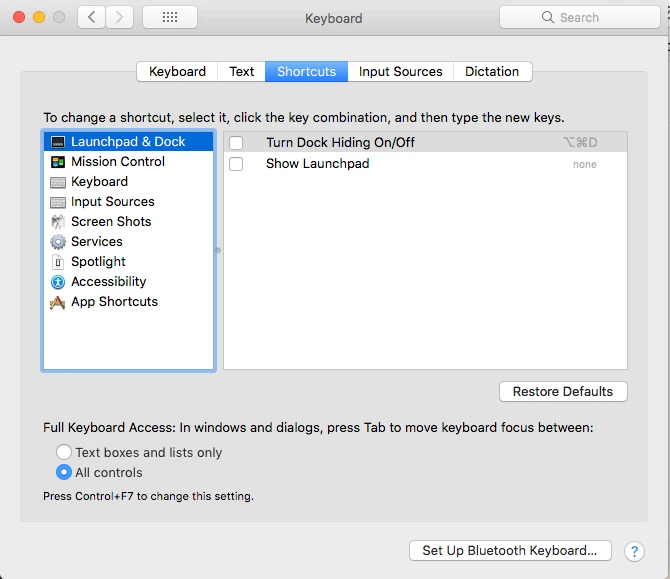
On OSX try unchecking the Turn Dock Hiding On/Off key command, that worked for me.


4 replies

rob day
Community Expert
rob dayCommunity ExpertCorrect answer
Community Expert
August 1, 2020

On OSX try unchecking the Turn Dock Hiding On/Off key command, that worked for me.


David Popham
Participating Frequently
August 2, 2020

Thanks, Rob. That worked for me as well. At least once a month I accidently hit the D key when I'm trying to type Cmd+Opt+F, so turning that off suits me just fine.

Mike Witherell
Community Expert
Community Expert
July 31, 2020

Ctrl+D! Of all the shortcuts in ID to remap! 🙂 

Seems like shortcuts stopping working are numerous lately... I wonder if it would be worth to experiment with duplicating the Default Shortcuts to a custom shortcut and test again? ... or resetting preferences?

Mike Witherell
David Popham
Participating Frequently
July 31, 2020

On Windows, Ctrl + D is the Place command, but on a Mac it's unused.

Mike Witherell
Community Expert
Community Expert
August 1, 2020

Yes, I was thinking Cmd+D. Anyway, I do notice that keyboard shortcuts seem to refuse to work in a sporadic way on both OS. When I prompt the menu choice, often the shortcut resumes working after that. It is so inconsistent, tho, that I haven't been able to see a pattern or find a solution.

Mike Witherell
David Popham
Participating Frequently
July 31, 2020

Same shortcut is not working for me either on a MacBook Pro Mojave (10.14.6), also InDesign 2020, even though it shows up as the default shortcut. I wonder if that's a bug. Changed it to Ctrl + D, which is an easier shortcut anyway, and it works just fine. I rarely use it, but it does come in handy when trying to create a row or column of objects with the same object that should be equally spaced.

Inspiring
July 31, 2020

Ctrl + D the default use of it is for placing in indesign such as image or document


But I made new shortcut ( Shift + L ) instead of this till original problem solve 

Mike Witherell
Community Expert
Community Expert
July 31, 2020

I usually Alt+drag one copy away to some distance/position and then press that shortcut.

Mike Witherell
Inspiring
July 31, 2020

and so I but this shortcut doesn't work with me 

I made new shortcut ( Shift + L ) instead of this till this problem solve