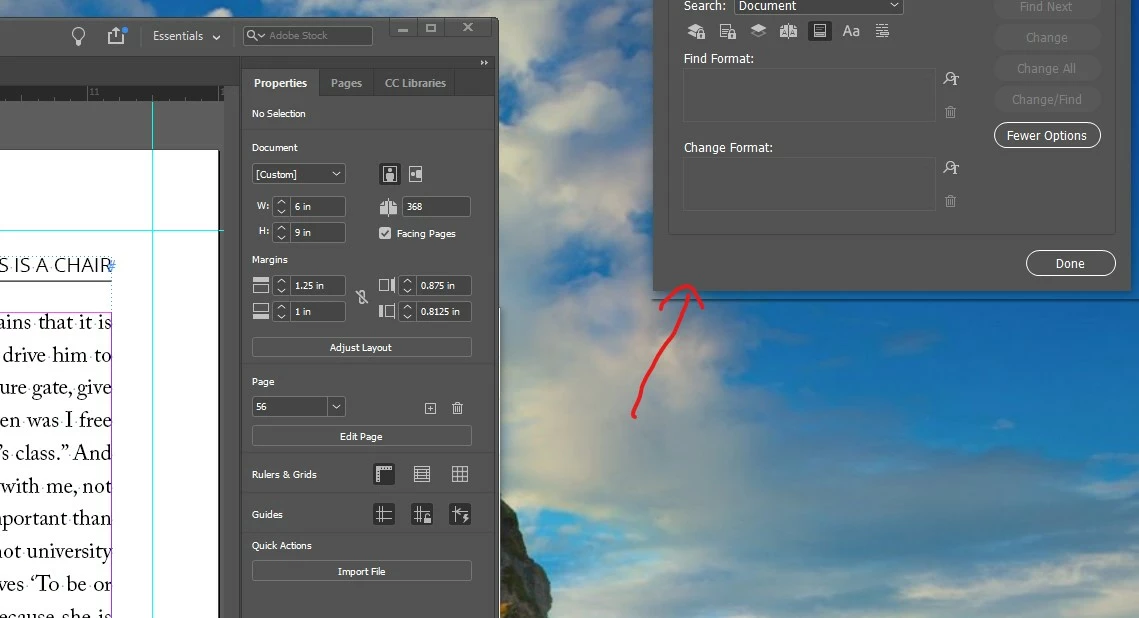
Edit/Change panel displays partially off the screen
In attempting to improve the readability of the Indesign panels, I foolishly followed a user's suggestion to change the Windows settings for display size for my monitor. It did increase the text size of the panels. However, one of the panels (the Edtt/Find/Change) now displays partially off the screen. I cannot get to the top of the panel to drag it down. I tried everything. Even uninstalled and reinstalled Indesign, and specified not to keep the old settings (to my dismay, that was a lot of work setting it sup). But all for naught. Nothing I do moves that panel down, it always displays halfway on the screen with just the bottom half accessible. Can't move it. I am attaching a screenshot showing to top of the screen with the panel. If Adobe, or anyone, can suggest a fix, I would be most appreciative.
 AdChoices