Vlady Valenti3710904582a6
Participating Frequently
January 22, 2025
Answered

Edit information like company on templates

  • January 22, 2025
  • 3 replies
  • 655 views

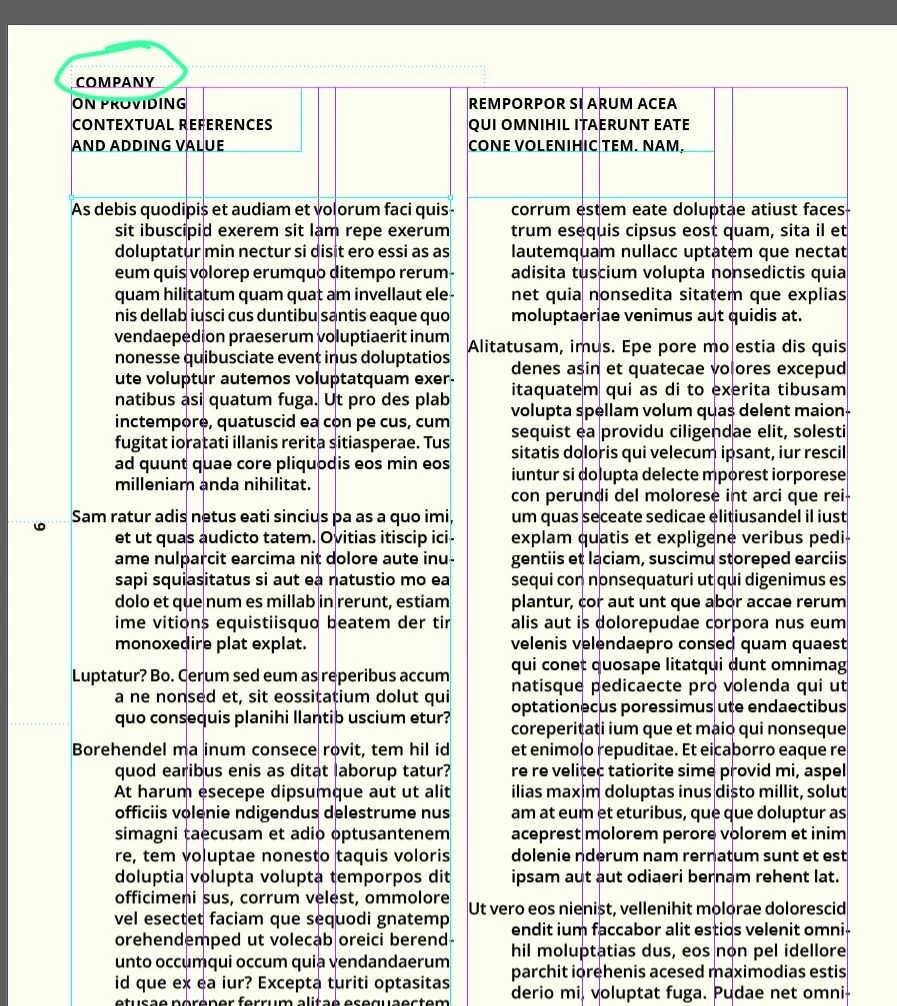
hi, I'm sure this is a no brainer but I can't seem to figure out how to change info on a current template in InDesign. I made a screenshot of it. I can't click on it to edit. And via the layers I can't find it either (in this example "COMPANY")

Soooo, where can I put my company name or even just deleting this text box from every single site?


Please help.


Thanks in advance.


Kind regards,

vlady

Correct answer James Gifford—NitroPress

@Barb Binder makes another very good point about determining where a frame is located, but it is a subtle detail.


If you don't understand how Parent pages (formerly and still often referred to as "Master" pages) work as an underlying design element, you're going to have a lot of hurdles in trying to edit documents in InDesign. It's not like Word where (generally) you can just plow along; you HAVE to know a spectrum of basic structure and design elements to even begin using it effectively. This is true even with templates to guide you — maybe even more so, since you have to unravel how the original designer built the model. There are few templates where you can just open them, edit a little text and have a desired result.


You might benefit from some of the basic tutorials, to get you oriented with ID's features — such as this one: https://helpx.adobe.com/indesign/using/parent-pages.html


3 replies

Willi Adelberger
Community Expert
Community Expert
January 22, 2025

Probably in text variables.

But this is a bad template.

Barb Binder
Community Expert
Community Expert
January 22, 2025

Hi @Vlady Valenti3710904582a6:


Actually, your screenshot shows the answer.


Frames on a parent page have dotted line border and frames on the body pages have a solid border. You can see the dotted line border around Company. 


The next time you see a dotted line border, you'll know immediately to go to the parent pages to edit the content.


~Barb 

~Barb at Rocky Mountain Training
Vlady Valenti3710904582a6
Participating Frequently
January 22, 2025

Hi Barb,

for thanks for your reply. Still, I can't click on it. None of the COMPANY boxes I can click on. As if they're locked. And on front page at bottom, it says "your company" etc. but it's not linked to the COMPANY frame on every page top left.

So confused over here... 😕😕

cheers

vlady

James Gifford—NitroPress
Legend
January 22, 2025

@Barb Binder makes another very good point about determining where a frame is located, but it is a subtle detail.


If you don't understand how Parent pages (formerly and still often referred to as "Master" pages) work as an underlying design element, you're going to have a lot of hurdles in trying to edit documents in InDesign. It's not like Word where (generally) you can just plow along; you HAVE to know a spectrum of basic structure and design elements to even begin using it effectively. This is true even with templates to guide you — maybe even more so, since you have to unravel how the original designer built the model. There are few templates where you can just open them, edit a little text and have a desired result.


You might benefit from some of the basic tutorials, to get you oriented with ID's features — such as this one: https://helpx.adobe.com/indesign/using/parent-pages.html
James Gifford—NitroPress
Legend
January 22, 2025

Without seeing an example of the template or file, it's hard to say exactly what is going on.


When you say "template" — do you actually mean an InDesign template (INDT) file downloaded from some resource? Or do you mean it more casually, a file given to you as a model for further work? (It can make a difference in what features might be in play.)


But check these points —

  • Is the 'company' block on a Parent page?
  • Is the block on a locked Layer?
  • Is the block itself locked?


... and I think that covers all the alternatives. If you're not sure how to check any of those, ask. And if none seem to address the problem, upload a (blank or dummy) copy of the file/template that's showing the problem.


(Formally created templates can sometimes use even more elaborate indirect content such as cross-references, conditional text and sometimes just wild designer choices... with luck, it's one of the simple things above.)


Vlady Valenti3710904582a6
Participating Frequently
January 22, 2025

Hi James and thanks for your quick reply. It is an actual free template from Adobe Stock. I shared the file here, hope you can open it.

https://stock.adobe.com/de/templates/creative-pitch-deck-layout/164633199?prev_url=detail 

I checked all layers and I just couldn't see any locked/editable text on there.

Curious to see, what you can make of the file.

Much appreciated, vlady


Mike Witherell
Community Expert
Community Expert
January 22, 2025

Double-click the Parent page in the Pages panel. There you will see the textframe that says Company in it. Your Type tool can freely edit the text content there. Afterwards, double-click out to any physical page to see the update.

Mike Witherell
