

marya6431116
Known Participant
September 20, 2021
Answered

Edit 'list items' in Buttons and Forms

  • September 20, 2021
  • 3 replies
  • 1170 views

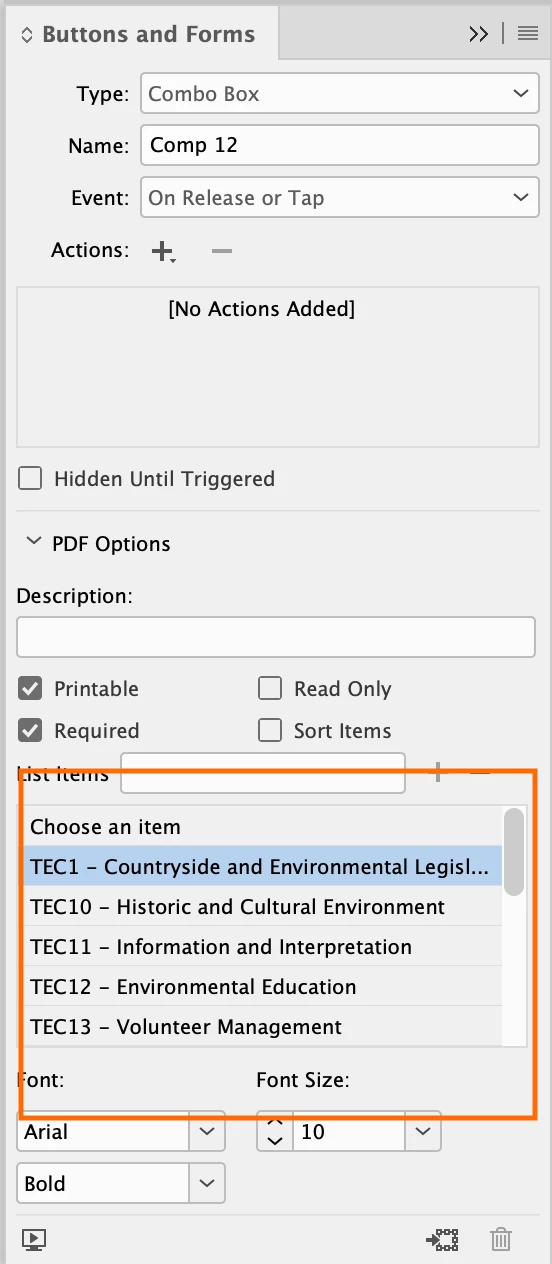
I really hope someone can help, I have created an interactive PDF,and have created a list for a drop down menu in Buttons and Forms. My client needs to change the numbering, and I dont seem to be able to edit these lists, does anyone have any ideas?

Please help!

Mary
This topic has been closed for replies.
Correct answer Laubender

The listed items have their counterparts on the active spread.

Open your Layers panel to identify the named items and rename them in the Layers panel.


Regards,
Uwe Laubender

( ACP )


3 replies

TᴀW
Legend
December 12, 2023

If you're doing a lot of this sort of thing, you might want to use the free script ComboMambo (https://creativepro.com/combomambo-script-updated-indesign-cc-2014/) which lets you batch-import list items, so you can maintain the list in a text editor, and then, if any changes need to be made, use ComboMambo to update it in InDesign. Much easier.

Or my own (not free) FormMaker, which does the same and also allows you to include export value for each list item. (https://www.id-extras.com/products/formmaker/)

id-extras.com | InDesign tools & scripts for typesetters, form designers, and translators
LaubenderCommunity ExpertCorrect answer
Community Expert
September 20, 2021

The listed items have their counterparts on the active spread.

Open your Layers panel to identify the named items and rename them in the Layers panel.


Regards,
Uwe Laubender

( ACP )


marya6431116
Known Participant
September 23, 2021

That is amazing, thank you - i never knew they were referenced in the layers! You are a super star, and I have learnt something new today!!! Thank you.

Geоrge
Legend
September 20, 2021

InDesign have only essential things about creating forms. Do your template in InDesign and then continue works in Acrobat Pro. 

Remember, never say you can't do something in InDesign, it's always just a question of finding the right workaround to get the job done. © David Blatner
marya6431116
Known Participant
September 20, 2021

Thank you, I get that, but if there is a way to just edit or even highlight the text, it will save me a shed load of work!! "time is money" and all that!!!

It seems that once added as a list item, all I can do is delete it - just wondering if there was a function in Indesign that I was missing, rather than skipping back and forth from Acrobat.

Geоrge
Legend
September 20, 2021

- You can sort the list by name (by checkbox "sort items")

- You can sort list manually (by drag&drop list items)

- You can delete list item and add new

- You can't rename list item


Remember, never say you can't do something in InDesign, it's always just a question of finding the right workaround to get the job done. © David Blatner