
Known Participant
June 12, 2018
Question

Edit master, apply to page without deleting page's overridden objects

  • June 12, 2018
  • 2 replies
  • 464 views

Apologies for asking a question that has surely been asked many times before . . .

I have a book - straightforward, all just running text throughout, no image boxes - whose margins I've decided need changing. I've changed the margins on the master pages. I want to apply them to the existing pages of the book. When I try to do this, the running text box I've set up in the master pages completely replaces the text boxes on the pages of the document. Usually. Often. Not always. I expect this has to do with overridden master text boxes, such as those I've changed the depth of to bottom out spreads, etc.

How do I get around this?

The thing is, I've done this before but I don't remember how I did it. (I'm a terrible planner, I admit it, and worse at taking notes when I've solved a problem.) In my memory, I did have to move the existing text boxes pretty much one by one to match the new margins that came with the re-applied masters. But I hadn't lost my text. If the running text box hadn't been tampered with at all during paging, it simply magically fit into the new margins. If I'd overridden it to adjust page depth, then I had to scootch it to match the new margins. But I didn't lose a filled text box.

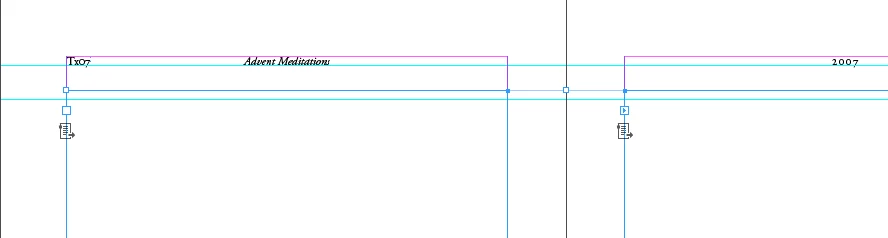
I hang my head and ask what very simple step I'm skipping here. A screen shot of a typical master spread is attached.

Rob
    This topic has been closed for replies.

    2 replies

    Rob EhleAuthor
    Known Participant
    June 12, 2018

    Thanks, Rob . . . yes, difficult indeed.

    Though I woke up in the middle of the night and remembered what I'd done before. I simply selected all of the pages in the book and put in the new margins. If the primary text frame hadn't been adjusted, it moved with the new margins. In my book, this happens about 15% of the time. For the rest of the frames, I have to manually scootch them. But with this fairly simple layout, it's pretty quickly done.

    rob day
    Community Expert
    Community Expert
    June 12, 2018

    If the primary text frame hadn't been adjusted, it moved with the new margins

    Yes with any MP item, whether it is a Primary Text Frame or not, once you change the associated page item's attributes, you can no longer control the changed attribute from the master page—i.e., if you change the width of the page item, but not its fill color, you can no longer affect its width from the master, but you can still affect its fill color.

    If you are using multiple masters, make sure the running text frames on all of the masters are set as primary—the page icon with an arrow when selected.

    rob day
    Community Expert
    Community Expert
    June 12, 2018

    I have a book - straightforward, all just running text throughout, no image boxes - whose margins I've decided need changing. I've changed the margins on the master pages. I want to apply them to the existing pages of the book. When I try to do this, the running text box I've set up in the master pages completely replaces the text boxes on the pages of the document.

    You would normally set up your document using Primary Text Frames for the running text.

    It might be difficult to switch to primary frames in a document where the frames are overridden master frames, usually you would check Primary Text Frames in the New Document dialog.

    This thread might help:

    Re: Can someone help demystify how primary text frames actually work?