tRiv
Inspiring
January 31, 2020
Answered

"Edit With" not showing photoshop and illustrator

  • January 31, 2020
  • 2 replies
  • 1526 views

I just got switched over to a new computer and I noticed that my options to edit pdfs [EDIT: just noticed all of the edit with options are gone for any file type]  with Photoshop or Illustrator are gone. 
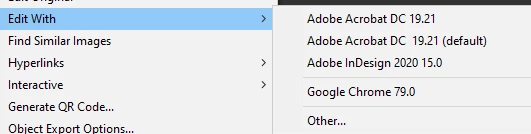
I can select "other" to get to them but it's a little tedious to have to do it everytime. 

I've had this issue on my last computer in the past and I found a fix but cannot remember what it was.

I've already tried uninstalling/reinstalling everything.


Is there anything that could be causing this or does anyone know of a fix?

This topic has been closed for replies.
Correct answer tRiv

Fixed it

I used "Open With" > "Other" from the file explorer until it recognized Illustrator and Photoshop as an options in Indesign. Also had to do this with jpegs for some reason even though it was set to open with Photoshop by default.

Anyway. Done.

2 replies

tRiv
tRivAuthorCorrect answer
Inspiring
February 3, 2020

Fixed it

I used "Open With" > "Other" from the file explorer until it recognized Illustrator and Photoshop as an options in Indesign. Also had to do this with jpegs for some reason even though it was set to open with Photoshop by default.

Anyway. Done.

BobLevine
Community Expert
Community Expert
January 31, 2020
I don't know what the issue is but I do have a question about your workflow.

Sounds like you're placing PDFs in InDesign and then you want to edit them in Photoshop or Illy? Why?

Photoshop PDFs can be saved with a PDP extension and Illy files can be saved as AI with PDF editability (in fact, they have to be). Those should open as default for both.

Other than that, this sounds like an operating system issue since those application in the Edit With list are generated by the Operating System. To check, right click a PDF in Finder or File Explorer and see what that list shows.
tRiv
tRivAuthor
Inspiring
January 31, 2020

I think you're right about it being an OS issue. I right clicked a pdf in explorer and it doesn't list Photoshop as an option.

In regards to your question about my workflow, I just like to be able to use any program to edit a pdf while in Indesign. I run dual monitors so I'll have Id on one side and then I'll have the pdf open on the other monitor and let's say the client wants something removed or I only want one part of the pdf but it's all vectorized, clicking and deleting in Acrobat pro will be annoying so I just right click in Indesign and say edit with > Illustrator vs going back to explorer > right click > open with > Illustrator.

It saves me clicks okay!! 😄


Keep in mind that we rarely deal with design savy clients. They aren't using Photoshop and Illustrator to create pdfs.

BobLevine
Community Expert
Community Expert
January 31, 2020
I would never use Illustrator to do this (unless it was originally created in Illustrator).

The potential to damage the design (fonts, colors, etc) is too high and you're not saving any time as opposed to do it in Acrobat.

Illustrator is NOT a general purpose PDF editor.