Daliah Fowler
Participant
January 22, 2018
Answered

Edit Words in User Dictionary InDesign

  • January 22, 2018
  • 1 reply
  • 1482 views

I said to ignore all in spell check by mistake when I wanted to correct the word, now it won't find that word. I've looked on Adobe's website regarding this,

Note:

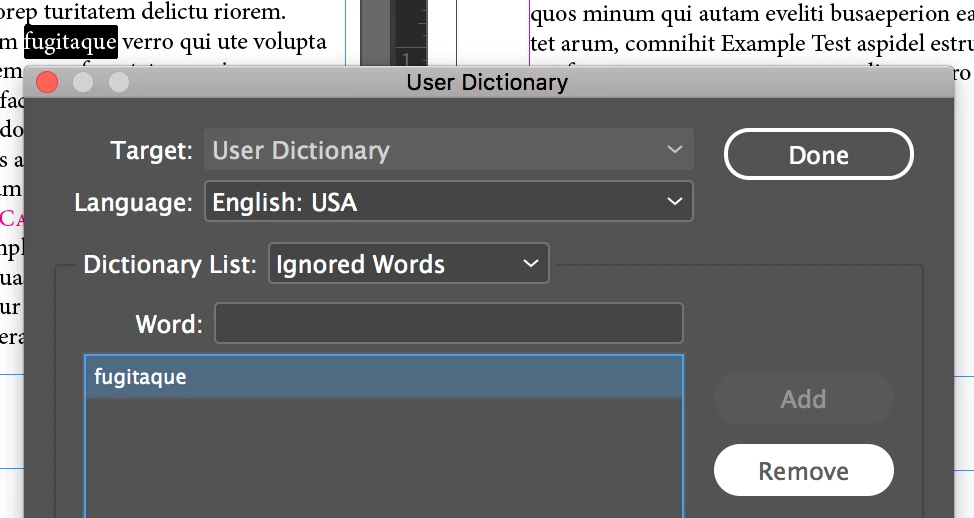
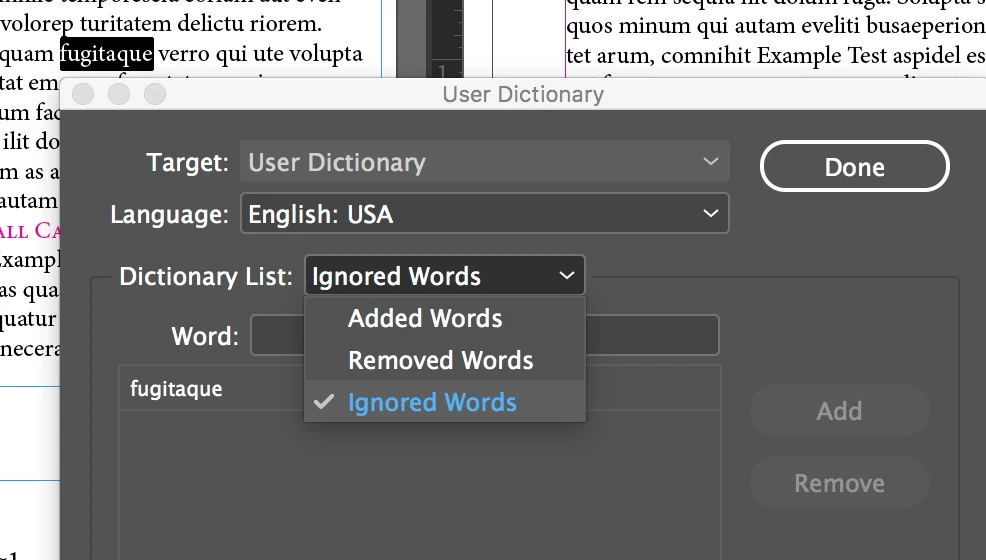
If you select Ignore All and then decide that you don’t want to ignore that word after all, Choose Ignored Words from the Dictionary List menu in the Dictionary dialog box and remove the word from the list.

I cannot find this "choose ignored words" list to edit.

Thanks Daliah
This topic has been closed for replies.
Correct answer Barb Binder

Hi Daliah:

Go to Edit > Spelling > User Dictionary > Dictionary List > Ignored Words.

Click the work and click Remove.

~Barb

1 reply

Barb Binder
Community Expert
Barb BinderCommunity ExpertCorrect answer
Community Expert
January 22, 2018

Hi Daliah:

Go to Edit > Spelling > User Dictionary > Dictionary List > Ignored Words.

Click the work and click Remove.

~Barb

~Barb at Rocky Mountain Training
Daliah Fowler
Participant
January 22, 2018

Thank you. Never found this dialog box. Much appreciated

Daliah

Barb Binder
Community Expert
Community Expert
January 22, 2018

Happy to help, Daliah.

~Barb

~Barb at Rocky Mountain Training