Editing or pasting text objects adds white space
All my character, paragraph, and object styles have been set for several work-hours on a specific project. When I went back in today, however, editing certain text objects, copying and pasting them, or duplicating the entire page caused those objects to shift around, primarily by adding white space above the lettering (as though I'd added pre-paragraph spacing), but also changing the kerning or white space on the sides. Text that was previously frame-fit perfect was now not only too tall for the frame but somehow too long as well, and required both adjusting the frame height and reducing the text size or kerning to fit where it used to.
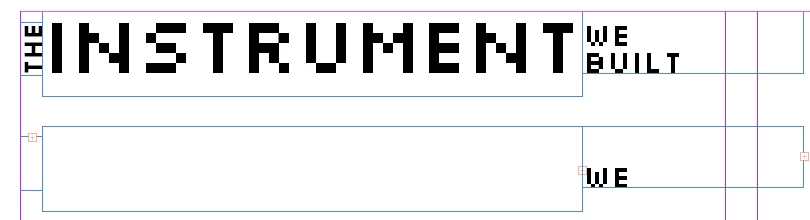
This screenshot demonstrates the problem. Above are three text frames that previously functioned as expected (although I'm not sure why the rightmost frame demanded so much extra space on the right when fit to content). Below are the same three text frames copied, pasted in place, and moved down, without editing their content or settings at all.
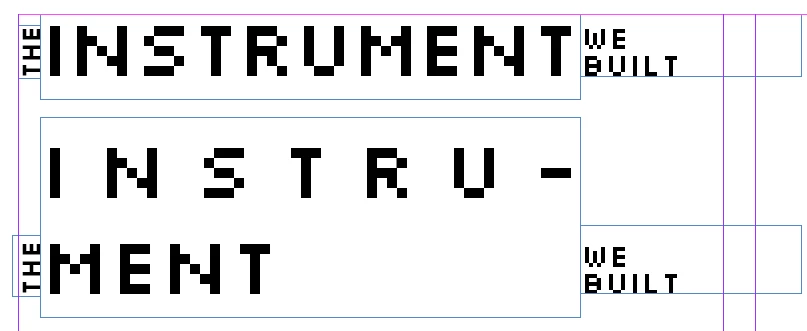
Here's what that looks like after I refit the frames to content, again without changing their settings or the text itself.
What's causing this? Is it fixable? I worked around it by manually adjutsing each affected frame, but it's a hueg hassle, and is happening to almost every part of my document.
 AdChoices