
Participant
December 30, 2019
Answered

Editing script label of every text frame with AppleScript

  • December 30, 2019
  • 2 replies
  • 1049 views

Hey, I'm trying to remove a hard return I have in some of my script labels on an InDesign document, but keep getting the error. Each page has multiple layers each with a text item that contains the label.
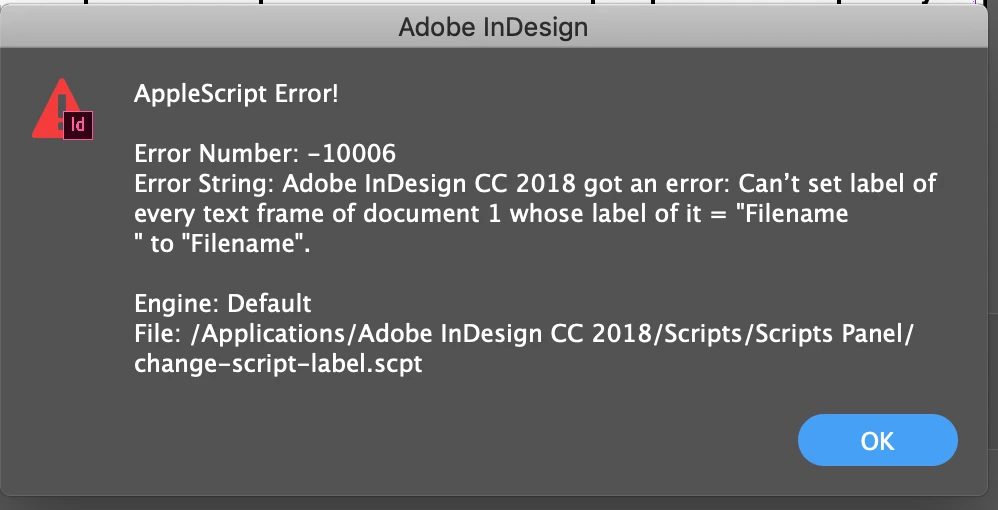


Here's the script:


tell application "Adobe InDesign CC 2018"

tell document 1

set label of (every text frame whose label is "Filename

") to "Filename"

end tell

end tell


Thanks!

This topic has been closed for replies.
Correct answer rob day

I get the same error if there are no text frames in the document with the "Filename" & return label—it worked the first time, but not when I ran it again. I think you need to catch that error:


tell application "Adobe InDesign CC 2018"
	tell document 1
		try
			set label of (every text frame whose label is "Filename" & return) to "Filename"
		end try
	end tell
end tell


2 replies

rob day
Community Expert
rob dayCommunity ExpertCorrect answer
Community Expert
December 30, 2019

I get the same error if there are no text frames in the document with the "Filename" & return label—it worked the first time, but not when I ran it again. I think you need to catch that error:


tell application "Adobe InDesign CC 2018"
	tell document 1
		try
			set label of (every text frame whose label is "Filename" & return) to "Filename"
		end try
	end tell
end tell


Inspiring
December 30, 2019

I always use "(return)" for a Carriage Return:


        set label of (every text frame whose label is ("Filename" & (return))) to "Filename"


Also, I set the label of an item after typing it by using the Enter key (not the Return key).

rob day
Community Expert
Community Expert
December 31, 2019

The script works with  either \r or & return, but only once—you need the try statement.

Community Expert
December 30, 2019

For writing the return character in the code type \r so the line should be 

set label of (every text frame whose label is "Filename\r") to "Filename"

 When you then execute the applescript editor does change \r to a new line but the code does work. Tested it on CC2020


-Manan

-Manan