
Participating Frequently
February 27, 2017
Question

Editting CopyCutter to break at hard returns?

  • February 27, 2017
  • 3 replies
  • 1063 views

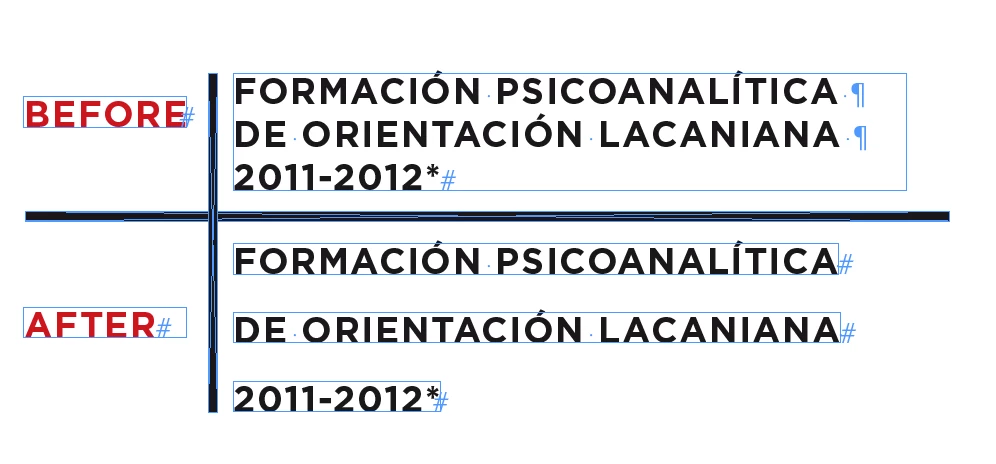
So I wanted to do what this guy wanted in this thread and break a long frame of text down to multiple text frames based on hard returns and he was told to use Copycutter and it seemed to work for him but I can only get it to create new text frames at each space not hard turn. I can't figure out how to read the script to change it. Could anyone help me please?
//DESCRIPTION:CopyCutter -- Run Me On A Text Frame To Shred It Into Strips

// A Jongware script 7-Aug-2011

// w/Thanks to SebastiaoV to find a working version

if (app.selection.length == 1 && app.selection[0].hasOwnProperty("baseline") && app.selection[0].length > 1)

{

  app.selection[0].insertionPoints[0].contents = "\r";

  app.selection[0].insertionPoints[-1].contents = "\r";

  app.findGrepPreferences = null;

  app.changeGrepPreferences = null;

  app.findGrepPreferences.findWhat = " +";

  app.changeGrepPreferences.changeTo = "\\r";

  app.selection[0].changeGrep();

  p = app.selection[0].parentTextFrames[0];

  lh = (p.lines[-1].baseline - p.lines[0].baseline) / (p.lines.length-1);

  top = app.selection[0].lines[0].baseline - lh;

  while (app.selection[0].length > 0)

  {

  f = app.activeDocument.layoutWindows[0].activePage.textFrames.add ({geometricBounds:[top, p.geometricBounds[3]+2*lh, top+lh, 2*(lh+p.geometricBounds[3])-p.geometricBounds[1] ]});

  app.selection[0].lines[0].move (LocationOptions.AFTER, f.texts[0]);

  top += lh;

  }

  app.selection[0].insertionPoints[-1].contents = "";

} else

  alert ("please select some text to shred");

This topic has been closed for replies.

3 replies

Jongware
Community Expert
Community Expert
February 27, 2017

Ah that script again. Yeah ... unfortunately, it proves to be popular to lots of people – but everyone and his aunt seems to have slightly different demands, and so there are lots and lots of edited versions floating around. This one doesn't really look like mine as I remember it – it slices everything into words, rather than lines.

I've found what appears to be the original proto-version online (well, a v.2) in the archives of Fabian (thank you!) on Github IDSnippets/splitTextFrame.jsx at master · fabianmoronzirfas/IDSnippets · GitHub , and this one does look a lot like the original. It does not depend on 'spaces' or 'returns', it literally slices and dices a frame into the actual lines that you currently see in that text frame. It does not rely on findGrep, it merely iterates over the current text lines, not matter for what reason they wrap to a new line. You can see that if one of the lines end with a soft hyphen, the line will be broken at that point (although the soft hyphen itself is not saved, because according to the Document Model there never was one to begin with).

This should be good for you:

//DESCRIPTION:CopyCutter 2 — Cut your Copy into Slivers

// Jongware, 3-Jun-2010

if (app.selection.length == 1 && app.selection[0] instanceof TextFrame)

{

  f = app.selection[0];

  for (i=0; i<f.lines.length; i++)

  {

  newf = f.duplicate();

  newf.texts[0].remove();

  f.lines.duplicate (LocationOptions.BEFORE,newf.lines[0]);

  if (i > 0)

  top = f.lines[i-1].baseline;

  else

  top = f.geometricBounds[0];

  bot = f.lines.baseline;

  newf.geometricBounds = [ top, f.geometricBounds[1], bot, f.geometricBounds[3] ];

  }

  f.remove();

}

Participating Frequently
February 27, 2017

That new code gives me this error

Community Expert
February 28, 2017

Hi Cody,

as I can see from the code, the script CopyCutter 2 Jongware digged out in reply 9 will not fit your needs presented in reply 4.

Hi Jongware,

just tested your CopyCutter 2 script on a simple text frame with InDesign CS6, also CS5.5.

It is working—every single line is cut, but the second line is at a wrong vertical position.
All consecutive lines are ok if you see the relative distance to line two.

From left to right:

1. Original text frame

2. Script result on a duplicate of the frame showing the problem with the vertical positions.

3. The relative vertical distance from frame two to all the frames following is perfect.

Not so the distance from frame 1 to frame 2.

Depending what one likes to do with the single text frames after running the script this little flaw might be not relevant.

I did not look closer to the code why the shift happens.

But I would suggest, that before doing the dups of the lines

1. All baseline values of the original text frame could be read out

2. The text frames could be moved according to differences found in the old and new values of baseline

Fixed version CopyCutter 2.1 plus global undo added:

/**

* @@@BUILDINFO@@@ CopyCutter2.1-SELECTED-TEXTFRAME.jsx !Version! Tue Feb 28 2017 09:16:09 GMT+0100

*/

/*

    CopyCutter 2.1 | Fixed version by Uwe Laubender [UL]

    Tested with CS5.5 and CS6


    FIXED : The second cut out text frame is on wrong vertical position.

                    All consecutive ones as well.


    Original code by:

    // Jongware, 3-Jun-2010

    posted at Adobe InDesign Forum by Jongware:


    9. Re: Editting CopyCutter to break at hard returns?

    [Jongware] Feb 27, 2017 11:05 PM (in response to codyhsmdr)

    https://forums.adobe.com/message/9359833#9359833

*/

//DESCRIPTION:CopyCutter 2.1 — Cut your Copy into Slivers | SELECTED TEXT FRAME

app.scriptPreferences.userInteractionLevel = UserInteractionLevels.INTERACT_WITH_ALL;

// [UL] Undo for all the script action in one go:

app.doScript

    (


    runCopyCutterOnTextFrame,

    ScriptLanguage.JAVASCRIPT,

    [],

    UndoModes.ENTIRE_SCRIPT,

    "Run CopyCutter 2.1 on Text Frame | SCRIPT"


    );

function runCopyCutterOnTextFrame()

{

    if (app.selection.length == 1 && app.selection[0] instanceof TextFrame)

    {


        var f = app.selection[0];


        // [UL] Some new vars we need for fixing a problem:

        var doc = app.documents[0];

        var allBaseLines = f.lines.everyItem().baseline;

        var newFramesIDs = [];


        for (i=0; i<f.lines.length; i++)

        {

            var newf = f.duplicate();

            newf.texts[0].remove();

            f.lines.duplicate (LocationOptions.BEFORE,newf.lines[0]);

            if (i > 0)

            var top = f.lines[i-1].baseline;

            else

            var top = f.geometricBounds[0];

            var bot = f.lines.baseline;

            newf.geometricBounds = [ top, f.geometricBounds[1], bot, f.geometricBounds[3] ];


            // [UL] Store the id of the new frame:

            newFramesIDs[newFramesIDs.length++] = newf.id;

        };


        // [UL] Move to original position comparing old with new baseline values.

        // [UL] Will NOT work if text is aligned to any baseline grid.


        for(var n=0;n<allBaseLines.length;n++)

        {

            var newf = doc.pageItems.itemByID(newFramesIDs).getElements()[0];

            var currentBaseline = newf.lines[0].baseline;

            newf.move( undefined , [0 ,  allBaseLines - currentBaseline ]);

        }


        f.remove();

    }

}

Regards,
Uwe

Mike Witherell
Community Expert
Community Expert
February 27, 2017

Then I suppose I would do a Find/Change for \n soft returns and replace them with spacebar spaces; ... then run the script where you removed the two lines.

Mike Witherell
Participating Frequently
February 27, 2017

Oh i hope it doesn't come to that, I have 25 pages of size 9 font to do.......

Mike Witherell
Community Expert
Community Expert
February 27, 2017

Did you try taking out lines 12 and 13?

Mike Witherell
Participating Frequently
February 27, 2017

Nope cause I dunno how to read this type of script , but i'll try that now!