Karl-Heinz2
Participant
July 9, 2018
Question

Effects Boxes in PDF viewed in browser

  • July 9, 2018
  • 4 replies
  • 414 views

Going from InDesign into Kodak Prinergy, Refine, PDF out for clients approval.

Or directly saving out PDF will show boxes in Safari, MacOS High Sierra 10.13.5,
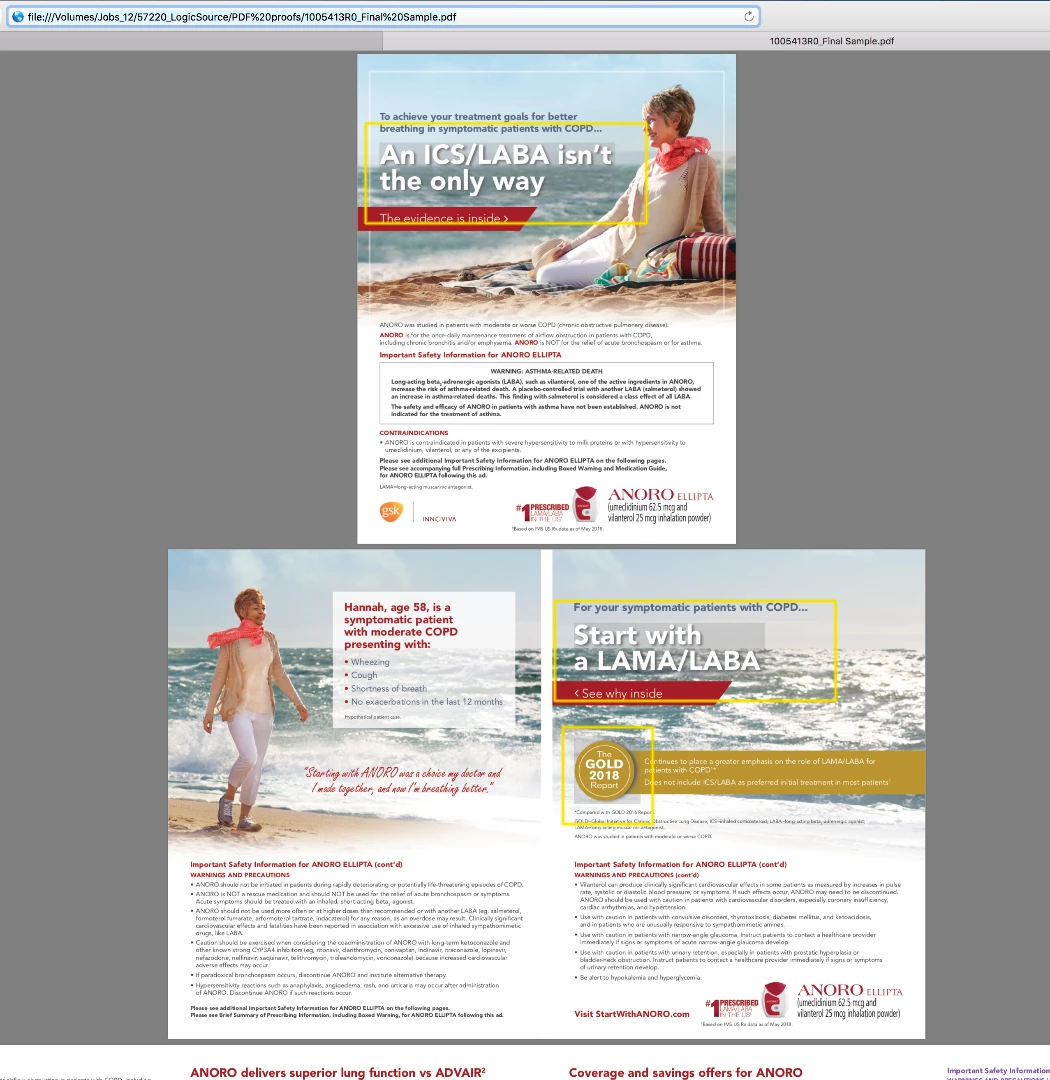
    This topic has been closed for replies.

    4 replies

    rob day
    Community Expert
    Community Expert
    July 10, 2018

    For clients that can't be relied on to use Acrobat Reader for reviewing PDFs I provide a flattened sRGB PDF proof with Overprint Simulation turned on, which gets around a browser's color management and transparency shortcomings.

    So below would convert GRACol CMYK color to sRGB without a change in color appearance. If the browser isn't capable of color managing via embedded profiles it will likely default to sRGB. The Acrobat 4 flattening would take care of a browser's problems rendering live transparency. If the spot colors are creating a problem you could convert them to process via Ink Manager.

    You could also flatten and convert to sRGB out of AcrobatPro.

    Even if your clients are always viewing in Reader, screen proofing would be unreliable as a contract proof. There are still Acrobat preferences that could change the view, not to mention bad monitor profiling on the client side.

    Karl-Heinz2
    Participant
    July 10, 2018

    It is still there ( didn't include screenshot of it ), even when I saved out PDF with High Res Transparency flattening as PDF/X4 and did not go thru Kodak Prinergy. Just out of InDesign CC2018, OSX  10.13,5. The File has only one Profile and thats Gracol G7, which we are certified! The boxes don't show up in Acrobat Pro and I wish I could tell my Clients not to use anything else but Acrobat with overprint preview selected, to review their files. My life would be a lot easier. Like i always say, its easy when you know it.

    Jongware
    Community Expert
    Community Expert
    July 10, 2018

    Karl-Heinz2  wrote

    The boxes don't show up in Acrobat Pro and I wish I could tell my Clients not to use anything else but Acrobat with overprint preview selected, to review their files. My life would be a lot easier. Like i always say, its easy when you know it.

    You can, and you should, and you have every right to do so.

    Just imagine that one of your clients inspects your print ready PDFs by importing them into Word "... because I always do like that and it always worked in the past/with files from others, so it's your error". Surely you would then also insist that they use proper software to check with!

    When sending over your PDFs for approval, add a HUGE warning that if clients do not use appropriate software, it may cost time and money because THEY send you off on a goose chase of a non-existent problem.

    Community Expert
    July 9, 2018

    Hi Karl-Heinz,

    did you export to PDF/X-4 before the PDF went through the Prinergy workflow?

    Do the "boxes" show up if you open the refinded PDF with Adobe Reader or Acrobat Pro?
    If so use the object inspector and see what color profiles are in place for the different parts of the image.

    And ask Kodak why this happens.

    Regards,
    Uwe

    BobLevine
    Community Expert
    Community Expert
    July 9, 2018

    Stop using a browser for proofing a PDF and stop using X/1-a which is what this looks like.

    Acrobat and Acrobat Reader with PDF/X-4 is the most reliable combination.
