


Participating Frequently
August 7, 2024
Question

Efficiently Linking TOC to Corresponding Pages in a Multi-Set PDF

  • August 7, 2024
  • 1 reply
  • 316 views

Hi Community,


Someone help me link the TOC numbers to the corresponding set page.


Usually, in our process we will have a PDF with different set pages(like Set 1, 2, 3....) attached and also will have the TOC(set numbers) for the same sets, we manually link each set number in the Table of Contents (TOC). Since the set numbers in the TOC can appear on multiple pages, each occurrence must be linked individually.
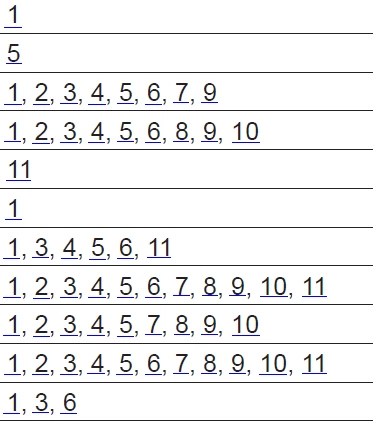
Numbers in the above TOC are set numbers, we will have the set pages in the same PDF, and we have to link each set number manually.

I want any script that can link them automatically or any feature that helps to create the link.

This topic has been closed for replies.

1 reply

Robert at ID-Tasker
Legend
August 7, 2024

TOC, in InDesign, is created from ParaStyles - and each entry has a reference to a single page.


Are you sure you are not talking about Index? 


Can you post some screenshots? 


If both - source and destination - is foundable - then automating it won't be a problem - especially, if you work on a PC.


VR44Author
Participating Frequently
August 8, 2024

Yes, I am not talking about the Index.

Initially, we will create these statements in InDesign and then export them as PDFs. We will create the links in PDF..


The TOC of the PDF will be like the one below and we will have all the set pages also attached to that PDF


This is the first page of Set 1. We have to link set 1 in the first screenshot to the first page of set 1.

We used to have 4 pages of TOC for each statement and the Set numbers were also repeated multiple times, every number should be linked.
I think this information is enough for your understanding, please ask me if you have any more questions.

Robert at ID-Tasker
Legend
August 8, 2024

You may treat is as a TOC - but technically it's rather an Index? 


You are using word "Statements" multiple times - even one under the other and they point to the same pages - unless you've collapsed this list - but how those words / phrases are represented on actual pages?


In order to automate the process - there needs to be a clear - more or less - way to find elements from the left on the actual pages.