


Jimmy d
Participant
December 5, 2025
Answered

Eliminate 2026 start page InDesign

  • December 5, 2025
  • 2 replies
  • 195 views

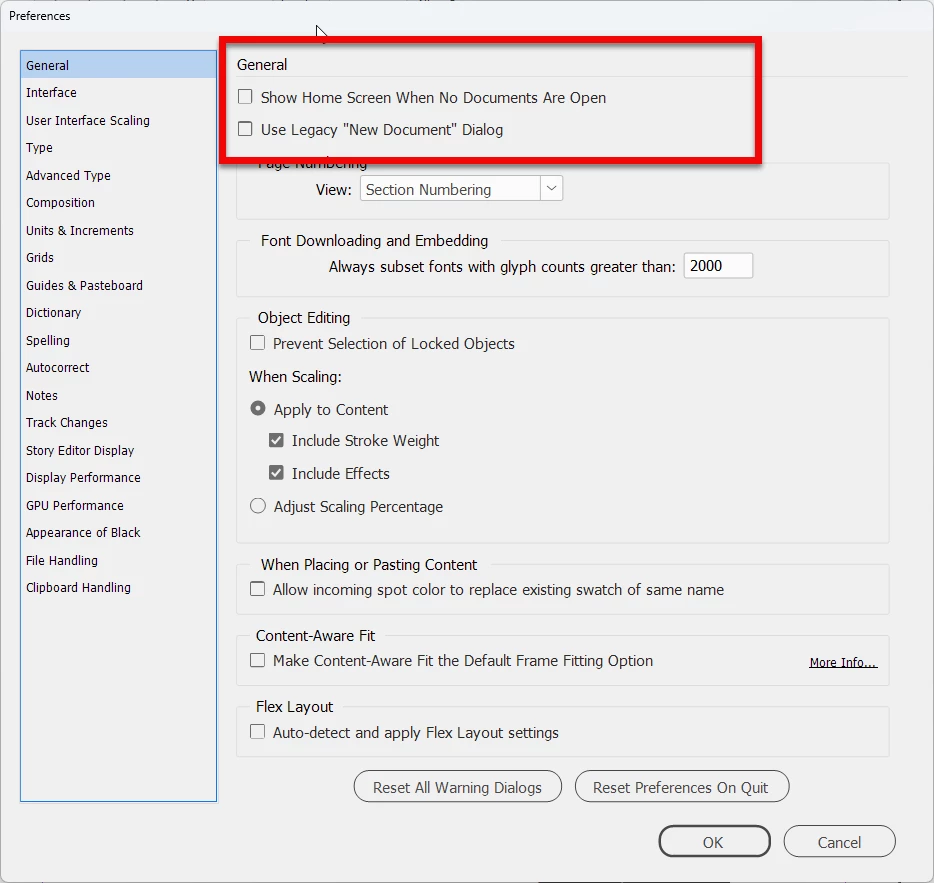
Was just upgraded recently to InDesign 2026. How do I get rid of the new start page?

Because of this page I cannot make changes as you could previously by setting preferences before you open a new file. Also it does not even show letter paper as an option. I want to get rid of this annoying feature.

Correct answer BobLevine

Set it in preferences:

2025-12-05_07-41-08.png


2 replies

Mike Witherell
Community Expert
Community Expert
December 5, 2025

Jimmy,

Are you sure you are on the correct pane in the left side of the Home Screen?

Notice that their are 5 other panes you might be clicked into, changing the Home Screen a lot.

Letter Size Page is the very first thing shown.

Here is a screenshot:

MikeWitherell_0-1764941458617.png


Mike Witherell
BobLevine
Community Expert
BobLevineCommunity ExpertCorrect answer
Community Expert
December 5, 2025

Set it in preferences:

2025-12-05_07-41-08.png