Participating Frequently
January 24, 2017
Answered

Eliminating a footnote or footer

  • January 24, 2017
  • 2 replies
  • 1410 views

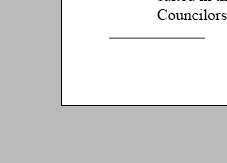
I imported a Word text file onto the pages of my document.  There was an unwanted footnote in it. I tried deleting the text of it, but there is still a horizontal line at the bottom of the page.

Here's an image of it. The word Councilors is the last line of the text on the page. Then the bar. The gray is pasteboard.

How can I get rid of this footer?

Thanks,

  Kathy
This topic has been closed for replies.
Correct answer TᴀW

Delete the reference to the footnote in the main text itself.

2 replies

Inspiring
January 26, 2024

I have the same issue. How is the reference in the main text deleted?

Inspiring
January 26, 2024

Disregard. I found what I needed to delete.

TᴀW
TᴀWCorrect answer
Legend
January 24, 2017

Delete the reference to the footnote in the main text itself.

id-extras.com | InDesign tools & scripts for typesetters, form designers, and translators
Participating Frequently
January 24, 2017

Thanks. That was it.