
Embedding Typekit Fonts in EPUB
Hello,
I'm working on a reflowable EPUB 3 and am having trouble with properly embedding Typekit fonts.
I'm using three typefaces (Adobe Caslon Pro [OTF], Korolev [OTF], and Montserrat [TTF]). All three exported from InDesign CC 2020 with no errors or warnings. Their files appeared in the fonts folder, as did the encyrption file in the META-INF folder.
Initially, all three fonts render correctly when the epub is viewed in iBooks, Adobe Digital Editions, and Chrome, but when I move the epub off my desktop to a mobile device (iPad), the fonts do not display. If I disable these fonts in Typekit, the fonts no longer display on my desktop in iBooks, ADE, or Chrome, leading me to believe that these platforms were drawing on the system font files (synced from Typekit) instead of the obfuscated fonts in the fonts folder.
To make sure the @11220649-face in my CSS was correct, I cut-and-pasted a non-obfuscated font file directly from my Mac's local fonts folder into the fonts folder in the EPUB and adjusted the CSS to point to it. This font displayed without a problem in Chrome, iBooks, and ADE on desktop, as well as iBooks on iPad. This indicates that the XHTML and CSS files are set up properly.
This has led me to conclude that the error must lie with either 1) Typekit's or InDesign's obfuscation/subsetting export or 2) the encryption file or encryption/decryption process.
Any insight or help is appreciated!
Edit: Attaching the epub file for reference. This is from a version I exported straight out of InDesign, and then went through and tore out all of the actual content of the ebook to get the file size down. Because of this, the .opf file, etc. is a mess, but the font files are just as InDesign exported them, and you can open the text.xhtml file in a browser and take a look.
And for further clarity, this is what the test.xhtml file looks like (with Korolev and Caslon specified in the CSS, but Typekit syncing is turned off, so they default to the obnoxious fallbacks Impact and Papyrus):
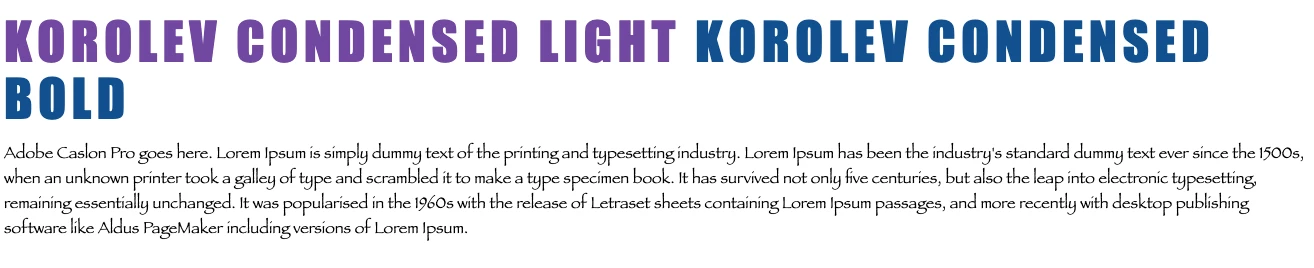
If I turn on Typekit syncing, the fonts magically work again:

...but Chrome is only drawing on the system fonts and not the obfuscated files in the font folder of the epub.
 AdChoices