Participating Frequently
June 19, 2019
Answered

Empty inner bleed area

  • June 19, 2019
  • 2 replies
  • 1907 views

Doing a little work for a client's in-house magazine. Usual InDesign page setup: A4 portrait, facing pages, 5mm top, bottom and outside bleed, 0mm inside so I can see the artwork as-is when I drag in large pre-prepared double-page background images upon which to add other elements.

Their printing firm want each page exported individually as A4 PDFs. So I exported with Use Document Bleed Settings checked, and selected the page number for the left half. I chose to include Bleed Marks. Same with the right half.

They rejected the documents. Said they wanted _no crop/bleed marks and no content at all_ on the inside bleed areas. i.e. a 3mm white 'bar' on the inside edges, but with regular 3mm bleed on the other three sides, and no printing marks.

Is this just weird, or a standard request? And, further, how is it best to set this up so it's not a major headache to export stuff to their requirements?

As far as I can make out:

1) If I set up the ID doc with inside bleed of 3mm, when I drag in an A3 background image for the double-page spread, I'll "lose" 6mm of inside edge content when exported: the halves won't be seamless when printed. Plus, I'd need to stretch the image slightly when Placing it in a frame to fit the 4 bleed areas.

2) If I set up the ID doc with no facing pages, designing double-page spreads is a hassle (unless I'm missing something) as I have to cut the background images in half prior to placing each. Plus, I still have to decide what to do about bleed on alternate pages.

3) If I omit all printer's marks on export, the resulting PDF has no bleed on the inside edge when Use Document Bleed Settings is checked, which will result in lost content on the inner edges when trimmed.

4) If I use custom bleed settings in the Export PDF dialog, say 3mm all round, then I do get 3mm of the 'other page' included, but the printing firm don't want this. They want _nothing_ - just whitespace - for the inside bleed. No content there whatsoever.

The only way I've managed to satisfy their requirements so far is via the following convoluted process:

a) Export each page to PDF using option (4) above so I have 3mm bleed all round, with no printer marks.

b) Import a page into Photoshop.

c) Draw a thin 3mm white bar with the rectangle tool and position it over the left or right edge to obliterate the bleed on the inner edge.

d) Save As PDF from Photoshop (which doesn't have bleed settings in the dialog anyway).

e) Repeat for each page.

That's a bind. Can anyone think of a way to set this up more seamlessly so I can design in double-page spread nirvana, yet export to PDF with a 'blank' 3mm inner bleed area?

Thank you in advance for any ideas.
This topic has been closed for replies.
Correct answer rob day

Ah, that might be it, thank you, rob day.

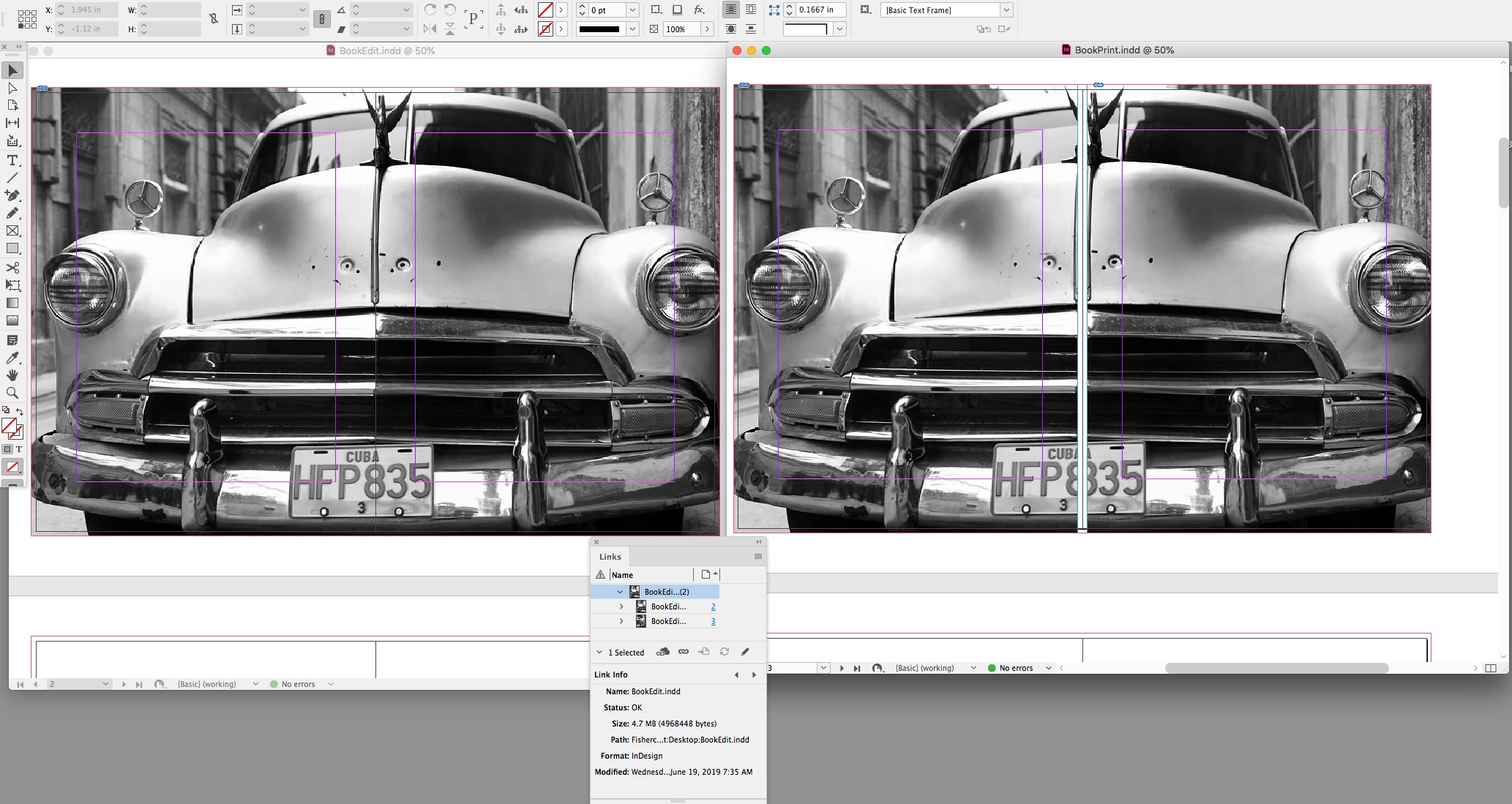
I'm sorry, but as I don't have a print background, I'm not sure of the processes involved once I hand over the design! It does seem (to my lowly understanding) that this should be handled at the printing stage - not the design output stage - but maybe they just have old or inflexible software. Or I've totally misunderstood their reasons for rejecting my initial PDFs. But after a few back-and-forths and some head-scratching, someone from the firm included a diagram like the one above, saying that's what they wanted me to produce.

I'm just trying to streamline the process to find out if this kind of output can be set up in InDesign (or during export) more easily than me having to manually add the white bars every time.


I'm sorry, but as I don't have a print background, I'm not sure of the processes involved once I hand over the design! It does seem (to my lowly understanding) that this should be handled at the printing stage - not the design output stage - but maybe they just have old or inflexible software.

Yes that's right, print dependent requirements like imposition and trapping should never be handled in the page layout. I would ask them to explain how to handle a crossover—I don't think there's anyway to do it without splitting and offsetting the image.

I think the "easiest" way would be to place the pages in another InDesign document, which has the extra bleed amount. Something like this where the "design" document is 8.5"x11", with its pages placed in an 8.625" x 11" "print" document:

2 replies

BobLevine
Community Expert
Community Expert
June 19, 2019

I'm not sure I understand the problem here. If you set the document up as facing pages and the inside bleed to zero with top, bottom and outside set appropriately, you should be able to provide the printer what they need.

rob day
Community Expert
Community Expert
June 19, 2019

The printer wants an inside bleed with no content, they are probably grinding and gluing the inside edge for perfect binding.

Ingram is the only printer I've run into that asks the designer to create the blank inside bleed in the page layout. Something like that should be easily handled by the imposition software—even InDesign’s Print Booklet has a setting for Space Between Pages.

stefblokeAuthor
Participating Frequently
June 19, 2019

Ah, that might be it, thank you, rob day.

I'm sorry, but as I don't have a print background, I'm not sure of the processes involved once I hand over the design! It does seem (to my lowly understanding) that this should be handled at the printing stage - not the design output stage - but maybe they just have old or inflexible software. Or I've totally misunderstood their reasons for rejecting my initial PDFs. But after a few back-and-forths and some head-scratching, someone from the firm included a diagram like the one above, saying that's what they wanted me to produce.

I'm just trying to streamline the process to find out if this kind of output can be set up in InDesign (or during export) more easily than me having to manually add the white bars every time.

rob day
Community Expert
Community Expert
June 19, 2019

Is the printer IngramSpark?

stefblokeAuthor
Participating Frequently
June 19, 2019

I don't think so. I have an inkling it's JPI Media but I can't be certain. I send files to the client and they deal with the printing firm.