
Known Participant
Nov 20, 2026 1:25 PM UTC
Question

Endnotes numbering problem

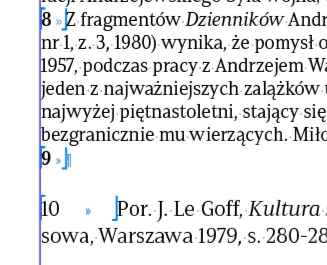
InDesign 22.0 on Mac. Long text with automatic reflow, so there is no z-links problem. When endnotes points in text are close one to another program has problem with correct numbering. When I put an anchor for next endnote in main text box , the number is correct (after 9 is 10) but in endnote section at the end of document program creates new new number 9 and previous endnote text is moved to number 10. There is no problem with style numbering option or text reflow. When I cut and place again main text numbers are correct but lat 2 endnotes are over start of endnotes section without numbering. 
 

    8 replies

    Participating Frequently
    Nov 23, 2026 9:27 AM UTC

    I'd suggest checking the endnote numbering settings and making sure they're set to continue numbering throughout the document rather than restarting in each section. Also, try updating the document fields and checking whether any section breaks are affecting the numbering. Sometimes a small formatting issue can cause numbering to behave unexpectedly.

    Translate
    Peter Kahrel
    Community Expert
    Community Expert
    Nov 21, 2026 8:27 PM UTC

    A problem with most (if not all) your endnotes is that the note text is outside the note bounderies. You have ‘blue opening symbol’ + plus note number + tab + ‘blue closing symbol’ + plus note text. The note text should be before the closing symbol, not after it. Surely this causes all kinds of problems.

    Translate
    RrNoAuthor
    Known Participant
    Nov 20, 2026 7:52 PM UTC

    I don't know why, but endnotes order stays correct if the last number is empty (endnote exist but in endnotes section has no text)

    Translate
    RrNoAuthor
    Known Participant
    Nov 20, 2026 7:16 PM UTC

    but the new endnote was added in correct order. Stay tuned. That story will continue

    Translate
    Abhishek Rao
    Community Manager
    Community Manager
    Nov 20, 2026 2:07 PM UTC

    Hi ​@RrNo,


    Thanks for reporting this and sharing the screenshot!

    I understand that when you insert endnotes close together, the reference numbering in the main text appears correct, but the endnotes section duplicates a number and shifts the associated note text.

    Since you've already checked the numbering settings and text reflow, could you please try a few additional checks?

    1. Go to View > Extras > Show Text Threads and verify that the text frames around the affected references are connected in the correct order.

    A similar issue was resolved by correcting the text-frame structure:
    https://community.adobe.com/questions-671/major-endnote-reordering-issue-893840

    2. On a copy of your document, press Cmd + Option + / to recompose the stories, then check whether the endnotes renumber correctly.

    3. Export the document as InDesign Markup (IDML), reopen it, save it as a new INDD file, and check whether the issue persists.

    Could you also confirm:

    • Your exact macOS version.

    • Whether the problem occurs in a completely new document with a few endnotes.

    • Whether the affected endnote references belong to the same threaded story.

    If possible, please share a small sample INDD/IDML file demonstrating the numbering issue, along with a short screen recording showing what happens when you insert endnote 10.

    This will help us determine whether the behavior is document-specific or a possible issue in InDesign 22.0.

    Thanks for your cooperation!

    Abhishek

    Translate
    RrNoAuthor
    Known Participant
    Nov 20, 2026 7:07 PM UTC

    Sonoma 14.5. on Mac Studio. Document is created from the first page, with automatic text box so new pages are added automatically depending on text length, there is just one frame per page, no additional boxes or text ( even no pictures). one text in a document. Every text format is by paragraf style and charakter style. I opened idml in InDesign 20.5.5. Result is the same. The numbering in main text block is correct. in endnotes is not. (see below)


    Translate
    RrNoAuthor
    Known Participant
    Nov 20, 2026 7:11 PM UTC

    I’ve copied text to a new document and some endnotes are missing


    Translate