
Participant
January 31, 2020
Answered

Endnotes to Footnotes conversion (InD 2020)

  • January 31, 2020
  • 4 replies
  • 2213 views

Hi all.


The article about this deals with endnotes that have no paragraph overrides (e.g. italicised titles). Tried to set my doc footnote and endnote options to exactly the same settings and convert from end to foot which is fine until it gets converted, where everything gets wiped to naked, unformatted text.

Tried to find and use Peter Kharel's script (my previous workaround, for which I have been very grateful) but I here get:
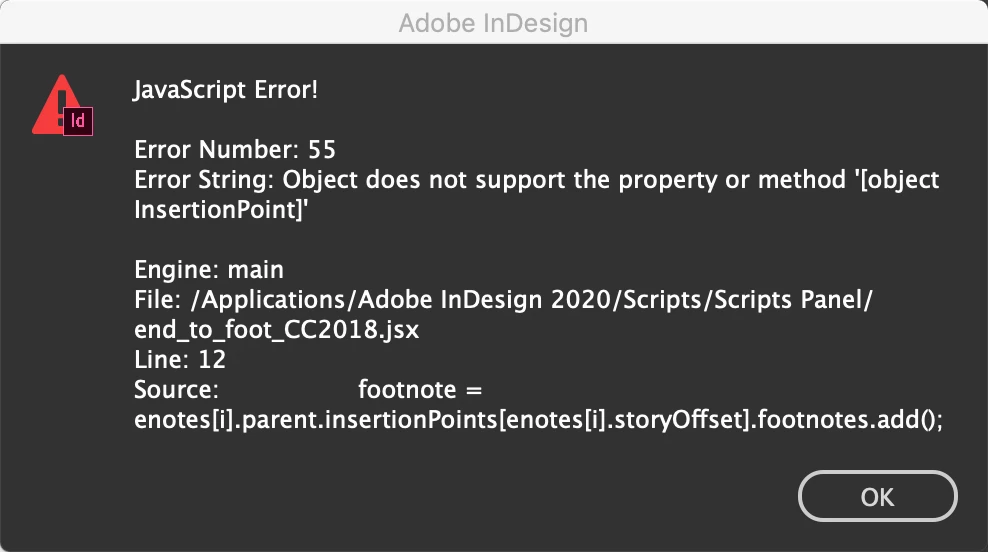
Suggestions anyone?


Warmest Regards.

This topic has been closed for replies.
Correct answer Laubender

Hi Megan,

did you try to apply a character style first and then convert the endnote to footnote?

Would that work? If yes, you could search for italic text with Find/Change and apply a character style for italic in one go all over the story with all endnotes.


Regards,
Uwe Laubender

( ACP )

4 replies

l0udgr4c3Author
Participant
February 5, 2020

Hi all,

Hope this finds you well. 

Thanks for your input MaxwithDax & Uwe. I did have to make a new character style as MaxwithDax noted but it didn't have to be nested? Did as Uwe suggested with the Find/Change and that wasn't as bad as I thought it might have been.

Thanks again everyone!

Warmest Regards,

Megan.

LaubenderCommunity ExpertCorrect answer
Community Expert
February 4, 2020

Hi Megan,

did you try to apply a character style first and then convert the endnote to footnote?

Would that work? If yes, you could search for italic text with Find/Change and apply a character style for italic in one go all over the story with all endnotes.


Regards,
Uwe Laubender

( ACP )

Known Participant
October 16, 2021

Hi Uwe and all,


I too have had painful experiences with this. InsSeveral projects.


The first conversion from footnotes to endotes, the italics seemed fine. But when I needed to export the content as Word manuscript, the export didn't include the endnotes. So then I had to convert the endnotes back to footnotes, tried exporting, ... and finally noticed that all the italics were gone!! Start again ... after many lost hours. 


Another project, the italics disappeared when, because after the first page draft, the client wanted the endnotes to start at 1 at the beginning of each chapter, I had to convert the endnotes back to footnotes, copy/paste out each chapter as separate stories, then re-convert the footnotes back to endnotes, shipped the job out (over 400 pages ... ) and it was then the editor that noticed that the italics had disappeared. 

So I had to go back to the old file, apply character style tags for all italics and small caps, figure out all the changes I had made in the interim (by exporting the text, and running Compare in Word, then manually re-doing all the changes), re-convert all the endnotes back to footnotes, cut the manuscript up into individual chapters, re-paste them all into separate stories, re-convert all the footnotes back to endnotes, type in all the chapter title subheads into the endnotes ... a lot of extra work. 


While I'm really grateful to Adobe for incorporating Peter Karel's script into InDesign, can't it include a script to retain local formatting? We stopped needing to apply character-level style tags years ago. It's a surprise now to have to start doing it again.  

Thanks a lot!

Linda

Community Expert
October 18, 2021

"While I'm really grateful to Adobe for incorporating Peter Karel's script into InDesign, can't it include a script to retain local formatting?"


Hi Linda,

I'm pretty sure, no, I'm absolutely sure, that the developers did not incorporate Peter Kahrel's script.

For my workflow I developed my own script for inhouse purposes. I had enough time spent to report bugs with InDesign's own conversion process for footnotes and endnotes, that are not fixed yet.


Regards,
Uwe Laubender

( ACP )

Community Expert
February 3, 2020

Hi l0udgr4c3,

is the italic text formatted with an applied character style?


Regards,
Uwe Laubender

( ACP )

l0udgr4c3Author
Participant
February 3, 2020

Hi Uwe Laubender,

no it isn't 😞


Warmest Regards,

Megan

maxwithdax
Community Expert
Community Expert
January 31, 2020

Your end notes are controlled by the Endnote Options. Type>Document Endnote Options. I would set my styles there before converting. Let us know if you are still having issues.


l0udgr4c3Author
Participant
February 2, 2020

Hi MaxwithDax,

Hope this finds you well.

I have set the styles below so that they match up but as I mentioned earlier, the conversion doesn't cater for style overrides like all the italics in each line, which I lose when I hit convert. Call me lazy but I'm not keen on manually highlighting all the titles and italicising them again in the footnotes after conversion when they have already been correctly placed.

Hope this helps. Do let me know if you find something else I can try. Many thanks in advance!

maxwithdax
Community Expert
Community Expert
February 3, 2020

Okay now I understand your issue. What you need here is a "Nested style." You are right, conversion will not carry forward overrides. You will have to build a nested style that accomplished the format you are looking for.