Inspiring
June 12, 2021
Answered

Enter characters with diacritics

  • June 12, 2021
  • 1 reply
  • 902 views

I am adding a dot under a letter. I am using Peter Kahrels useful script to do this - https://creativepro.com/files/kahrel/indesign/compose.html


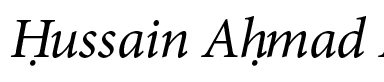
The dot is placed correctly below letters when using roman fonts, but in italic fonts they're not placed correctly.  See images below. The dot is not in the middle.


Is it possible to duplicate the same script and amend it for italic letters?



This topic has been closed for replies.
Correct answer Peter Kahrel

Thank you.


I'll have a go.


But would i not then have to worry about kerning the space with the next letter?


As they say, there's only one way to find out. But seriously, I think it'll be ok, it's been a while. But if there's a problem you ca fix it with yet another entry in the script's configuration file. Though I must urge you to go for IndyFont, it's a much more efficient and robust solution.

1 reply

Charu Rajput
Community Expert
Community Expert
June 12, 2021

Hi,

Did you try the solution mentioned on the same link?

See screenshot where it is mention.


Best regards
Inspiring
June 12, 2021

So i need to insert the unicode character U+02D9 into the script?


Can you tell me how?


I don't really know much about scripts.

Peter Kahrel
Community Expert
Community Expert
June 13, 2021

So i need to insert the unicode character U+02D9 into the script?

No. What Charu meant is that the script's page mentioned that in italic type styles the diacritics below aren't positioned correctly, and offers two solutions: the kerning script and Indyfont. The latter is by far the best solution.

P.