
Inspiring
March 19, 2018
Question

Epub fixed layout - every word contains span element

  • March 19, 2018
  • 4 replies
  • 1448 views

Hey Everyone,

I export Epub fixed layout from InDesign file, The XHTML file contains span element for every word in paragraphs(Refer below screenshot)

And an epub file size is too large. Any solutions available to export epub without/minimum count of span element?
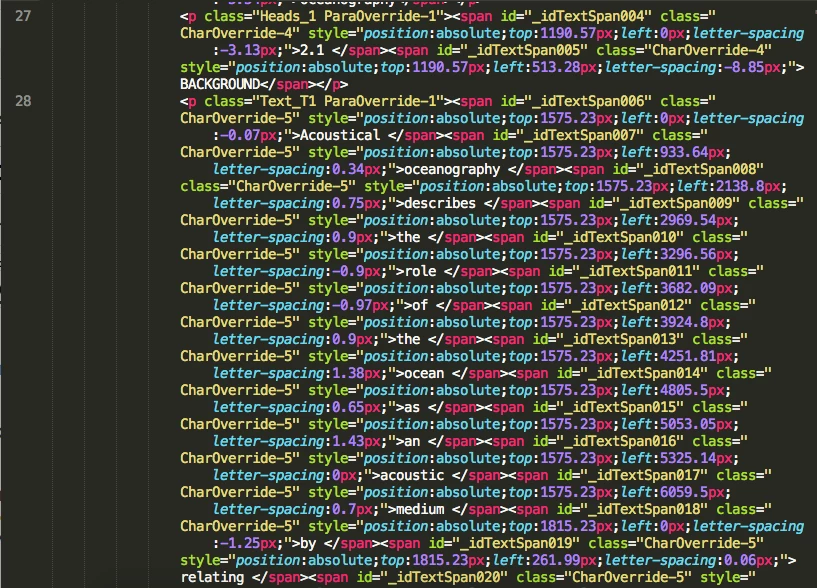
Thank you all for any help!

John..

This topic has been closed for replies.

4 replies

ssimpson_kidscan
Participating Frequently
July 23, 2020

I exlusively make fixed layout epubs (children's books) and I know from editing my epubs manually pretty frequently that it's totally possible to put each whole line of text into a single span and have that line remain fixed. I think you MAY need to seperate any individual words that have a diferent character style on them into a seperate span, but it may be possible to nest.

This is a lot of work to do manually however, and I usually only do this when I have to make an edit to a line of text because the line-ending was incorrect (compared to the print book). It would be great if inDesign exported epubs with line-by-line spans instead of word-by-word automatically, as the former is much better for accessibility (screenreaders for people with vision impairment, brail readers etc).

Participant
September 14, 2020

You are absolutly right. There should be an option to choose how it should be exported. The other problem with the every-word-in-a-span think is that it is hardly possible to search in EPUBs which are produced like this.  

Silvia Lifman
Participating Frequently
March 29, 2018

The number of SPAN tags is due to the incorrect way to apply character styles.
Changing characters within a paragraph, for example: overwriting an italic by adding bold, produces SPAN tags within the code.
Recommendation: Do not overwrite styles, use character styles over existing paragraph styles.

Derek Cross
Community Expert
Community Expert
March 29, 2018

This is a Fixed Layout ePub, so each word/element must have an absolute position, hence the span tags applied to each word. Maybe you’re getting mixed up with a Reflowable Text ePub.

BobLevine
Community Expert
Community Expert
March 19, 2018

Moved to EPUB forum.

As pointed out by Derek, that is how fixed layout epub works. What does too large mean? I did one a few months ago that came in at 750MB.

Derek Cross
Community Expert
Community Expert
March 19, 2018

That's what a FXL ePub has (a span element for every word !)

If your document is simple and text heavy, consider producing a reflowable text ePub.

There is an InDesign ePub forum.

Participant
September 14, 2020

This is not correct. In a fixed layout epub every element has a fixed position. But such an element (<div>) can contain more than one word. Every word in a span is Adobe's solution but it is not necessary following the epub standards and techniques.