
Known Participant
June 27, 2025
Answered

EPUB photos moving while anchored

  • June 27, 2025
  • 1 reply
  • 234 views

Hi I am trying to put photos into my EPUB and have several times got ¾ the way through placing and anchoring the photos. But when I make small changes in one part of the document, most of the photos throughout the document misalign. It’s a 140 page book and I’m on my third attempt from scratch of getting ¾ the way through. Tomorrow will be day 4.


Here’s what I’m doing if you can help me figure out where I am going wrong. I apply a paragraph style to the paragraph before the photo, with 0.7 in space after the para.  Then I press enter after the final word in that para then file place the photo. I drag the photo to the size I want then select jump object. I anchor the photo to the last word of the para before.

Then under the photo I type a caption and apply my caption style, which has 0.5 in space before and 0.5 in space after. 

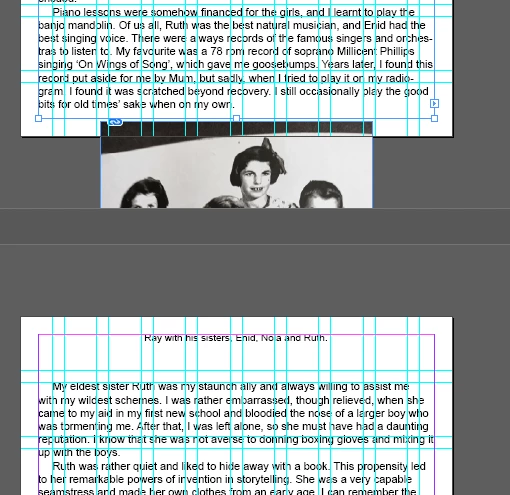
But here's an example of what’s happening. The photos are sitting between two pages.


Correct answer Mike Witherell

I have found that it is a good idea to anchor photos in their own hard return and not at the end of a paragraph; nor at the beginningh of a paragraph. Isolate it into its own hard return. Also, give that picture/paragraph a paragraph style with the leading set to Auto.

1 reply

Mike Witherell
Community Expert
Mike WitherellCommunity ExpertCorrect answer
Community Expert
July 1, 2025

I have found that it is a good idea to anchor photos in their own hard return and not at the end of a paragraph; nor at the beginningh of a paragraph. Isolate it into its own hard return. Also, give that picture/paragraph a paragraph style with the leading set to Auto.

Mike Witherell
ali_4619Author
Known Participant
July 2, 2025

Fantastic. Thanks so much.

ali_4619Author
Known Participant
July 4, 2025

Hi, I know this is a lot to ask but is there a chance you could screen record how you do your solution and share it here? I tried your method but no matter how many times I try, it doesn't work for me. Some screenshot examples below of workarounds I've tried also. I am now on day 5 now working full-time trying to fix the first two photos in the document which are the ones causing me problems. Even if I can somewhat fix them, all the photos in the document move down and off the page. They are all anchored. What I can’t understand is all the photos were in there ok till I fixed a few spelling errors. I could understand if they added add any lines but they didn't as they were small changes such as changing the letter S to C.


Screenshot

How the document looks after placing the photo after using the hard return and jump object

To me, it looks too close to the para  below. (I tried applying a style to the para below with space before but that style looks different for the other photos through the document and I want it to look consistent).


Screenshot 2

How the caption looks after applying static caption (caption in red)


Screenshot 3


How it looks after creating a style after the photo with space after of 0.3 after the photo


Screenshot 4


How it looks after applying space before to the para after the caption. When I anchor the photo, the red text above the pic changes to black.


Screenshot 5

Also weirdly it made the changes below to several other pages even though I didn't touch those pages.