


Participant
September 17, 2023
Question

Error 6 Version Indesign 18.5

  • September 17, 2023
  • 3 replies
  • 251 views

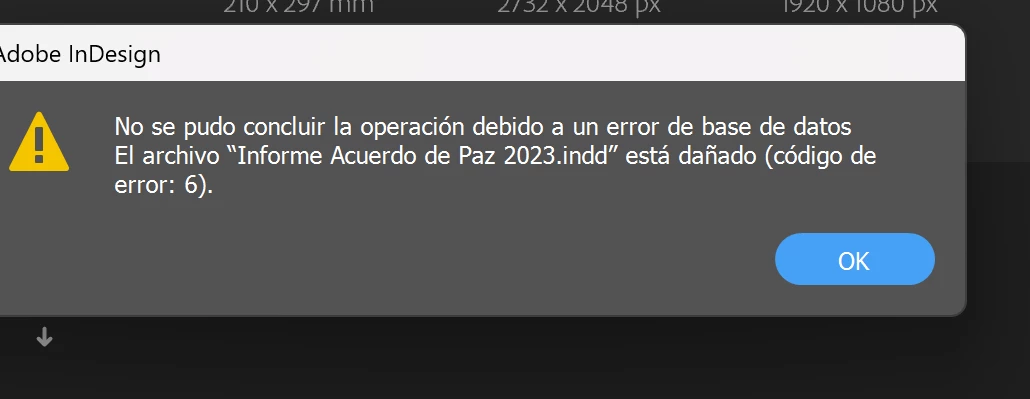
Hi, I need help. I was working on a large document on InDesign. Suddenly, my design didn't open again, sometimes the software got the prompt "Could not complete your request because of a database error" and other times "Cannot open file... .indd".


I don't know what to do. I tried:

- Reinstalled Indesign.

- Opened my design on other computers.

- Changed names and places.

- "Please change Data Recovery folder destination under Preferences > File Handling" as the other discussion I found.


I sent an e-mail to Adobe about my file, but I haven't received an answer yet. Important: I don't have money to pay Markzware. 


So, what other thing can I do with this trouble?


Also I have a Windows 10.


This topic has been closed for replies.

3 replies

Barb Binder
Community Expert
Community Expert
September 18, 2023

I'm so sorry to hear this. Have you worked through the suggestions on this page?

https://helpx.adobe.com/indesign/kb/troubleshoot-file-issues.html


Looking ahead, please give some consideration to how you back up your files. You can manually back up to an external drive, you can create incremental back ups that you also back up to an external drive, or you could consider saving to a cloud drive like dropbox that backs up your files for you automatically, and also creates incremental back ups for you automatically.


~Barb

~Barb at Rocky Mountain Training
Bill Silbert
Community Expert
Community Expert
September 17, 2023

Is this happening on just one document? If it is happening with other documents as well then it sounds similar to a problem that Macintosh users have reported with InDesign 18.5 using Mac OS Ventura. The solution that has helped many of them is to update the OS to the latest version of Ventura. Since you are still using Windows 10 it could be worth a try to update to the latest version of Windows 11 and see if that helps.

Robert at ID-Tasker
Legend
September 18, 2023

It's rather very extreme solution - updating to Win 11...


Robert at ID-Tasker
Legend
September 17, 2023

There is a script - you need to search forum - that will try to open your INDD document without showing it and export / save it. 


http://kasyan.ho.ua/indesign/all/blind_open_and_idml-export.html


On a different note - how often are you doing Save As with a new name? 


Participant
September 17, 2023

That's a problem. It's practically my first time working completely with Indesign and I never thought about troubles with this software. I just saved a copy on PDF 10 days ago, so I lost 40 designed document pages.


I know that maybe I can find a solution because I can watch "the preview pages" when I look in Windows.