
Participating Frequently
November 23, 2017
Question

Error code 4 all docs created with CC 2018

  • November 23, 2017
  • 33 replies
  • 20848 views

Hey Guys

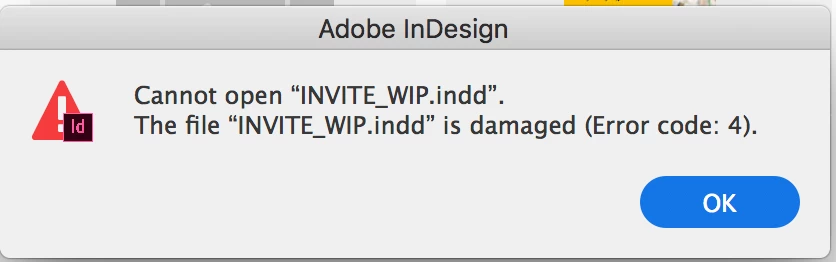
Please help me understand why I cannot open any InDesign documents I create with the new InDesign 2018. All the files I make or save with the new software give me the same error on opening: "Cannot open "INVITE_WIP.indd". The file "INVITE_WIP.indd" is damaged (Error code: 4).

Please help me! I am paying this does not mean I have lost all the work I have created with InDesign CC 2018.

- Sarah
This topic has been closed for replies.

33 replies

Participating Frequently
February 10, 2018

Not sure if this helps narrow down the problem but I installed Indesign CC 2017 for a project and just got the same error. So it doesn't seem to be a CC 2018 specific error.

Inspiring
February 7, 2018

I'm using the latest OS High Sierra, I think the error may have something to do with our custom work spaces. I noticed an Abobe person replied to this thread trying to blame the error on 3rd party apps or the OS. Both Apple and Adobe are now basically using us as beta testers, I guess it's cheaper for them, but most of us are actually working and NOT playing, all this jacking around with a product we pay dearly for is costing us money and making ME mad.

Participant
February 7, 2018

As many have stated and for me, restarting InDesign has allowed me to open the files I need to. Yes, it's frustrating, but it works for now. I had a similar issue with the same "Damaged file" error that would not allow me to save the file. I was able to export to an IDML file in case I could not recover the file after restarting.  If I remember correctly I did have to use the .IDML file because I could not open the original .INDD file.

I'm sending info to Adobe now to help them sort the issue out. refer to the second post in this thread.  Thanks.

Participating Frequently
February 7, 2018

Does everyone getting this error have the latest OSX?

I wonder if it's because of the new file handling system that Adobe introduced.

Participant
February 7, 2018

I use the latest OSX.

Inspiring
January 30, 2018

Restarting Indesign worked for me

tierraj
Participant
January 29, 2018

I'm experiencing the same issue. This has been such an inconvenience. The only solution I found was to uninstall the 2018 version and revert back to 2017.

PaulaStrand
Participating Frequently
January 29, 2018

I reinstalled 2017 but kept 2018 too. I formatted a book – 14 chapters, each chapter having endnotes – in 2017, then flowed the Text into a 2018 template (having imported the style sheets first). It is a horror story in my business. I’m still nervous it’s corrupt as both file have behaved oddly when I reopen them from scratch. I can only open from within the programme, not by double clicking. It’s a disaster for publishers, oddly the mainstay of early InDesign’s customer base.

Abambo
Community Expert
Community Expert
January 30, 2018

PaulaStrand  wrote

I can only open from within the programme, not by double clicking.

That's an OS functionality.

ABAMBO | Hard- and Software Engineer | Photographer
Steve Werner
Community Expert
Community Expert
January 21, 2018

You’re not speaking to Adobe here. Only other users like yourself.

PaulaStrand
Participating Frequently
January 20, 2018

Just to say InDesign is working again, and I don't know why. I restarted my computer when the Error 4 occurred initially, and that didn't work. Since then, I quit InDesign and opened the file from within InDesign, and it opened. I did this because on my work computer (my issue was on my home computer) I got an Error 14 (I don't have further details of that error), and when I closed InDesign and opened it again, and opened the file from within the app, it opened. As a remark worth making, InDesign has become very unstable in recent months. As a long-time user I'm qualified to say this. I share files in work with two other people. It is vital InDesign only update the app when absolutely essential, as each update risks problems occurring. We are professional users, so interrupted workflow wastes time, and time is money, and deadlines are our business. I'm asking that emphasis be placed on the professional users' essential stability. When I get upset with problems, it doesn't mean I'm not in appreciation for a great piece of design software, it's only that no matter how fab a piece of software, if it's not reliable it's not for professionals. Being able to open a file – a new file or a file a few years old – is one of the most basic requirements. If there are regular issues with this basic requirement, than as manager of the design department, I'm obliged to look to alternatives.

garyr93739538
Known Participant
January 20, 2018

Here Here!

Adobe - you should be looking at this stuff as we professionals are feeling very let down by what has become the only industry standard.

Let’s all look for alternatives until we hear from the company we are all spending so much with what they are doing about fixing a problem of their causing.

Gary Rowland

[Personal Info removed by Moderator]

Abambo
Community Expert
Community Expert
January 20, 2018

If you updated Java and that solved the problem, go and blame someone other. Java is not the responsibility of Adobe.

For All the professionels here on this forum, I’m sure that Adobe is working hard to solve all problems that may arise with the use of their product. But please note that not all problems are caused by Adobe.

A system update, a security update, a company’s rights management system, Firewall and internet configuration etc etc have an influence on the system and the working of programs of all kind.

Regards,

Abambo

Professional user.

ABAMBO | Hard- and Software Engineer | Photographer
Srishti Bali
Legend
January 18, 2018

Hi All,

Those who are using MAC please try this and share results.

  • quit InDesign
  • go to: ~/library/caches/
  • and delete this folder: 'Adobe InDesign'

Regards,

Srishti

Participating Frequently
January 19, 2018

Doing as you suggested has, for the moment at least, allowed me to open a file that was giving me that error code.

Participant
January 18, 2018

I've had this issue happen one too many times so I've made it a habit to repeatedly save a document as I'm working on it. I had this error pop up on a file I spent four hours on yesterday after INDD crashed unexpectedly. I had to log on to Adobe, go into my cloud files and restore it to my last save point. With that I was able to open it and thankfully remake minimal changes. This is the 3rd crash I've had in the last month - not sure if it's an INDD 2018 issue or a Mac High Sierra 10.13.2 issue

darrenf64164547
Participant
January 18, 2018

I plus one this. Same issue as above - Error code 4 - 2013 Macbook Pro - High Sierra - InD 2018. Restarting InD allows the file to be opened again.