
Participant
July 13, 2023
Answered

Error in Hyperlink, URL is not available in InDesign

  • July 13, 2023
  • 1 reply
  • 1421 views

Hi All,


I've followed the tutorials and have read through the errors, but none of it has helped me. I've created a new hyperlink using the "New Hyperlink from URL" in the Hyperlinks panel and it creates the Hyperlink just fine. I get the red error and see that "URL is not available" when I hover over it. However, when I click on the link it still works and takes me to the appropriate site. Does anyone know why I still might be getting the error?
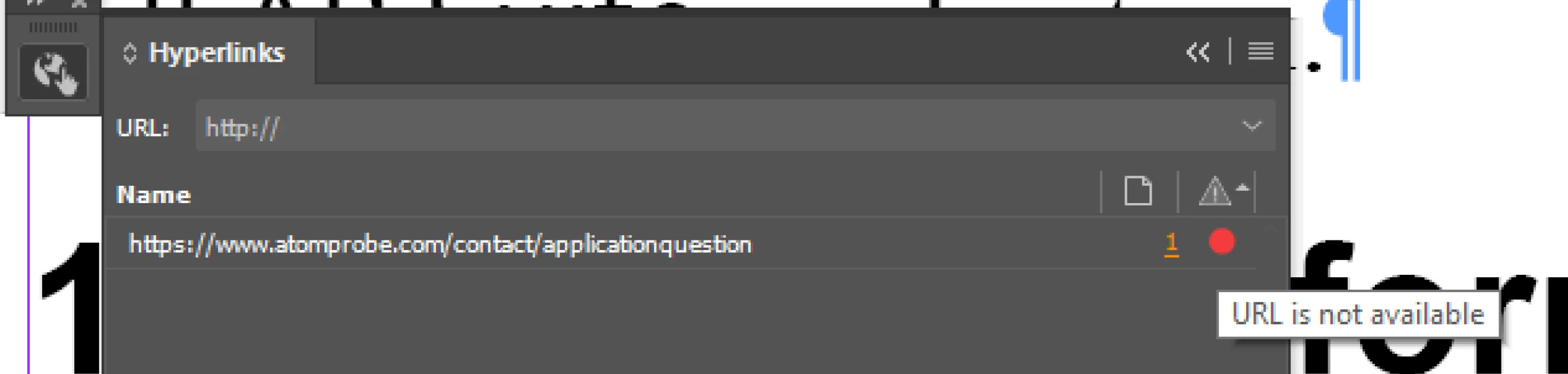
 

<Title renamed by moderator>

This topic has been closed for replies.
Correct answer Digitální svět s.r.o.

Can you please delete this post? The problem was not InDesign, but a bad redirect on the server (when using a URL without www). I apologize for misidentifying the problem.

1 reply

Harshika Verma
Community Manager
Community Manager
July 19, 2023

Hi @Shelby299684634q14,


Thank you for reporting the issue. We would like to know if you're having issues with this specific file. If the URL is working, then what happens when you publish or export the file?


Have you tried removing the link and applying it again?


Let us know if that helps. We will be happy to assist you further.


Thanks,
Harshika

Participating Frequently
September 5, 2023

This bug is really annoying!!! The URL is OK, but when you click on the hyperlink, the slash is removed from the URL. Can you please fix it ASAP?

Participating Frequently
September 5, 2023

Can you please delete this post? The problem was not InDesign, but a bad redirect on the server (when using a URL without www). I apologize for misidentifying the problem.