


vbh012
Participant
December 14, 2022
Question

Error in thumbnail image on public online document

  • December 14, 2022
  • 1 reply
  • 353 views
When I publish a file online and want to share it on social media, the small thumbnail image of the document does not appear. Instead, it just shows an empty field and a text, (see photo). The link to the file works, but it's not nice and right
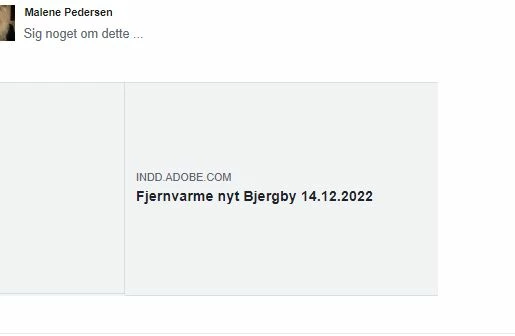
This topic has been closed for replies.

1 reply

Steve Werner
Community Expert
Community Expert
December 14, 2022

If I'm understanding your problem, you want to share an image of a Publish Online document on social media. What is the process you're using to share the image?  What social media are you trying to use it in?


Also, please tell us more about your system: Please tell us what operating system (exactly) you're running. Please tell us (exactly) what InDesign version you're using.

vbh012
vbh012Author
Participant
December 14, 2022

Hey Steve

Im working with windows 10. and it's Indesign version 17.2.1

I'm using the commande in indesign, publish online, and then from my publish online dashboard I chosse share to facebook. And Its here the thumnail for the shared file are missing. Its suppose to show the first page of the document.

Steve Werner
Community Expert
Community Expert
December 14, 2022

I'm on a Mac in Ventura 13.1 using InDesign version 18.0. I'm getting the same result as you - no preview appears to show in Facebook even though a Preview image as included. It's not something I would do so I don't have an explanation.