



LINA KÖPPEN
Participant
May 27, 2024
Question

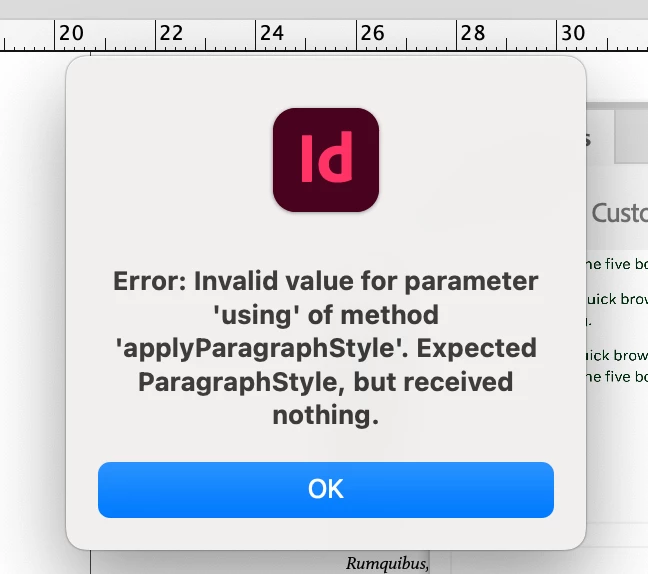
"Error: Invalid value for parameter 'using' of method "while create a paragraph style in InDesign

  • May 27, 2024
  • 17 replies
  • 2247 views

it works perfeclty if i just apply an exsiting style, the moment I want to create my own style pack this message appears, when i click it away, it will come back like 5 times then indesign crashes, I have updated indesign but still the same issue, any ideas ?
 

<Title renamed by moderator>

17 replies

graphics_4075
Inspiring
August 4, 2026

I am experiencing this after opening up an in-progress file with paragraph styles already set up and attempting to create a style pack. Every single paragraph style I choose gives me this error, and when I try to create the style pack it tells me “Reference error: object is invalid.”


InDesign 21.4.1 on Mac Studio M1 Ultra Tahoe 26.5.1.


I tested in a new document and Style Packs work fine, as it does if I create new paragraph styles. The issue then most likely lies with the paragraph styles I had already made. Some things I have noted could be contributors:

  1. I have a script that balanced ragged lines that I use on my text, which I then save as a style. This could be causing an issue
  2. There are style overrides on most styles since I kerned most headers in the file
     

Other than those, I weirdly suspect the “Based on style” could be messing with things. As I am making paragraph styles and deleting them, the hierarchy of what is based on what can get all messed up. Maybe this is bad workflow, but it has caused issues before. 


As others below have said, scripts and plugins may not have an effect. Creating a blank pack causes error for me, but only on documents that have preexisting paragraph styles. It still creates the pack too, but with none of my choice: just Minion. 

Cheers
graphics_4075
Inspiring
August 4, 2026

I booted in Safe Mode to see if that helps. I am met with the same errors as before but (maybe I didn’t notice this), the style pack can be created despite the errors, and it seems to still work as intended. 


I attached a screen recording showing this. Each time I define a style, I am met with an error, and a text box is created in the top left corner of my document. When I click past the error message, the text box disappears. I suspect this is a visual manifestation of what is causing this bug. Hopefully this info can help narrow down the cause and fix it. I have never used style packs, and the one time I was interested I was met with a bug. Having to click through 6 errors messages to slightly improve my workflow is not worth it. 

Cheers
Abhishek Rao
Community Manager
Community Manager
August 4, 2026

Hi ​@graphics_4075,


Thanks for the additional testing and for sharing the screen recording. The fact that the issue only occurs with documents containing pre-existing paragraph styles, while new documents work correctly, is very helpful.

I tried reproducing this with my test file but could not reproduce it. So, to help narrow this down further, could you please try exporting the affected document to IDML, reopen it, save it back as a new INDD, and test creating the Style Pack again? I'd also recommend creating a duplicate of one of the affected paragraph styles with Based On set to [No Paragraph Style] (or Basic Paragraph) and clearing any style overrides before testing whether it can be added to a Style Pack.

Since you mentioned using a script to balance ragged lines, could you also try creating a brand-new paragraph style manually in the same document (without using the script) and check whether that style can be added successfully?

If the issue still persists, could you please share a simplified sample INDD that reproduces the problem (or the original file if you can), along with the rag-balancing script? If the files are confidential, you can send them to me via Direct Message using Google Drive, Dropbox, or another cloud-sharing service.


Looking forward to hearing back. 
Abhishek

Participating Frequently
February 25, 2025

Its now almost March 2025, and I am having precisely the same issue. M2 Macmini, fully updated. Fully updated indesign (2024.1).

I don't seem to have any scripts, plugins or  extensions running. I am trying to make a style pack out of a few custom designed paragraphs. Even creating a blank pack causes an error

Participant
March 10, 2025

Same issue here! Brand new MacBook Pro and fully up to date indesign. No 3rd party plug-ins installed. I need to create a style pack for my work and i get the same error message. It will eventually create the style pack but it doesn't save into  the style pack list- meaning its unavailable in any other document. ADOBE PLEASE ADVISE. This is a major issue.

Abhishek Rao
Community Manager
Community Manager
March 17, 2025

Hey @Todditron and @erin_5757,


Sorry for the delay. I just tested this on my end, and it works as expected without any errors on InDesign latest 20.2 version. Could you double-check if there are any duplicate style names (Paragraph style name)in your document? Also, since you've ruled out scripts, could you try running InDesign in Safe Mode to ensure a plug-in isn’t interfering? Ref:

https://adobe.ly/3DWLw0L

If the issue persists, would you mind sharing a screen recording? Try creating a new InDesign document and then making a style pack while recording. Looking forward to your update. 


^

Abhishek

Mike Witherell
Community Expert
Community Expert
May 27, 2024

And you are following these guidelines?

https://helpx.adobe.com/indesign/using/work-with-style-packs.html

And you are patched to the latest InDesign and OS?

Mike Witherell
LINA KÖPPEN
Participant
May 28, 2024

yes i have updated it and i also know how to do it, it just crashes on me 🙂

Mike Witherell
Community Expert
Community Expert
May 29, 2024

You might experiment with this grab-bag of assorted troubleshooting:

https://community.adobe.com/t5/indesign-discussions/reset-indesign-preferences-and-other-troubleshooting/td-p/11990234

... especially the section about troubleshooting a corrupt INDD file.

Mike Witherell
Harshika Verma
Community Manager
Community Manager
May 27, 2024

Hi @LINA KÖPPEN,

Thank you for reaching out, and sorry to hear you are unable to create style packs in InDesign. A few more details would be super helpful.

The details of your operating system.
Does that happen with all files or on a new file when you try to create a new style pack?
Please check if 2 or more styles have the same name.


We will try our best to help.


Thanks,

Harshika

LINA KÖPPEN
Participant
May 28, 2024

hello


here are the details: 

operating system MAX sonoma 14.3.1 (23D60)

it just happens with this file.

all styles in there are just the default onces i havent changed anything as i am using it for the first time  🙂

Community Expert
May 30, 2024

Strange that it happens with only a single file. The error message seems to point that some code/script is executed which is causing this issue. Did you install any third party plugin/scripts recently? If yes try uninstalling them. Also, you could try and recorver the InDesign if it has been somehow corrupted by exporting it out to IDML and then resaving the IDML back to INDD. Then try with the new INDD that you get.

-Manan

-Manan