Participant
October 28, 2020
Question

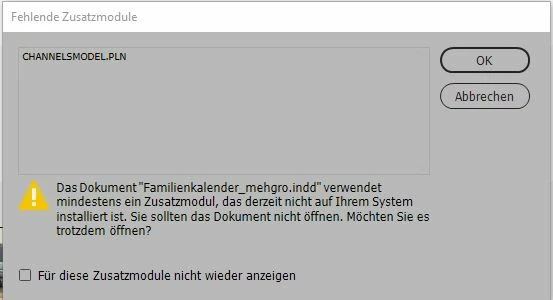
error message "CHANNELSMODEL.PLN is not installed after updating to 16.0

  • October 28, 2020
  • 4 replies
  • 1080 views

After updating to version 16, I can no longer open InDesign documents. The error message "CHANNELSMODEL.PN is not installed" appears with every document. The files were created by myself in the 2020 version.
This topic has been closed for replies.

4 replies

Community Expert
October 30, 2020

Hi Jennifer,

that's rather strange.

Downloaded your sample document and opened it without any problem in my German InDesign 2021 version 16.0.0.77 on Windows 10. Of course, some fonts are missing, but that was it. No call for missing plug-ins.


Regards,
Uwe Laubender

( ACP )

Community Expert
October 30, 2020

Hi Jennifer,

could you share one InDesign document where you see this issue?

Just put it on Dropbox or a similar service and post the download link.


Thanks,
Uwe Laubender

( ACP )

Participant
October 30, 2020

Yesterday I completely uninstalled InDesign on every PC in the office and reinstalled the 2021 version today. Now it seems to be working.

Thanks for your help.

Community Expert
October 29, 2020

You could also use Manan Joshi's InExUtils to remove the remnant from the InDesign document directly:

https://github.com/Manan-Joshi/inexutils


( A demo version of InExUtils should be available for 7 days. )


Regards,
Uwe Laubender

( ACP )

Participant
October 30, 2020

Thank you.

I don't think that's an option. I get the error message for every file from the 2020 version, not just one.

Community Expert
October 29, 2020

Hi Jennifer,

don't think that CHANNELSMODEL is a regular InDesign component.

It's very likely a remnant of a 3rd-parties Plug-in that is not part of the update.


Export the document to IDML, open the IDML file as InDesign document and the issue should be gone.


Regards,
Uwe Laubender

( ACP )

Participant
October 30, 2020

Thanks for your answer.

I saved the file as "IDML" and opened it. The error persists.

I have now uninstalled InDesign 2021 on all PCs in our office and we will continue to work with the 2020 version for the time being.