
M.Hasanin
Inspiring
December 23, 2021
Answered

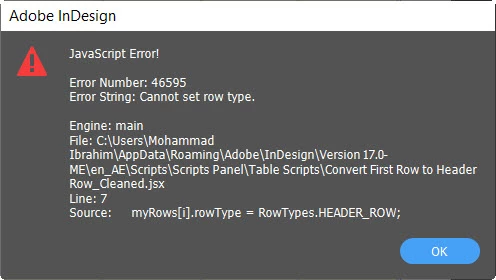
Error Message if I Ran the Script the Second time!

  • December 23, 2021
  • 2 replies
  • 504 views

Hi Experts

I wrote little Script to convert first table rows to header row, and it work good for the first time but if i ran the script again after converting every table first row to header in all tables it give an error? how i can avoid that? because if i add new tables needed to be convert their first row  it will not work again and give error!, so how i can let the script ignore the errors and continue to find any new tables needed to be convert its first table row! and thanks in advance 

//Convert Every First Table Row to Header Row
var myDoc = app.activeDocument;
var myRows = myDoc.stories.everyItem().tables.everyItem().rows[0].getElements();

for (var i = 0; i < myRows.length; i++) {
    if (myRows[i].rowType == RowTypes.BODY_ROW);
    myRows[i].rowType = RowTypes.HEADER_ROW;
}

The Error Message for the Second time
This topic has been closed for replies.
Correct answer Manan Joshi

The problem is with your if statement, remove the ; after the if and it will work fine. In the current state the if statement has no effect as the statement it's controlling is a blank statement denoted by a ; The line after it is executed always and hence you see the error

-Manan

2 replies

SumitKumar
Inspiring
January 1, 2022

Also, It may not work if any cell has rowSpan greater than 1.


-Sumit
Manan JoshiCommunity ExpertCorrect answer
Community Expert
December 23, 2021

The problem is with your if statement, remove the ; after the if and it will work fine. In the current state the if statement has no effect as the statement it's controlling is a blank statement denoted by a ; The line after it is executed always and hence you see the error

-Manan

-Manan
M.Hasanin
M.HasaninAuthor
Inspiring
December 23, 2021

@Manan Joshi 

Thanks a lot , you saved me

Mohammad Hasanin