
lfcorullon13651490
Legend
May 9, 2017
Question

"Error" placing icml files with anchored [object Group]

  • May 9, 2017
  • 1 reply
  • 620 views

Hello, fellows.

I'm having troubles with icml files.

I can export all my textFrames with no problems.

Almost all textFrames has anchored group of objects within it. More than one. And some of those groups have a lot of objects.

Like this:
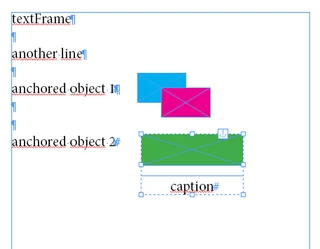
The problem is: when I place the exported icml file into a new document, all those groups became locked and InDesign shows an error ("Object is locked"). In some cases, just one error window appears. But, in other cases, a lot of errors are shown. A LOT. I don't know how to solve this. I tried to write a code to create a new document and then disable user interactions and then place the icml file. But the error persists.

Any ideas?

This topic has been closed for replies.

1 reply

Community Expert
May 10, 2017

lf.corullon  wrote

… Any ideas?

Yes.

Check the lockState of the Story.
And try something with methods checkIn() and checkOut() of the story.
( Not tested. )

Adobe InDesign CS6 (8.0) Object Model JS: Story

Regards,
Uwe

lfcorullon13651490
Legend
May 10, 2017

I don't think so. Because everything is OK when the story doesn't have anchored objects...

Is it possible that applied object styles are causing the issue?

But, following your suggestion, I checked the story lock state after export the textFrame to icml and get "CHECKED_IN_STORY".

That is what it should be, or not?

Community Expert
May 11, 2017

Hm. Yes.

Maybe you ran into a bug?
Is every error telling the same "Object is locked." message?
Then I suppose it's for every object in the group perhaps…

Will there be no error messages if the anchored groups do not contain text frames?
What is the version of your InDesign and OS?

Regards,
Uwe