


licral83685769
Inspiring
June 20, 2018
Answered

Error when Exporting PDF-X4 file : Missing Glyph

  • June 20, 2018
  • 3 replies
  • 6060 views

Hello,

I'm currently facing an issue with indesign CC2018, latest version.

It's a 24 pages document, no missing font, no broken link, no error showing, green dot on the bottom of the screen :

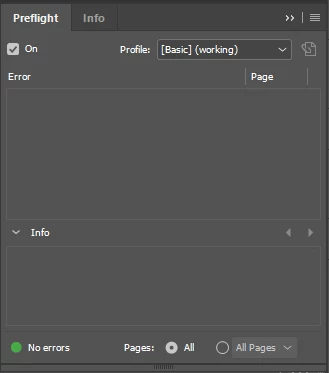
Yet, I'm having an error showing up after exporting in PDF X4 print PDF format (file is exported, but PDF X4 standard is not respected) :
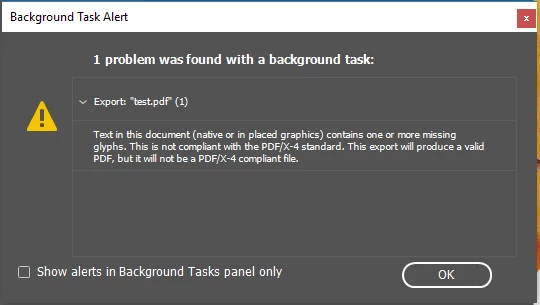
What's wrong ? I can't tell what's happening.

Help ?

Thank you

    Correct answer Peter Spier

    The error message (and lack of ID finding it in preflight) suggests the problem is an imported graphic that does not have all fonts embedded.

    3 replies

    Participant
    April 28, 2026

    Thnx for pointing this out. It is exactly my conclusion too. I was asked to reprint some designs we made 1-2yrs ago. Never had any issues with the PDF exporting, never encountered this Glyph problem before. Created prepress PDFs with page mark & page info and all of a sudden got the Glyph (soft) error. Just unticking the “page info” option in the PDF export options made the error go away.

    So maybe its a non existing character somewhere in the document path??

    /Users/stefannoordhoek/ZZESTO Dropbox/ZZESTO Projects Now/Z22178 - Alkmaar Ontwikkelkaders/08 Ontwikkelkader Viaanse Molen/_pdf/Ontwikkelkader Viaanse Molen v05 prepress TEST.pdf

    Enough info to ignore it, in any case!
    Kind regards,
    Stefan


    Participant
    October 14, 2024

    Hi.
    I ran across the same problem yesterday.
    Went through every mm(inch) of the document and found nothing.
    And after a long 3 hours struggle, I somehow found that by unchecking 'page information' in 'Export Pdf>Marks and bleeds>marks' my document was totally alert free.

    I assume you have overcome this issue by now. I'm just leaving this in hope that it might save some fellow designer's invaluable time.

    =Bottom line.=

    If you get missing glyphs alert for no reason in Indesign, try unchecking page information in Mark and bleeds.

    Peace.

    leo.r
    Community Expert
    Community Expert
    October 14, 2024


    quote

    And after a long 3 hours struggle, I somehow found that by unchecking 'page information' in 'Export Pdf>Marks and bleeds>marks' my document was totally alert free.


    By @yoo_soo_8216


    Interesting. I wonder what are your versions of InDesign and the operating system? 


    Also, does your document name contain any special characters, accents, diacritics, etc? Although normally this shouldn't make any difference anyway.

    Peter Spier
    Community Expert
    Peter SpierCommunity ExpertCorrect answer
    Community Expert
    June 20, 2018

    The error message (and lack of ID finding it in preflight) suggests the problem is an imported graphic that does not have all fonts embedded.

    Known Participant
    October 18, 2023

    I get the same message, but the bigger problem is that I have no way of figuring out which imported ad is missing the fonts. Acrobat > Print Production > Preflight > PDF Analysis >  "List potential font problems" does not show any missing fonts.  [Is a missing glyph the same as a missing font, or does it mean an embedded font doesn't have a certain character?] 

    It does say "A font name is not unique." "A font with the same name is embedded multiple times." I can't do anything about that if multiple advertisers embed the same font in their ads. But Preflight doesn't say any fonts or glyphs are missing. So InDesign is offering an error but no way to track it down, right?

    Peter Spier
    Community Expert
    Community Expert
    October 19, 2023

    The only way I can think of to find the problem would be "divide and conquer" where you continually split the failing doc in halves until you isolate the failure. You could also, of course, generate the PDF and proof it.

    Are you actually responsible in any way if this goes as-is? Whose responsibility is it to properly create the ads?