
Participant
January 13, 2020
Question

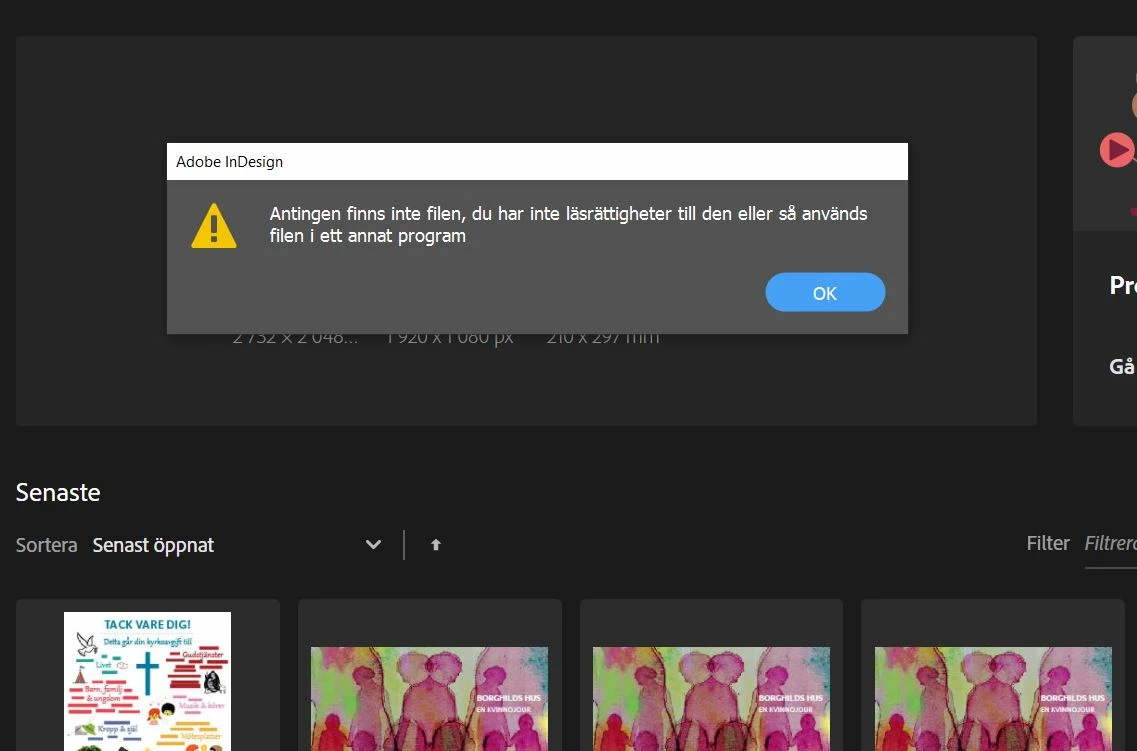
Error while opening ID files: Either the file doesn't exist or you don't have permission to open

  • January 13, 2020
  • 2 replies
  • 4875 views

Hi!
I updated my indesign and now I can´t open my files! The text is in swedish but it says that "Either the file don´t exist or I don´t have the readingrights or the file is used in another program."

PLEASE, I´m desperate. I have customers waiting and I can´t get to their folders and stuff.

What is wrong?

Kindly regards
Camilla


{Renamed by MOD}

This topic has been closed for replies.

2 replies

Srishti_Bali
Legend
January 15, 2020

Hi Camilla,


So sorry to hear about this. I agree with the point mentioned by Bob. Try saving the file on Local hard drive and check how it works from there. If that doesn't help either, I would request if you can share a few more details like:

  • OS and version of  InDesign
  • Is the issue related to a specific document? If yes, could you please share the document with us? You can upload it to the creative cloud and share the download link.
  • Where the files are saved (Network Drive/ System HDD/ Shared Folder on System /External HDD)?
  • When did this start happening? Are there any recent changes made to your system? For example, any antivirus, system updates or web extensions installed recently.


Regards,

Srishti

Participant
September 23, 2022

Similar problem. I was the "second device" on my son's account and saved a few files. He got a new job, cancelled his membership, so I bought my own InDesign. I can see old files under recent, but they give that error above. 

Rishabh_Tiwari
Legend
September 23, 2022

Hi @Ruth2463497049s1 ,


Sorry to hear about the trouble. Could you please copy the file from the source folder and paste it on the desktop and then try opening the file and let us know if this helps or if you need any further assistance?


Regards
Rishabh

BobLevine
Community Expert
Community Expert
January 14, 2020

Are you working from a Dropbox or Onedrive folder? If so, make sure the files are locally synced and not cloud-only.