
Known Participant
January 4, 2024
Answered

Event listener to check border

  • January 4, 2024
  • 6 replies
  • 727 views

Hi,

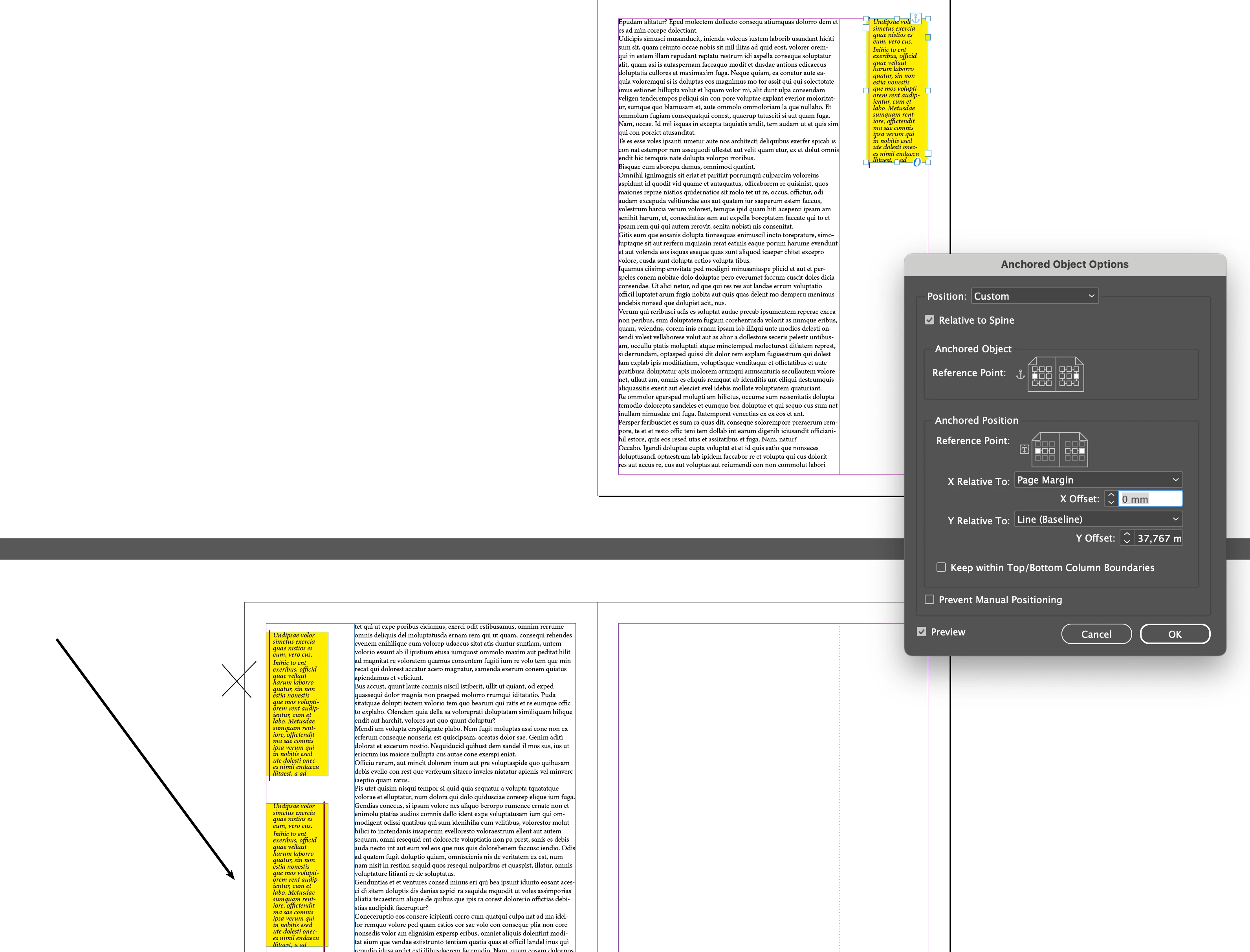
my object is "relative spin" and.... 
Is this possible? When you move to the next page, the paragraph border should take value from the right, not the left. Can I follow this event and make automatic transactions? Thanks... 
This topic has been closed for replies.
Correct answer Peter Kahrel

But you can't apply a stroke to part of a frame in an object style (or even on a frame directly), so you'll have to place separate rules on the frames.

6 replies

Peter Kahrel
Community Expert
Community Expert
January 5, 2024

Clever, mon brave. So you paste an object into the anchored frames. And how do you get the arrows to point into the correct direction?


Another thing is that the rules should be the length of the height of the boxes. How would you adjust the height of the objects you paste?

FRIdNGE
January 5, 2024

Sometimes, complex things just need InDesign basic features as 2 object styles and a simplistic regex! …

Screenshots previously posted not allowed.


(^/)  The Jedi

Peter Kahrel
Community Expert
Community Expert
January 5, 2024

Good job. Tip for the future: when you place text frames (like your margin frames) always label them on the Layers panel. That way they easy to find so that when you go looking for frames in a script, the script uses less code and is more efficient (and quicker too, usually).

uniq1Author
Known Participant
January 5, 2024

Hi everyone,

Hi everyone;


....

var allDocPages = app.documents[0].pages.everyItem().getElements();
// Loop all pages:
for (var n = 0; n < allDocPages.length; n++)

{
// Test Left or Right Hand side of page:
//if (allDocPages[n].side == PageSideOptions.LEFT_HAND) { //Left (Odd)
if (allDocPages[n].side == PageSideOptions.RIGHT_HAND)

{ //Right (Even)
// Get all items on the current page:
var mySelection = allDocPages[n].allPageItems;
for (var i = 0; i < mySelection.length; i++)
{
if ((mySelection[i].constructor.name == "TextFrame") && (mySelection[i].appliedObjectStyle == myOs1_O))

....

I solved the problem with the script I prepared using this logic. Thanks @Peter Kahrel 

Robert at ID-Tasker
Legend
January 5, 2024

As your TFs are Anchored - you don't have to check all TFs on all Pages - you could just iterate TFs collection of the Story.


It will be quicker / more efficient.


Peter Kahrel
Community Expert
Peter KahrelCommunity ExpertCorrect answer
Community Expert
January 4, 2024

But you can't apply a stroke to part of a frame in an object style (or even on a frame directly), so you'll have to place separate rules on the frames.

Peter Kahrel
Community Expert
Community Expert
January 4, 2024

Paragraph borders (and paragraph rules) are not spine-relative, so, no, you can't get what you showed.


The only way to deal with this is not to use paragraph borders (or paragraph rules), but instead use a script to place the rules when all margin frames have been placed.

uniq1Author
Known Participant
January 4, 2024

Hi @Peter Kahrel Thank you very much for your reply.
"Find all text frames for the script and apply object style 1 if they are on the right of the page, apply object style 2 if they are on the left of the page." I will try to develop a code with this logic. Does anyone have a better idea?