
Participant
May 17, 2024
Answered

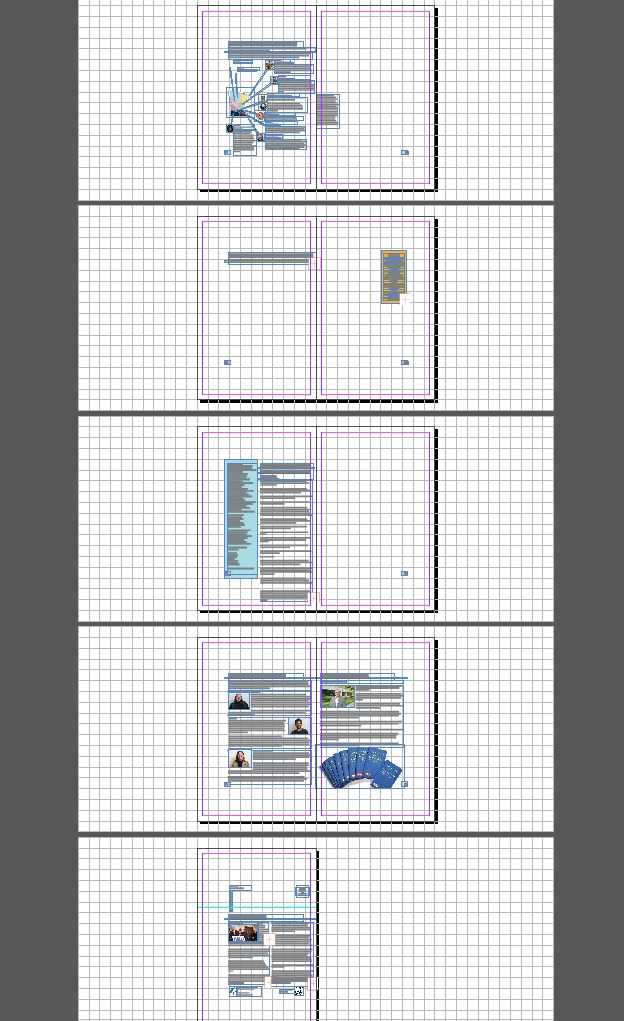
Everything suddenly shrank and shifted on every single page of a 16 page document!
  • May 17, 2024
  • 2 replies
  • 387 views

I had everything aligned and fit on the pages that were finished. I saved and exited out of the file for about an hour and when I reopened it, everything was tiny and shifted on EVERY. SINGLE. PAGE.


HELP!!!


How do I fix this without having to go through each and every page again and making sure all the image sizes and font sizes are what they were before I closed out of the document?! Kind of freaking out.

This topic has been closed for replies.
Correct answer James Gifford—NitroPress

But you can't select content on all the spreads at one time—50% scaling would have to be spread-by-spread. One could change the paper size for the entire document at one time.  Or maybe stumble into an alternate layout. That's all I can think of. 


~Barb


True, about selecting things... but the only way I could come close to replicating the fault was to use the Page tool to select all doc pages (I guess that could happen), and then scale up the pages... which produced a somewhat different result.


Maybe just a corrupt file. OP: save the file as IDML, then open that and save again as a regular INDD file under a new name. That *might* correct the fault if it's certain kinds of document corruption causing it.

2 replies

Barb Binder
Community Expert
Community Expert
May 17, 2024

This is very odd.


What is the paper size of the document? It looks like the page dimensions were resized, not the content. Check File > Document Setup. 


~Barb

~Barb at Rocky Mountain Training
James Gifford—NitroPress
Legend
May 17, 2024

This makes sense. I am trying to think of any one-key, one-click command that would do something like this, and the only thing that comes to mind is hitting (say) 50% scale while all the page frames were selected.

Barb Binder
Community Expert
Community Expert
May 17, 2024

But you can't select content on all the spreads at one time—50% scaling would have to be spread-by-spread. One could change the paper size for the entire document at one time.  Or maybe stumble into an alternate layout. That's all I can think of. 


~Barb


~Barb at Rocky Mountain Training
leo.r
Community Expert
Community Expert
May 17, 2024

Frankly, I'm not sure what exactly happened. First question is: are you running any incremental backup (Time Machine on Mac or File Version on Windows etc?) Or working on a cloud service like OneDrive? Then you could retrieve your file version from a few hours earlier.