
Participant
January 11, 2019
Answered

Excel file with no cell borders populating cell borders after it's placed?

  • January 11, 2019
  • 4 replies
  • 1390 views

I am placing pages in an excel file onto an InDesign document. The first 2 pages worked fine; I adjusted the layout to fit the page with no issues. The 3rd and 4th page however, continually populated with black borders around the cells. In excel I have all the pages set to no borders and in InDesign there is no stroke indicated on the cells or the text. Is there a setting I am not seeing?
This topic has been closed for replies.
Correct answer davids55608846

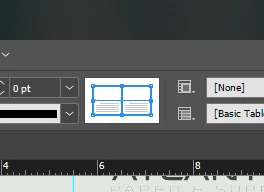
Selecting the borders in this function and clearing the stroke worked. Thank you!

4 replies

davids55608846AuthorCorrect answer
Participant
January 23, 2019

Selecting the borders in this function and clearing the stroke worked. Thank you!

jane-e
Community Expert
Community Expert
January 23, 2019

davids55608846  wrote

In excel I have all the pages set to no borders and in InDesign there is no stroke indicated on the cells or the text.


davids55608846  wrote

Selecting the borders in this function and clearing the stroke worked. Thank you!

I'm glad it's solved — since the borders show up in the widget in the Control panel, they should have also been in Table > Cell Options > Strokes and Fills. Or in the Table Options if they were set for the entire table.

Srishti_Bali
Legend
January 17, 2019

Hi David,

I would like to know if the steps suggested above worked for you, or the issue still persists.

Kindly update the discussion if you need further assistance with it.

Thanks,

Srishti

jane-e
Community Expert
Community Expert
January 13, 2019

Hi David,

Is it exactly at the start of page 3 in InDesing or is it at a specific cell in Excel?

To test in InDesign, resize a frame on page 1 or page 2 to force the text to reflow. Do the borders show up in the same place?

If it’s in Excel, click in the cell and look in the Ribbon to confirm.

Also, in InDesign, turn off the View for gridlines to better see the borders. Maybe do that in Excel also.

Post screen shots if you don’t see it.

Jane

Community Expert
January 11, 2019

My suggestion would be to import an Unformatted Table into Indesign. This will not import any existing excel styles,. Then create table and cell styles and apply to the table.