Participant
May 13, 2024
Answered

Expanding text box in InDesign

  • May 13, 2024
  • 2 replies
  • 623 views

It's been a while since I made my first resume. Any detailed explanation for overflowing words in InDesign, Adobe Acrobat, and other apps?

This topic has been closed for replies.
Correct answer Barb Binder

Hi Andy:


Here is a quick refresher.:


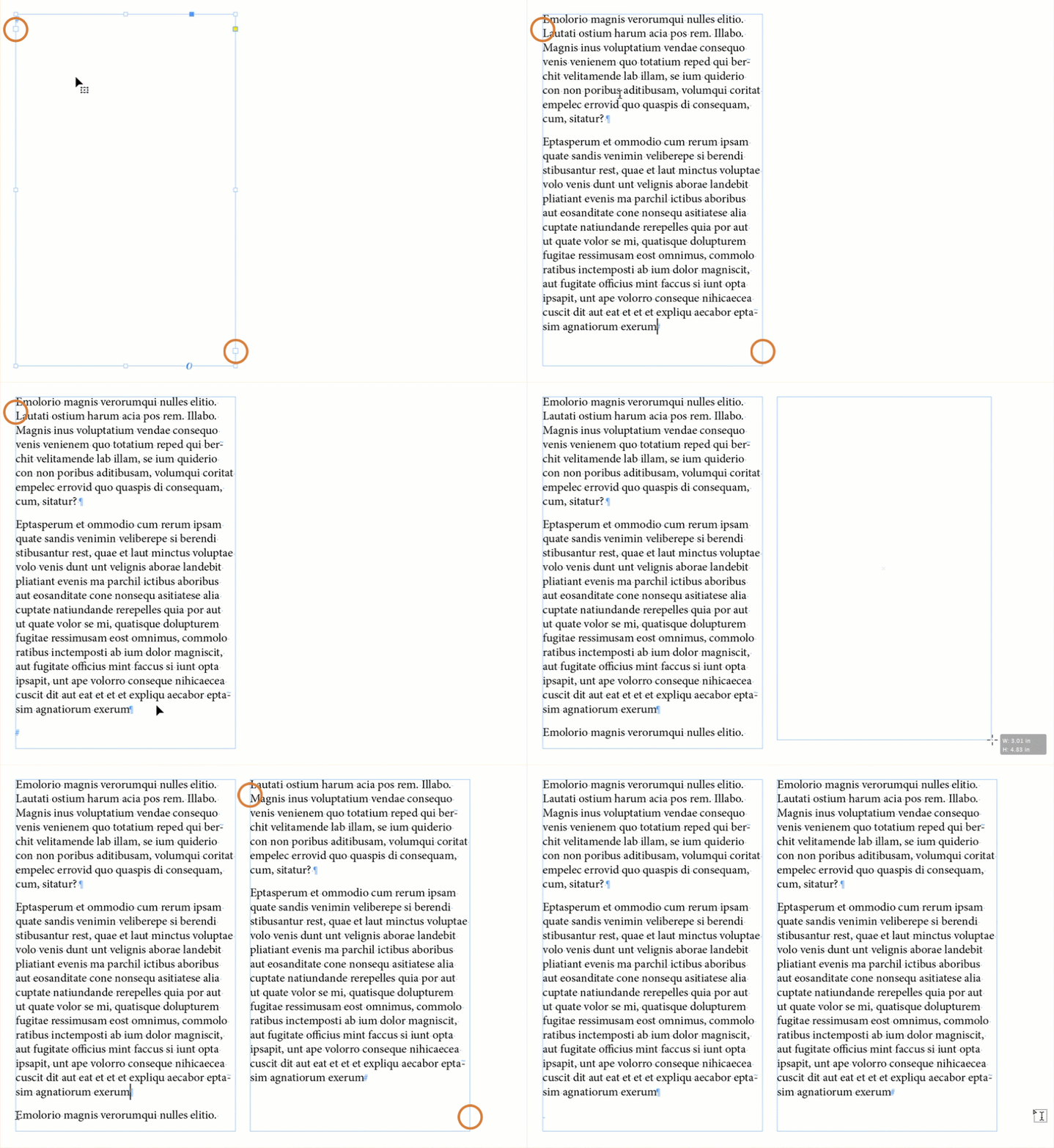
Text frames have in ports and out ports (circled, left below). And empy in port signals the beginning of the story, and the empty out port signals the end. Even after I add content it all fits within the first frame. 


But when I add more content, the text is overset and a red plus is visible in the out port. Click the red plus to reload the remaining text and add a new frame to hold it. The empty out port signals the end of the story in the second fame.  In between, you will see an arrow on the inside ports, indicating text is continuing.


You also mentioned a text box break. You can add a break with Type > Insert Break Character > Column Break (or Frame Break). Both work in my example below because they are two separate frames. 


~Barb
2 replies

Barb Binder
Community Expert
Barb BinderCommunity ExpertCorrect answer
Community Expert
May 14, 2024

Hi Andy:


Here is a quick refresher.:


Text frames have in ports and out ports (circled, left below). And empy in port signals the beginning of the story, and the empty out port signals the end. Even after I add content it all fits within the first frame. 


But when I add more content, the text is overset and a red plus is visible in the out port. Click the red plus to reload the remaining text and add a new frame to hold it. The empty out port signals the end of the story in the second fame.  In between, you will see an arrow on the inside ports, indicating text is continuing.


You also mentioned a text box break. You can add a break with Type > Insert Break Character > Column Break (or Frame Break). Both work in my example below because they are two separate frames. 


~Barb

~Barb at Rocky Mountain Training
James Gifford—NitroPress
Legend
May 13, 2024

I'm not reading an answerable question here... if you have more text than will fit in a text frame, you make the frame larger or allow text to flow to more frames, usually on succeeding pages.


ID is not a word processor; you have to set up your page structure to suit your document.


There are good tutorials on these basic procedures. It's not an app that lends itself to 'learn as you go,' at least, not until you know the basics.

Participant
May 13, 2024
My idea is that if the text box could not hold enough characters in one
page, I want to continue that passage by text box break to another
duplicate page while editing.
James Gifford—NitroPress
Legend
May 13, 2024

That's basically how it works. You can add pages and text boxes manually or set it up to flow automatically..