Inspiring
August 25, 2017
Answered

Export Color Issues.

  • August 25, 2017
  • 3 replies
  • 6120 views

Hi all.  I have a problem with a few of my files.  WHen i export them with the exact same PDF preset they come out a different shade.  I'll paste them below.  From what i can tell my color spaces are the same.  The document's look different inside Indesign and When exported.  What am i missing?

Both swatches are Pantone 186

    This topic has been closed for replies.
    Correct answer rob day

    Yes all colors are from the Pantone Solid Coated Library.  From both Illustrator and Indesign


    Was the document created from scratch in a recent version of AI? The fact that you have a mix of CMYK and Lab defined Pantone swatches indicates that the document may have started in an older version.

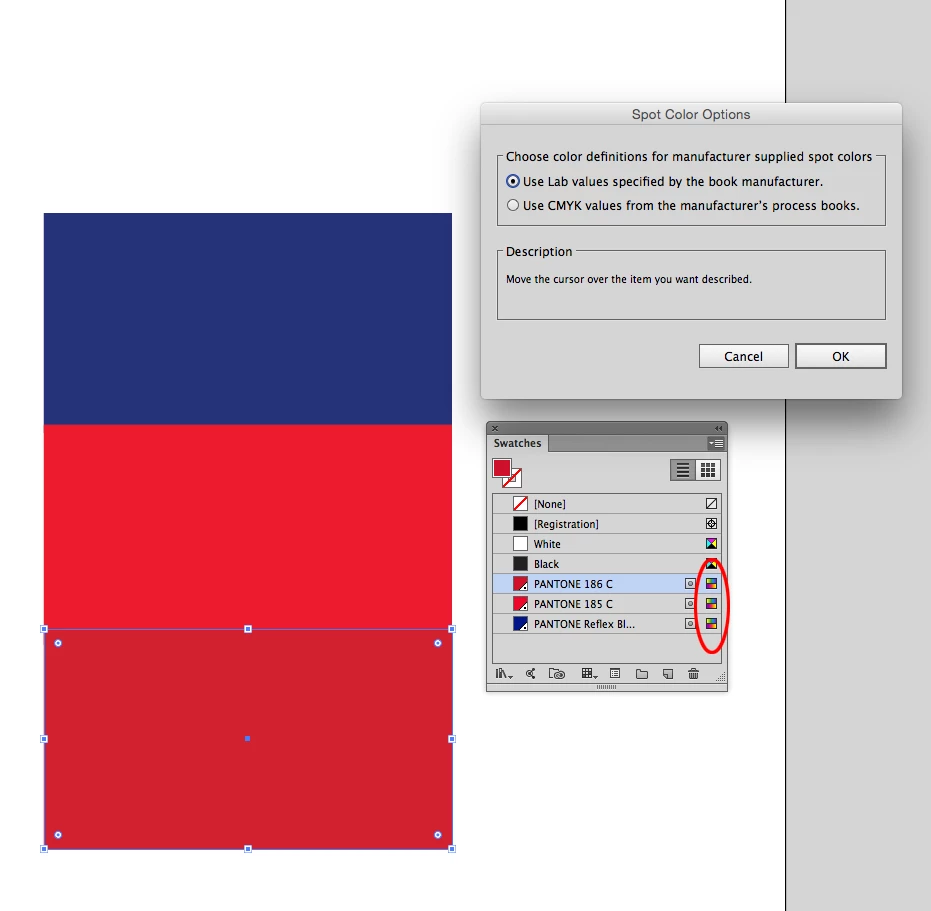
    Make sure all of your Pantone swatches have the Lab definition—the color space of the definition is shown by the right icon. Also choose Spots.. from the Swatch flyout and make sure Lab definitions is chosen

    3 replies

    cbishop01Author
    Inspiring
    August 25, 2017

    unfortunately no it does not replace the cmyk with Lab. It only does it when i start all over.  As for the plates and press this has never affected anything. Its for the proofing that we get questioned on "sometimes"

    Dov Isaacs
    Legend
    August 25, 2017

    What you may be missing?

    (1)     Unless you have the View=>Proof Colors option on and perhaps also View=>Overprint Preview option enabled in InDesign, you are likely not seeing a particularly accurate view of the colors.

    (2)     Colors may be converted to a different color space when doing the export. What joboptions are you specifying for PDF export?

    (3)     If there is transparency involved and you are flattening the transparency in PDF export (such as if you are using the PDF/X-1a or PDF/X-3 settings, neither of which are recommended), you may be seeing expected changes in color spaces or loss of spot color integrity.

    (4)     Color rendition in Acrobat may depend on current settings in Acrobat for color and if the PDF file was exported as PDF/X.

    In other words, there are any number of workflow considerations that can cause the symptoms you describe.

              - Dov

    - Dov Isaacs, former Adobe Principal Scientist (April 30, 1990 - May 30, 2021)
    cbishop01Author
    Inspiring
    August 25, 2017

    Here's a few more Screen shots.  Its not just the red that you will see its all the colors.  I copied and pasted the darker red and pasted into my 1 problem file.   the Reflex blue is all from the same file and as you can see its different as well. Maybe something in Illustartor is messing up?

    and i've exported this with about every setting and its the same result.  it shows up before the Export even happens.  Unfortunatley it just sticks around after the export. 

    Now when open this file it started out with the lighter red however when i change the artwork to a different 186.ai/.eps file and merge the colors in the Swatches panel it still displays them different even though they are using the same swatch. Hopefully this is narrowing my problems down.

    Dov Isaacs
    Legend
    August 25, 2017

    Never, repeat never place content as EPS or even .AI from Illustrator.

    Save a copy as a PDF/X-4 file from Illustrator, maintaining the spot colors as spot colors during the save process, and place the PDF/X-4 file into your InDesign document.

              - Dov

    - Dov Isaacs, former Adobe Principal Scientist (April 30, 1990 - May 30, 2021)
    rob day
    Community Expert
    Community Expert
    August 25, 2017

    What version of InDesign are you using? The way Pantone spot colors are defined changed with CS6. Is your document really going to be printed as separate spot color plates?

    cbishop01Author
    Inspiring
    August 25, 2017

    Its the latest Indesign CC 2017 not sure on version #.  And yes this is going to be its own Spot Color Plate.  I've looked through all my settings and cannot find anything that is different. And from what i could see the settings From My .ai and .eps files are the same as well This is just puzzling me. 

    rob day
    Community Expert
    Community Expert
    August 25, 2017

    Are you sure both colors are from the same Solid library. The Pantone Solid libraries are Lab defined spot colors and there would be no color conversion on export unless you used Ink Manger to change them to process color.

    Your screen capture looks like the difference is 186C vs.186U