
Participating Frequently
May 24, 2021
Answered

Export InDesign thumbnails to PDF

  • May 24, 2021
  • 2 replies
  • 8534 views

I'm trying to export my InDesign file as thumbnails so I can paint the entire sheet of thumbnails at once in photoshop. I can print the thumbnails and I can export the full size files as a pdf - but not the thumbnail array. I would have thought I could just save the PDF from the print dialog box, like I would from any other program, but I'm getting an error message saying that's not supported. Is there some other way to do this? Thanks! 
Correct answer Srishti_Bali

Hi there, 


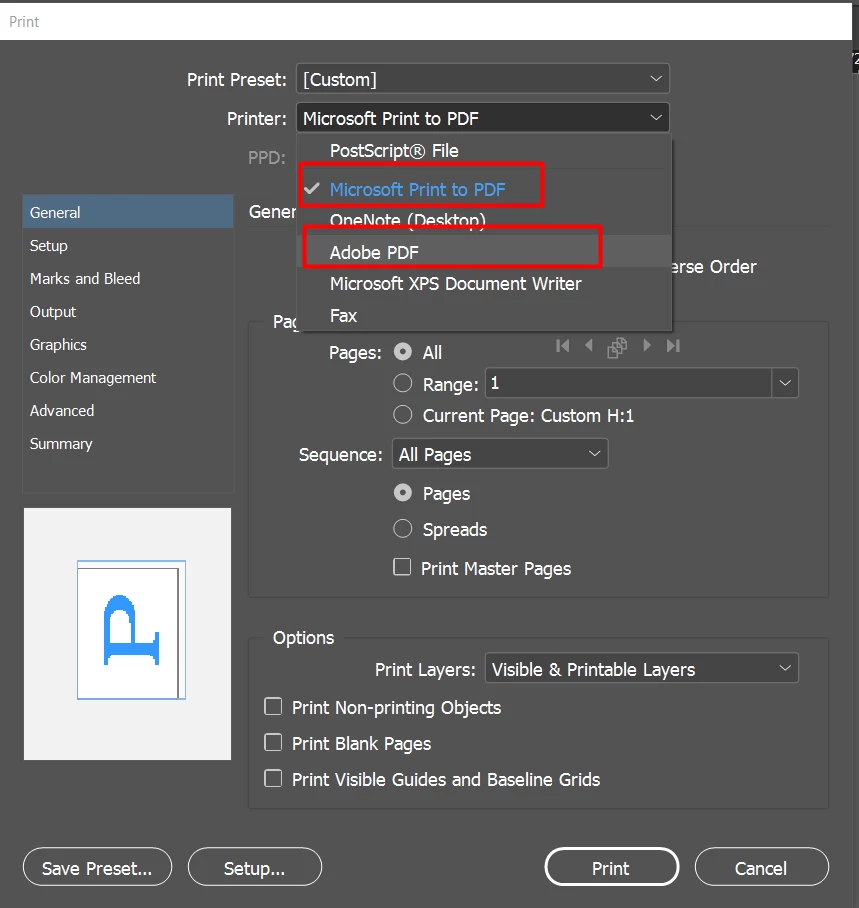
Thanks for reaching out. Screenshot you shared shows that your system doesn't have PDF printer. You need to select one of these options to Print PDF.


Could you please confirm which operating system is this? 


Regards,

Srishti

2 replies

Srishti_Bali
Srishti_BaliCorrect answer
Legend
May 24, 2021

Hi there, 


Thanks for reaching out. Screenshot you shared shows that your system doesn't have PDF printer. You need to select one of these options to Print PDF.


Could you please confirm which operating system is this? 


Regards,

Srishti

Participating Frequently
May 24, 2021

Thanks! I have IOs 11.2.1 How can I enable the PDF printer? I can print to PDF in other applications.

Brad @ Roaring Mouse
Community Expert
Community Expert
May 25, 2021

You should be able to do this without that. Even without a printer installed, in the Print dialog, where you tried to Print to PDF before and got the error, you should see Save as Postscript. Take the resulting file and Distill it into a PDF (as I said, the easiest way to invoke this is to simply drag the file onto your Acrobat icon). You will be given a "trust" question and then it should generate the PDF.


Brad @ Roaring Mouse
Community Expert
Community Expert
May 24, 2021

Save as Postscript instead, then open that in Acrobat... that will open Distiller and create a PDF the way you want.

There are other ways, but this might be all you need for your purposes.


Participating Frequently
May 25, 2021

That worked - thanks!