
Known Participant
September 4, 2021
Answered

Export issue with variable font

  • September 4, 2021
  • 3 replies
  • 2461 views

I wanted to export a booklet using (Edits > print booklet) and exporting a booklet of my Indesign project.


Once opened and converted to PDF, the exported file has replaced every variable font I used by Courrier.


It gets thing like that:
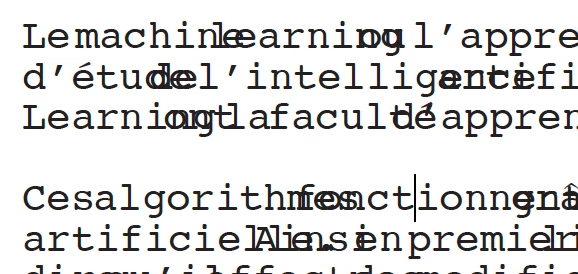
When converting throught Distiller I get error like: 

Inconsolata-Medium not found, using Courier.
Inconsolata-SemiBold not found, using Courier.
Inconsolata-UltraExpandedBlack not found, using Courier.
Inconsolata-CondensedLight not found, using Courier.


How can I prevent that ? I thought Indesign handled variable font.


I've seen the post of Dov Isaacs about that notion, He said that PDF EPS of PostScript export use fixed instance of the variable font depending of the style/weight used on the project.


I tried on Indesign 2020 / 2021 on both Mac and PC. (on PC I also tried to print to Adobe PDF, I got the same result)


Thanks in advance,


Félix


This topic has been closed for replies.
Correct answer Brad @ Roaring Mouse

Try this:

In Print Booklet > Print Settings > Graphics > Fonts > Download > Subset

(instead of Complete)

This forces an instance in the PS file

3 replies

Brad @ Roaring Mouse
Community Expert
Brad @ Roaring MouseCommunity ExpertCorrect answer
Community Expert
September 7, 2021

Try this:

In Print Booklet > Print Settings > Graphics > Fonts > Download > Subset

(instead of Complete)

This forces an instance in the PS file

F.JelyAuthor
Known Participant
September 9, 2021

Thanks, it corrected the issue !

rob day
Community Expert
Community Expert
September 4, 2021

Acrobat also has a Booklet feature, have you tried exporting a PDFas reader spreads and printing the printer spreads form Acrobat?

F.JelyAuthor
Known Participant
September 4, 2021

I cannot add bleeds into the format with that technique, as far as I know. And it adds an space between the two pages during imposition.

rob day
Community Expert
Community Expert
September 4, 2021

You can try this simple imposition script, which avoids postscript and Distiller:


https://shared-assets.adobe.com/link/3bfdb004-f188-4f3d-5904-d82dd8f8e2d1


There is a sample ID file in the folder you can test with. If you are sending out the imposition check the PDF carefully—I’ve only done limited testing.

Jeff Witchel, ACI
Community Expert
Community Expert
September 4, 2021

Sounds like your font has some issues. Maybe it's corrupted.

Have you tried replacing the font?

I've exported plenty of layouts containing variable fonts without an issue. So it normally does work.

If you can't reinstall the font, I would recommend something that I would normally not recommend. (I know Dov wouldn't recommend it either.) Save the file with a new name and try outlining the fonts in InDesign (Type > Create Outline).

Hope this helps!

F.JelyAuthor
Known Participant
September 4, 2021

Thanks for your answer,

PDF export is fine. As I mentionned, I tried to export on two different computer (PC / Mac) thus with two different font installation. It seems that the font file doesn't have issues. Each variable font uses TTF format. 

I guess I will try outlining the font.