Participating Frequently
December 12, 2020
Answered

export issues for LinkedIn - poor quality type

  • December 12, 2020
  • 3 replies
  • 5535 views

Hi! Hoping someone can help me out here... I'm trying to post a LinkedIn graphic I created for a client, and no matter what I try the photo in the background looks fine, but the type looks bitmapped and unclear. The original graphic was made in InDesign, but I've remade it in Photoshop & Illustrator, too. I've exported it at a vatiety of dimensions and DPIs, and they all look relatively the same - I've attached a screenshot from LinkedIn. Each file I upload looks fine on my computer, but terrible online. My client is freaking out. Anyone have any ideas for me? I've been at this for a while now and am out of ideas. Thanks!
This topic has been closed for replies.
Correct answer rob day

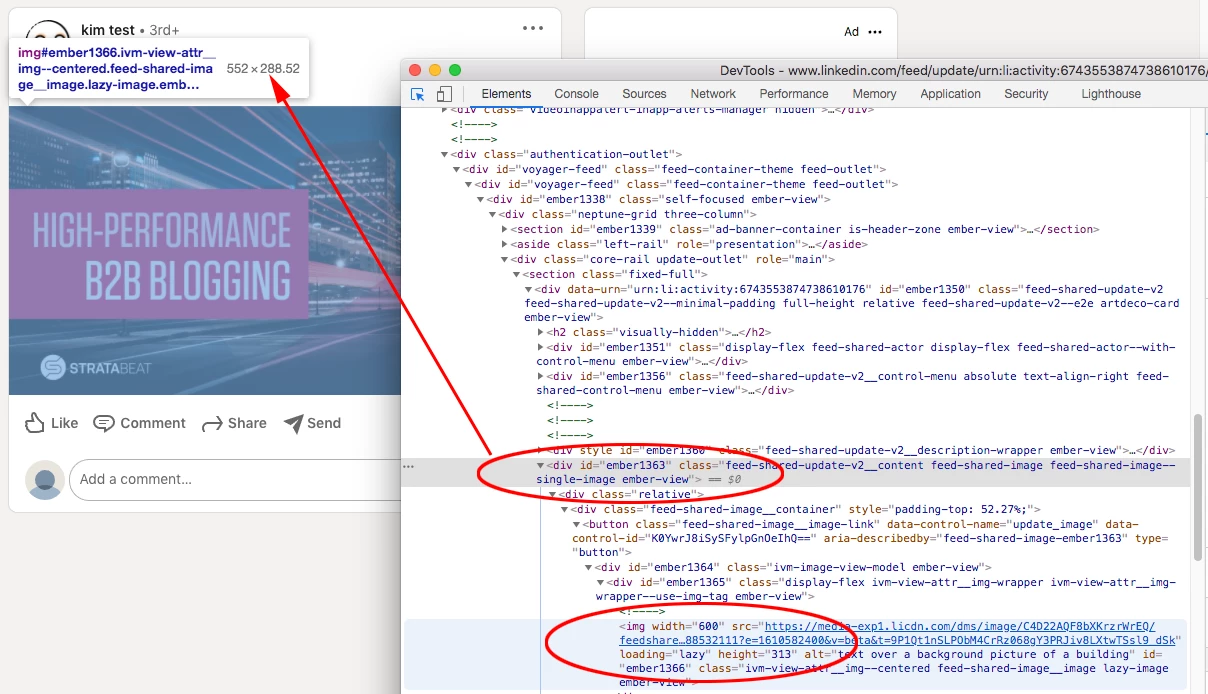
If I look at the LinkedIn page code using Chrome’s developer tools, I can see that the image gets sampled to 600px wide no matter how large your original pixel dimensions are. There’s nothing you can do about that because LinkedIn is setting the width to 600px in the HTML code:


3 replies

Community Expert
December 12, 2020

Can you show me the post on Linkedin? 

keem_cAuthor
Participating Frequently
December 12, 2020

Eugene, you're amazing!! Thanks so much for looking at this. Unfortunately, ANY bitmapping or artifacts are problems for the client. I've noticed that the type looks significantly better when it's not on that pink background, but my client is insiting on it... we might need to have a chat about that today!


I agree that it looks fine, if not great in a lot of your screenshots, especially the 300dpi. Here's a link to my test page on Linkedin, and my many attepts at getting this right. www.linkedin.com/in/kim-test 

rob day
Community Expert
rob dayCommunity ExpertCorrect answer
Community Expert
December 12, 2020

If I look at the LinkedIn page code using Chrome’s developer tools, I can see that the image gets sampled to 600px wide no matter how large your original pixel dimensions are. There’s nothing you can do about that because LinkedIn is setting the width to 600px in the HTML code:


rob day
Community Expert
Community Expert
December 12, 2020

It looks like the LinkedIn post image dimension size should be 1200 x 628 pixels. If you want to work in InDesign set the document up as Web Intent at 1200 x 628, and export the page to PNG or JPEG at 72ppi—the exported image dimensions will be the same. Working at a larger pixel dimension wouldn’t likely help because the image would be resampled on the upload, and you obviously don’t want to work at a smaller pixel dimension.

keem_cAuthor
Participating Frequently
December 12, 2020

Thanks, Rob! I just remade the file to your specs, and I'm still getting that bitmapping- here's a screenshot from LinkedIn.

Do you think there's a change that the client's color & font choice are fighting with LinkedIn's compression algorithm?

rob day
Community Expert
Community Expert
December 12, 2020

LinkedIn’s post spec is 1200 x 628, but that doesn’t mean it gets displayed at that size in the interface. In your capture the image is being scaled to 550 x 290, so it’s effectively getting downsampled to fit in the space and the text degrades as it is fit into the smaller pixel dimension. I don’t think there is anything you can do about it other than avoid small text.

Community Expert
December 12, 2020

Can you please supply the original image you uploaded?

Thanks

keem_cAuthor
Participating Frequently
December 12, 2020

Hi Eugene, here are jpges made from InDesign at 72 & 300 dpi. Thanks!!