Known Participant
January 24, 2024
Answered

Export PDF, page numbers are odd

  • January 24, 2024
  • 3 replies
  • 1107 views

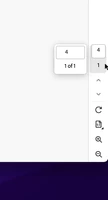
I am exporting pages from my InDesign document to PDF and when I open the PDF the page number is showing is based on the original page it is from in the InDesign document. I don't recall ever seeing it this way. Did I never notice this?? 
 

This topic has been closed for replies.
Correct answer leo.r

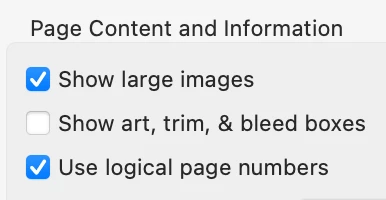
Yes. it's an expected behavior: PDF preserves the actual page numbers (which are called "logical page numbers" or "labels" in PDF terminology).


You can disable it in Acrobat Preferences > Page Display:


3 replies

GiGiTexasAuthor
Known Participant
January 24, 2024

Anyone willing to test their system and see what it does? Create a quick multiple page document and save a HIgh Quality PDF of page 3 and see what it says in Adobe? I'm just tryng to determine if its a normal function or my system is wacked somehow. I swear in the past it would read 1 in the box, and 1 of 1.


Its deceiving, when you glance at the box you think there is more than one page and my firest reaction is I screwed up and forgot to select my one page and did All pages in error. 

leo.r
Community Expert
leo.rCommunity ExpertCorrect answer
Community Expert
January 24, 2024

Yes. it's an expected behavior: PDF preserves the actual page numbers (which are called "logical page numbers" or "labels" in PDF terminology).


You can disable it in Acrobat Preferences > Page Display:


GiGiTexasAuthor
Known Participant
January 24, 2024

THANK YOU!! 

Community Expert
January 24, 2024
GiGiTexasAuthor
Known Participant
January 24, 2024

I tried changing that setting, still the same.


I reset my preferences (Shift, Control, Option, Command) started a new document. Added some placeholder text and exported page 2 from it...same thing. For fun I exported the file as individual pages, same thing.


Just seems very odd. I can fix it once in Adobe but I have lots of files. 

James Gifford—NitroPress
Legend
January 24, 2024

I  believe PDF documents are numbered linearly, 1-n (and /n or 'of n'), regardless of the source page numbers. That is, those are PDF page numbers, not the source or content page numbers. I am not sure if there's any way to select or override that.

GiGiTexasAuthor
Known Participant
January 24, 2024

I'm not sure I understand what your saying. 🙂


If I have a 6 page Indesign document and export page 4 out, seems like my PDF should should read  1  1 of 1 its a 1 page PDF.  Instead it is taking the Page number from InDesign (4) and it reads 4  1 of 1. 

James Gifford—NitroPress
Legend
January 24, 2024

Sorry, my answer was off-target. (In very small part because your screen clip was tiny and I misinterpreted it.) 😛


Leo R nailed it below.