
DietmarB
Known Participant
November 9, 2021
Answered

Export text as path

  • November 9, 2021
  • 1 reply
  • 1607 views

Is there another way in InDesign to export the text as paths when exporting to a pdf file?
One can do this via:
- PDF/X-1a - Advanced - Flattening - Default - Text to paths
to convert the text to paths. However, this does not always work properly, especially when text is displayed at an angle.

Thanks, Dietmar
This topic has been closed for replies.
Correct answer Laubender

Hallo Dietmar,

Du kannst dafür auch Acrobat Pro DC benutzen.

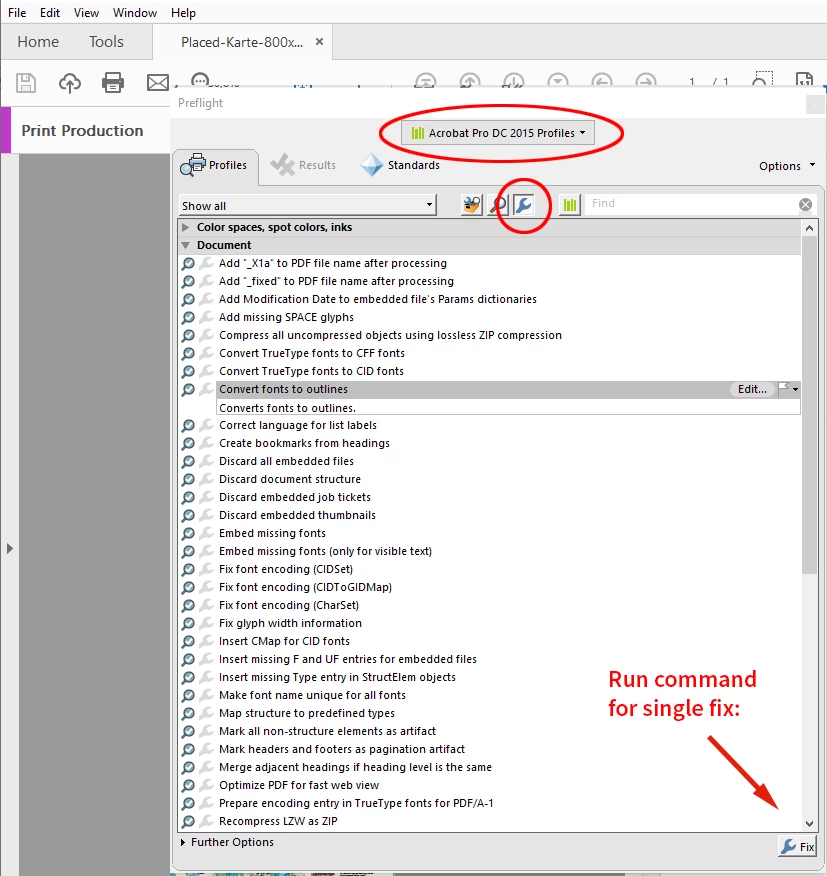
Da gibt's eine Single-Fix-Aktion im Preflight mit Namen "Convert fonts to outline".

Sorry, aber einen Screenshot in Deutsch habe ich gerade nicht vorrätig:


Gruß,
Uwe Laubender

( ACP )

1 reply

LaubenderCommunity ExpertCorrect answer
Community Expert
November 9, 2021

Hallo Dietmar,

Du kannst dafür auch Acrobat Pro DC benutzen.

Da gibt's eine Single-Fix-Aktion im Preflight mit Namen "Convert fonts to outline".

Sorry, aber einen Screenshot in Deutsch habe ich gerade nicht vorrätig:


Gruß,
Uwe Laubender

( ACP )

DietmarB
DietmarBAuthor
Known Participant
November 9, 2021

Hallo Uwe,

Super, Danke - funktioniert perfekt.

Damit hatte ich mich noch nicht wirklich auseinander gesetzt 😉

Das Ganze heißt: Schriften in Kurven konvertieren.


Vielen Dank, Dietmar