
Inspiring
February 1, 2019
Question

Export to ePub--Pictures get small

  • February 1, 2019
  • 3 replies
  • 2188 views

I'm exporting to Epub 3.0 reflowable from InDesign CC 2018.

I have a number of column width pictures in a book, so about 4 inches wide. Oddly, in earlier exports I did not have a problem with the pics getting smaller.

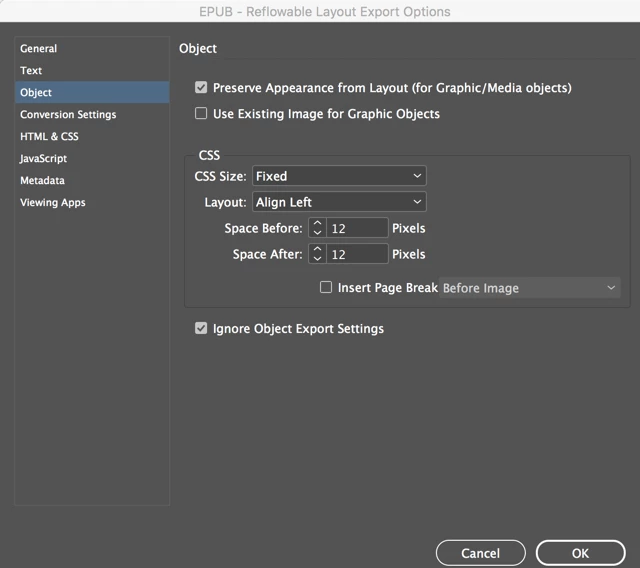
For Object export I've set the CSS size as Fixed / Preserve Appearance... The pics are anchored.

The column-width pictures come out at about half-size (so some smaller pics get very small indeed). In the example, I've checked Ignore Object Export Settings to make sure there was no interference from that, but it made no difference.
This topic has been closed for replies.

3 replies

James Gifford—NitroPress
Legend
August 10, 2022

Getting images to come out the size you want them to is a bit involved. There is the global export option you already noted, and you can set individual options for each image as well (as Derek noted). But what each option does is fairly multi-layered, with one setting affecting others.


In general, if you want full-size images, use CSS Size: Relative to Text Flow. If that doesn't do what you want for all images, either try Relative to Text Size in the indivdual options or just adjust the ones that don't export the way you want. (It's simplest, obviously, to find the global setting that gets the most images right, and then just adjust some subset or small number that need different settings.)


There's quite a bit of detail on this in the Guide, and you might find it useful in general, but happy to help with the tweaking until you get it where you want it.


Here is a relative guide to how the various settings (in Export Options) affects size:

  • A: Width 1 inch
  • B: Default
  • C: Default with 2X CSS override
  • D : Height 3 inches
  • E: Width=50%
  • F: Text Size (also layout placement size)
  • G: Text Flow
  • H: None


Derek Cross
Community Expert
Community Expert
February 4, 2019

Have you experimented with the Object Export Options dialogue box?

Marvest
Inspiring
February 3, 2019

Check this thread. Re: control image size export The answer that says you need to create an object style still works. Try it and let us know.

JennethLeeD
Known Participant
August 10, 2022

The link doesn't work anymore. Could you repost?