Inspiring
February 2, 2017
Answered

Export to High-Quality Print Creates Four-Color Black Text

  • February 2, 2017
  • 3 replies
  • 3330 views

I'm wondering why the High-Quality Print preset for exporting to PDF converts text that is using black ink only, into a four-color (CMYK) process black?

In what scenario would this ever be desired?

This topic has been closed for replies.
Correct answer josh55205112

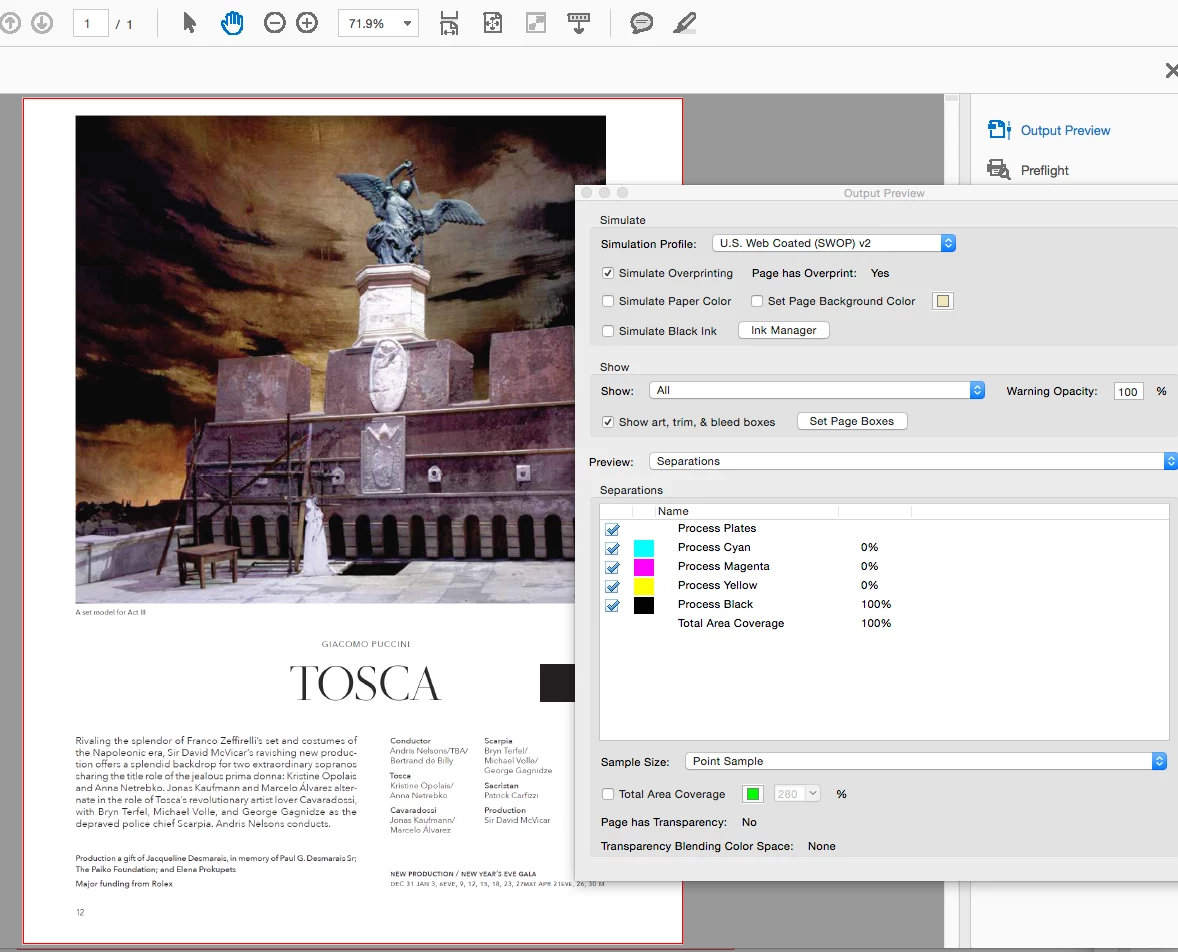
Ink Manager does not give you any output values—it shows expected ink densities which are not separation halftone values.

You have to open Output Preview where the Separations panel gives you the output CMYK values under your cursor for the chosen destination profile (Simulation Profile):
You can also use Preview>Object Inspector to get an object's assigned color profile and native color values.
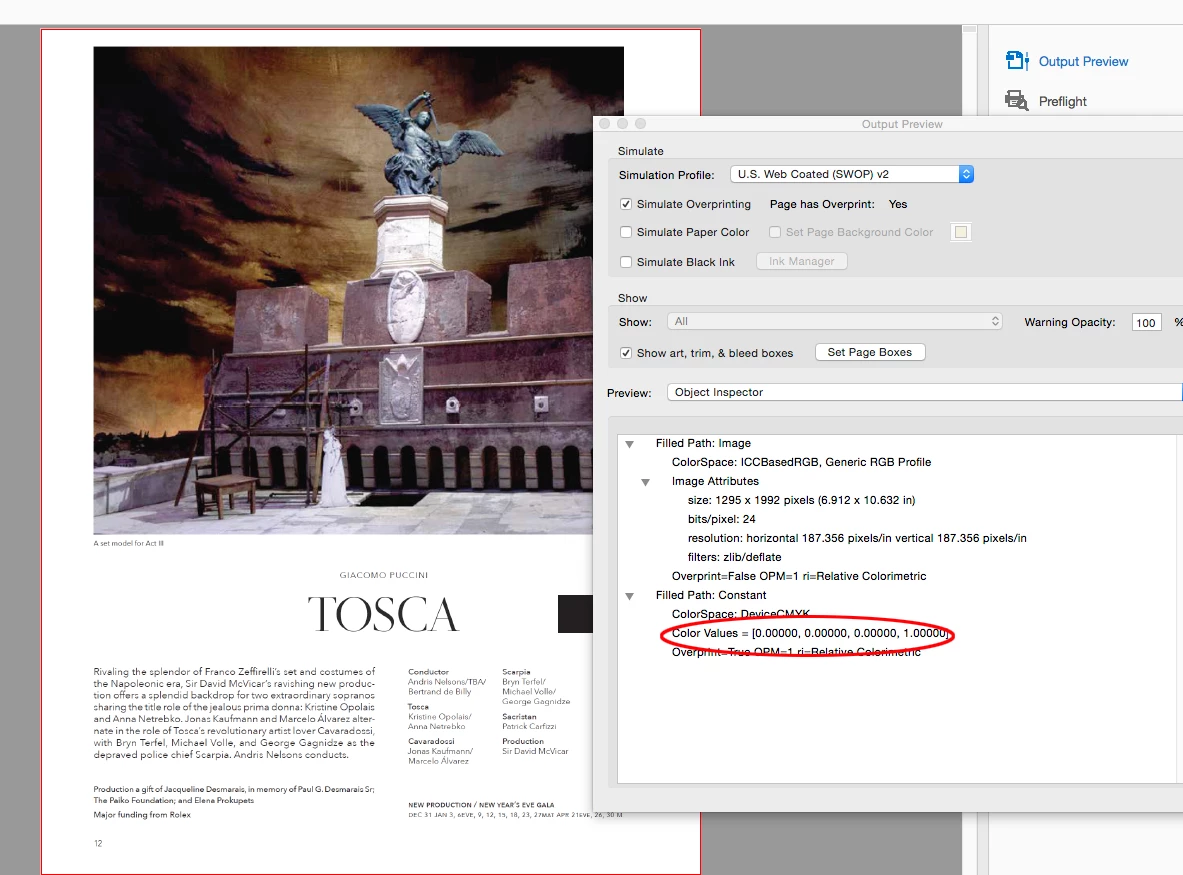

Yes Output Preview is the one to inspect, you are right.

Because the original problem keeps digressing into other topics through this post, and having since corrected my problem by using the PDF/X1-a preset solved the issue I'm going to close this question.

Thank you for all your help.

3 replies

Luke Jennings
Inspiring
February 3, 2017

I can't think of a scenario where you would want your blacks to change upon export to a print PDF. Is your transparency blend space set to CMYK? There are times when you should not use 100% black type; Small black type that is on top of an image or object should be set to overprint, whenever there is a possibility for misregistration. Some rips will automatically make this change as part of the trap settings, even if the file is not set up this way. Large black type set to overprint might show a hard line where it covers the edge of an object, the fix is to set the large black type to not overprint (aka knock out), or change it to a rich or 4C black. I have noticed some designers prefer to set their black type to 90% black, I suppose it's just a design decision, has anybody else ever noticed this? or know what the advantage might be?

rob day
Community Expert
Community Expert
February 3, 2017

I have noticed some designers prefer to set their black type to 90% black, I suppose it's just a design decision, has anybody else ever noticed this? or know what the advantage might be?

The black ink limit (or the maximum percentage of black allowed in the separation) is determined by the CMYK profile used to make the conversion into CMYK. I doubt it's the designer's preference, rather an indicator that the default US Web Coated SWOP profile was used to make the conversion. The SWOP black limit is 90%, but Coated Fogra 27 is 100%, while US Newsprint SNAP is 69%. The limit might vary slightly depending on the conversion intent setting.

I think the theory is limiting black and compensating with CMY will hold more shadow detail in lower end printing conditions.

Luke Jennings
Inspiring
February 3, 2017

Thanks rob, that's interesting, but many of the files I receive are packaged InDesign files and occasionally the live black type is set to 90% black in InDesign.

rob day
Community Expert
Community Expert
February 2, 2017

converts text that is using black ink only, into a four-color (CMYK) process black?

Are you making any changes to the [High Quality] preset?

Where are you measuring the PDF values? AcrobatPro's Output Preview? If so what version

Inspiring
February 6, 2017

Rob, here's a quick rundown of the Export settings, apologies I can't remember them all:

Preset = High-Quality PDF

Output = Convert to Destination (preserve numbers), SWOP v2

Nothing else I believe would affect the shift of all text output as 4-color post export. Someone else mentioned Transparency Blend Space and the document is set to CMYK for that.

I inspected the PDF to verify the 4-color black text (as it was brought up by the printer) in Acrobat CC (latest) using the Ink Manager in the Print Production Tools.

***I have since exported using the PDF/X-1A standard and the issue has disappeared. I wonder if this was the problem?***

rob day
Community Expert
Community Expert
February 6, 2017

I inspected the PDF to verify the 4-color black text (as it was brought up by the printer) in Acrobat CC (latest)

The latest is Acrobat DC 2015 Release. The reason I ask is the earlier Acrobat XI could give incorrect output values of DeviceCMYK objects in Output Preview. 

using the Ink Manager in the Print Production Tools.

You mean Separations in Output Preview? Ink Manager doesn't show output values.

Derek Cross
Community Expert
Community Expert
February 2, 2017

I think you may have Rich Black selected for text, this is not desirable except maybe for registration marks.