Participant
May 12, 2020
Answered

Export to JPG/PNG basics

  • May 12, 2020
  • 3 replies
  • 4067 views

Hi,


I regularly design images (like website banners, social media images etc.) for my job in InDesign. I know the InDesign basics from school, but they never teached me how to export properly. I keep having issues with exporting my files to JPG or PNG. I always export at quality 'high' and resolution 300ppi and I check the box 'anti-aliasing', but mostly they are too big to use on web/social media when I use this settings. When I export with less ppi/quality they always come out pixelated or 'grainy' around text/objects.  I don't have this issues when I export to PDF.  Is there anything I'm missing, or can someone mention the 'basic rules' I have to take into account (or a website/video that explains it). Thanks very much!
This topic has been closed for replies.
Correct answer rob day

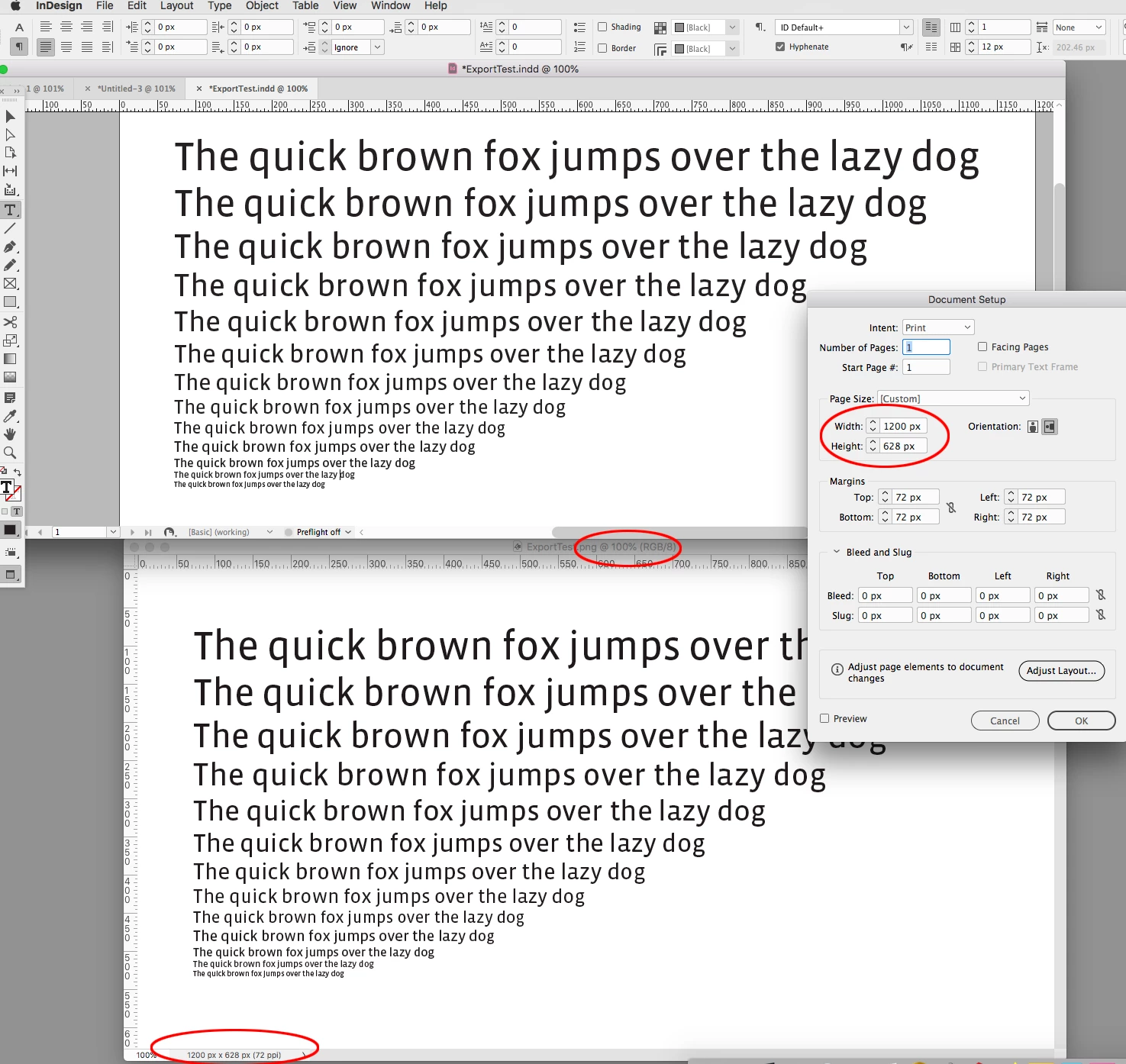
Here’s an example using pixel dimensions in InDesign and an export to 72ppi PNG—the matching view in Photoshop at a 100% . The text is set from 54pt to 10pt:


3 replies

rob day
Community Expert
Community Expert
May 12, 2020

I regularly design images (like website banners, social media images etc.) for my job in InDesign


Before you start you have to know the banner’s required pixel dimensions. Is the page code loading a single version, or will there be media queries loading a higher res version for Retina or HiDPI screens. If you know the pixel dimensions you can setup your InDesign document’s width and height as pixels (with your  ruler units set as Pixels). If the JPEG or PNG export Resolution is set to 72ppi the exported image will have matching pixel dimensions.


Starting with Photoshop at the same pixel dimensions would not provide any better text quality. In either case you should assess the quality of the final JPEG in Photoshop with the view set to 100%, which displays the image to monitor pixels at a 1:1 ratio.

Inspiring
May 12, 2020

"Starting with Photoshop at the same pixel dimensions would not provide any better text quality."


This is not entirely true. In Photoshop, you can choose from more anti-aliasing options for text, not just anti-aliase or not as in InDesign. Useful mostly on little texts. No problem using InDesign for bitmaps for LCD like 1920x1080 or so, but on smaller banners, it differs a lot.

rob day
Community Expert
Community Expert
June 3, 2020

I prefer InDesign’s anti-aliasing to any of the PS options. Photoshop Sharp on the left, which seems to be the most legible option at small point sizes,  vs. InDesign Anti-Aliased on the right:


Community Expert
May 12, 2020

Hi,

if your target media allows for Scalable Vector Graphics, best do your work with Adobe Illustrator and save to the SVG file format. That is very light-weight compared to a pixel image format. The quality is superior.


Details:

https://helpx.adobe.com/illustrator/how-to/export-svg.html


Regards,
Uwe Laubender

( ACP )

M.273018Author
Participant
May 12, 2020

Thanks! I already tried this, but our website, mailing program and social media unfortunately does not support SVG. 

BobLevine
Community Expert
Community Expert
May 12, 2020

InDesign is not the right tool for this. If you need web graphics, the best way to create them is in Photoshop. If you insist on using InDesign, export a PDF, open that in Photoshop and save as JPG or PNG from there.

M.273018Author
Participant
May 12, 2020

Thanks for your answer! 😊 It also happens when I design my images in photoshop and then export them to PNG. But I am very bad with Photoshop basics, so I probably don't have the settings right. I use this settings, and it's at 300ppi. So InDesign is only suitable for print?


rob day
Community Expert
Community Expert
May 12, 2020

When I export with less ppi/quality they always come out pixelated or 'grainy' around text/objects.


If you set your InDesign ruler to Pixel units what are the dimensions of your page? Could you show a screen capture of a 72ppi banner export in Photoshop with the view set to 100%?